ODBC and JDBC were designed 30 years ago when systems where much more monolithic and data was much smaller than today. Most business intelligence tools universally accept ODBC and JDBC to connect to data sources.
However, using ODBC today compared to Arrow ADBC result in data copying twice as explained by the following diagram:
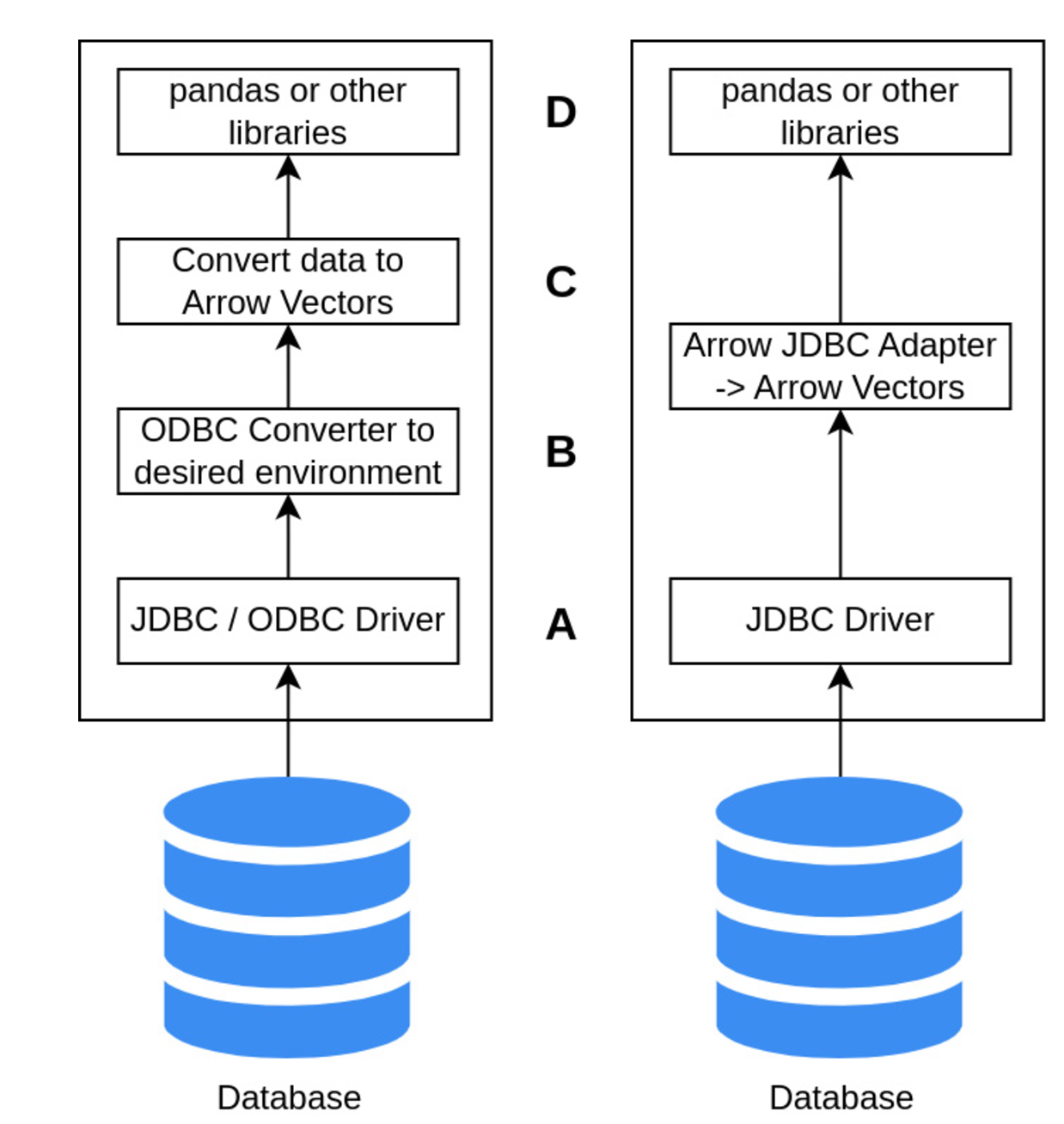
As the ecosystem continue to expand, several companies and tools have already built support for Arrow:
- Snowflake’s ODBC drivers and Python client use Arrow for data transfer. They saw between 5x and 10x performance improvements when they made the switch, depending on the use case (https://www.snowflake.com/blog/fetching-query-results-from-snowflake-just-got-a-lot-faster-with-apache-arrow/).
- Google’s BigQuery added support for pulling data using Arrow record batches and users saw from 15x to 31x performance improvements for retrieving data into pandas DataFrames from the BigQuery Storage API (https://medium.com/google-cloud/announcing-google-cloud-bigquery-version-1-17-0-1fc428512171).
- Dremio Sonar’s JDBC and ODBC drivers have always utilized Arrow to transfer data to users because Arrow is Dremio Sonar’s internal memory format already! There is zero data conversion from when the data is read to when the result set is returned to the client.
The ADBC specification
Although it is effectively possible for ODBC to support column-oriented data, its types do not map well to Arrow, and JDBC doesn’t support column oriented at all. Therefore systems that uses JDBC observe this behavior:
- The JDBC driver fetches data from a system, which might be column-oriented
- The JDBC driver will convert this column-oriented representation into a row-oriented
- The system on the other side (i.e. Spark) will convert again in column-oriented
Such a waste is significant, and the ADBC is meant to solve this problem. If the database return data in its native connector that is already in Arrow Format, no need to convert it again
Key part of the specification
Database objects hold any state that can be shared across multiple connections, like common configuration settings and caches. Effectively it is used to open Connections to the database. Connections provide entry point to set and retrieve options, but also to retrieve large amount of metadata such as table, catalogs, database objects, statistics, etc. With the NewStatement method on the Connection, one can create a Statement object.
Statements can be re-used, in case they are Prepared Statements. In such a case you will need to invoke Prepare and Bind, or you can simply use them as a one off entity.
Tip
Result types will be returned using the structs described in Arrow C data interface since effectively ADBC is built on top of the C interface specification
Handling partitioned results set
The same way Arrow Flight provides features for scalability the ADBC specifies an ExecutePartitions function that can be implemented to return a list of partitions. Each partition can be passed to the ReadPartition method that will return am ArrowArrayStream to allow consuming multiple partitions in parallel.
Note
ExecutePartitions should be invoked instead of ExecuteQuery on a Statement. If this is not supported, the driver will return an error
The Driver Manager
The Driver Manager has the same role that it has in JDBC: allowing a program to be written without invoking a specific driver code, but in an abstract way. For example, instead of invoking specific SQLLite driver functions, we can set an option like so:
AdbcDatabaseNew(&database, nullptr);
AdbcDatabaseSetOption(&database, "driver","adbc_driver_sqlite", nullptr);
AdbcDatabaseSetOption(&database, ADBC_OPTION_URI,
					"file:data.db", nullptr);
AdbcDatabaseInit(&database, nullptr);