LSM Compaction
The Log-Structured Merge tree (LSM tree) is the storage engine behind most modern write-heavy databases: LevelDB, RocksDB, Cassandra, VictoriaMetrics, and many others. Patrick O’Neil et al. published the original design in 1996.
The core idea: never update data in place. Buffer writes in memory, flush them to disk as sorted, immutable files, and periodically merge (compact) those files to keep the on-disk structure organized. This converts random writes into sequential I/O — great for throughput, but every piece of data gets rewritten multiple times as it moves through the system. That cost is write amplification.
There are two major compaction strategies — leveled and size-tiered — that make fundamentally different tradeoffs between write cost, read cost, and disk space.
Interactive companion
The LSM Compaction notebook has an interactive write amplification explorer with sliders for level count and size ratio.
The common path: MemTable to L0
Regardless of compaction strategy, the write path is the same:
- Write — a key-value pair goes into the MemTable, an in-memory sorted buffer.
- Flush — when the MemTable is full, it’s written to disk as an immutable SSTable (Sorted String Table) at Level 0 (L0).
- Compact — when L0 accumulates enough files, they merge into deeper levels. How that merge works is where the two strategies diverge.
L0 files are raw MemTable dumps, so their key ranges overlap freely. This is true in both strategies.
Leveled compaction
Used by LevelDB, RocksDB (default), and VictoriaMetrics.
Structure and reads
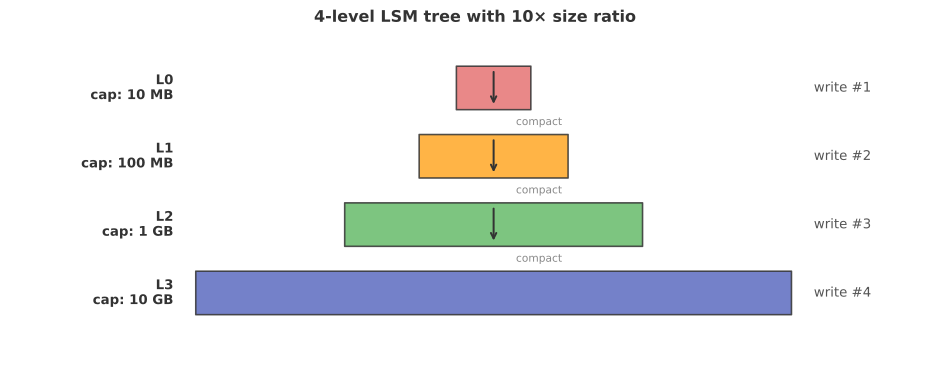
Each level is T× larger than the previous (T is the size ratio, typically 10). All SSTables are the same size (e.g., 64 MB). Levels grow by holding more files, not bigger files.
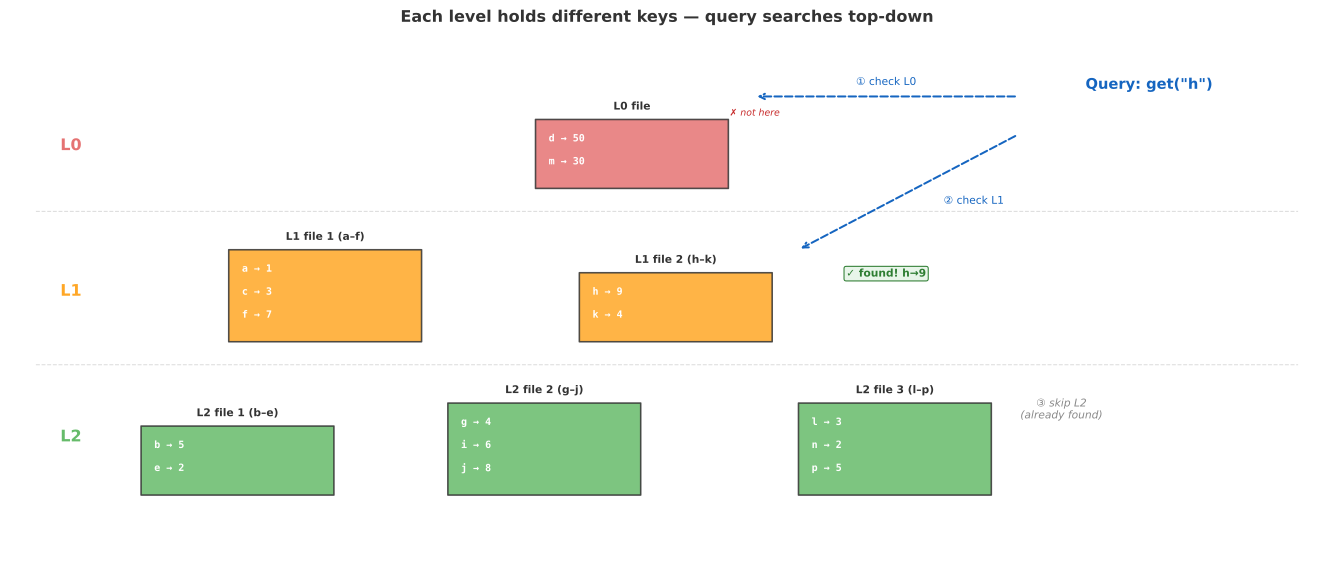
The defining property: at L1 and below, files never overlap. Each file owns an exclusive slice of the key space. This is the whole point of leveled compaction — it’s what you pay write amplification for. A point lookup binary-searches the file boundaries, checks one file per level, and with Bloom filters typically reads only 1–2 files total.
Each level holds a different subset of keys — the database is the union of all levels, not copies of the same data. Queries search top-down and stop at the first hit.
The merge process
When compaction picks an L0 file, it finds all L1 files whose key ranges overlap. Since L0 files span wide key ranges, this pulls in many L1 files. All participating files are merge-sorted into new files; where a key exists in both levels, the newer version wins.
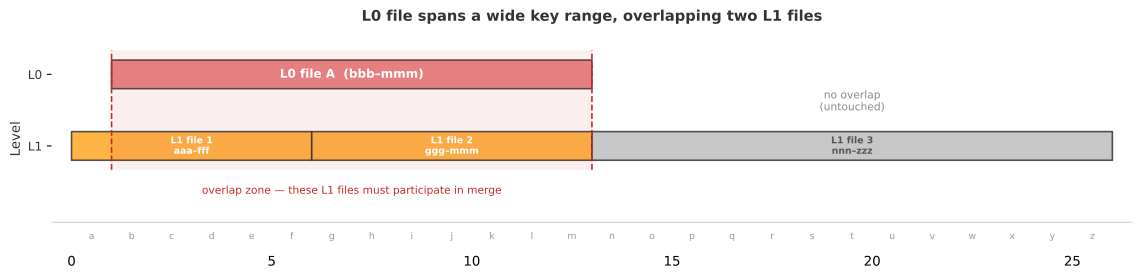
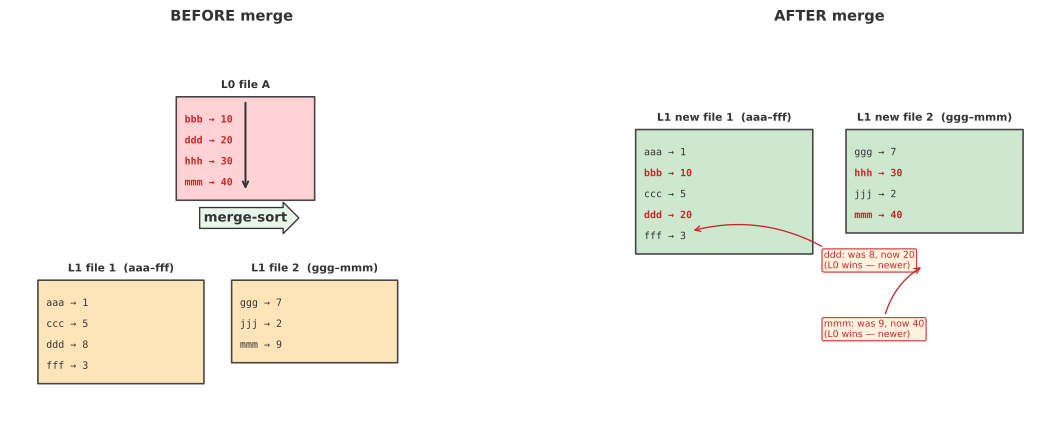
The output files contain genuinely different data (new keys interleaved, duplicates resolved). But producing them required reading and rewriting the existing L1 data — that rewriting is write amplification.
Why write amplification is ~T per level
All SSTables are the same size, so the number of files per level is proportional to the level’s capacity:
| Level | File count | Key range per file |
|---|---|---|
| L1 | 10 | 1/10 of key space |
| L2 | 100 | 1/100 of key space |
| L3 | 1000 | 1/1000 of key space |
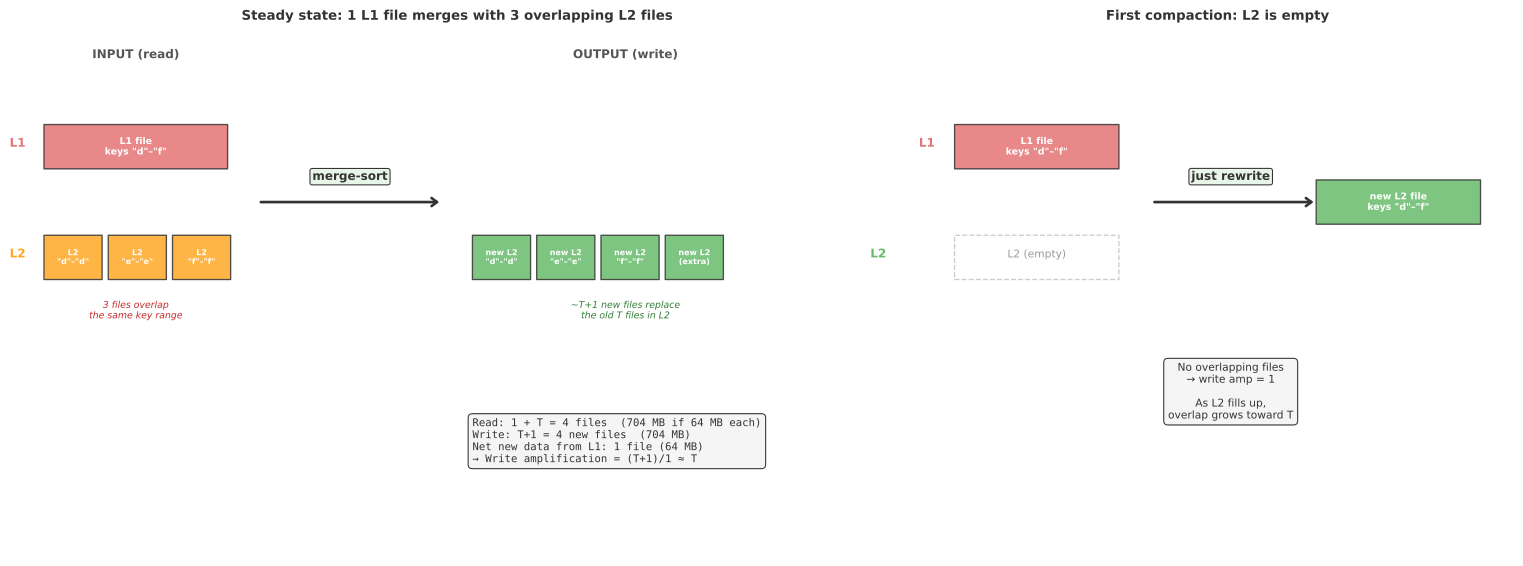
Here’s what one compaction step actually does:
compact(source_level, target_level):
    file = pick_overflowing_file(source_level)
    overlapping = find_files_in_same_key_range(target_level, file.key_range)

    # First compaction into an empty level: overlapping = [] → write amp = 1
    # Steady state (level is full):        overlapping ≈ T  → write amp ≈ T

    new_files = merge_sort(file, *overlapping)   # interleave, newer key wins
    target_level.replace(overlapping, new_files)  # swap old files for new
    source_level.remove(file)
The key point: you’re not splitting an L1 file into L2 files. You’re merging 1 L1 file with the ~T existing L2 files that overlap the same key range, then writing ~T+1 new files back to L2. When the target level is empty (first compaction), there’s nothing to merge with — write amp is just 1. As the level fills up, overlap grows toward T.
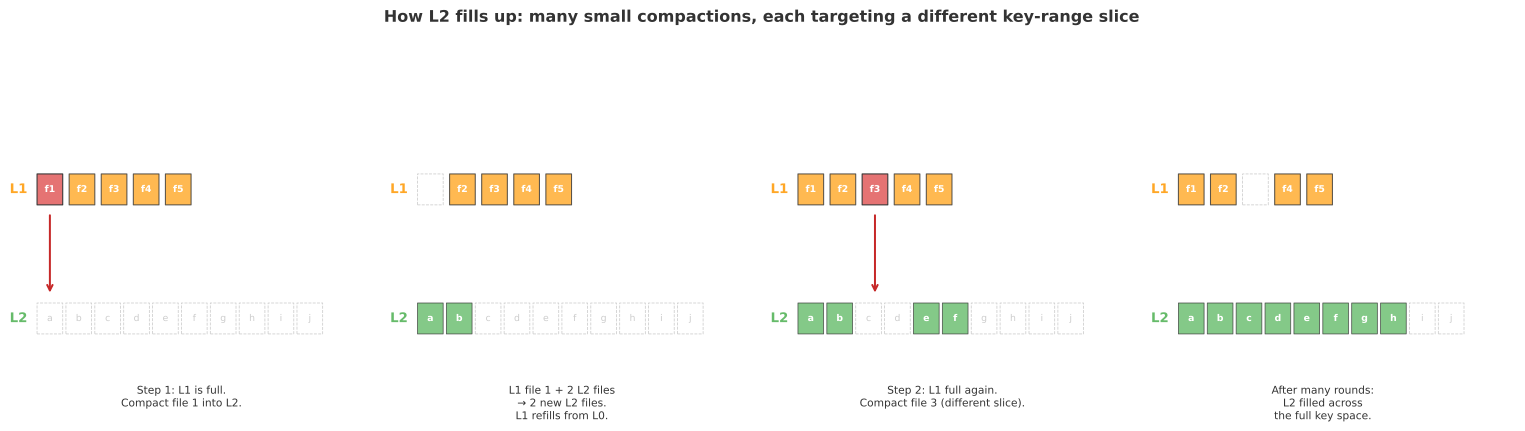
Each compaction targets a different slice of the key space. After many rounds, the level is filled across its full range.
Compaction scheduling
Compactions are asynchronous background jobs, not synchronous cascades. A compaction at L1→L2 does not immediately trigger L2→L3. Instead, a background thread pool continuously evaluates which level is most over-budget and schedules work accordingly:
# Background compaction loop (runs independently of writes)
while true:
    scores = {}
    scores[L0] = L0.file_count / file_count_trigger     # L0 scored by file count
    for level in L1, L2, ..., Ln:
        scores[level] = level.current_size / level.target_size  # L1+ scored by size

    worst = max(scores, key=scores.get)
    if scores[worst] <= 1.0:
        sleep()    # nothing over budget
        continue

    file = pick_file(worst)                               # 1 file from worst level
    overlapping = find_overlapping(worst + 1, file.key_range)  # ~T files
    new_files = merge_sort(file, *overlapping)
    (worst + 1).replace(overlapping, new_files)           # T old → T+1 new
    worst.remove(file)
    # next iteration re-evaluates scores — worst+1 may now be over budget
Levels are allowed to temporarily exceed their size target. When an L0→L1 compaction lands new data in L1, L1’s score rises. If L1 now has the highest score, a background thread picks it for L1→L2. But this is a separate job — not a recursive call inside the first compaction. Multiple levels can compact concurrently on different threads, as long as they don’t touch overlapping key ranges.
The cascade from L0 down to L_max happens over time, across many independent compaction jobs — not in one synchronous operation.
The write amplification formula
This is an amortized cost over the lifetime of all data, not a per-write cost. A single user write does not trigger T rewrites at every level. Instead, each byte of data eventually participates in one compaction at each level transition — separated by minutes or hours — and at each transition the dominant cost is rewriting the ~T overlapping files at the target level:
| Configuration | Result |
|---|---|
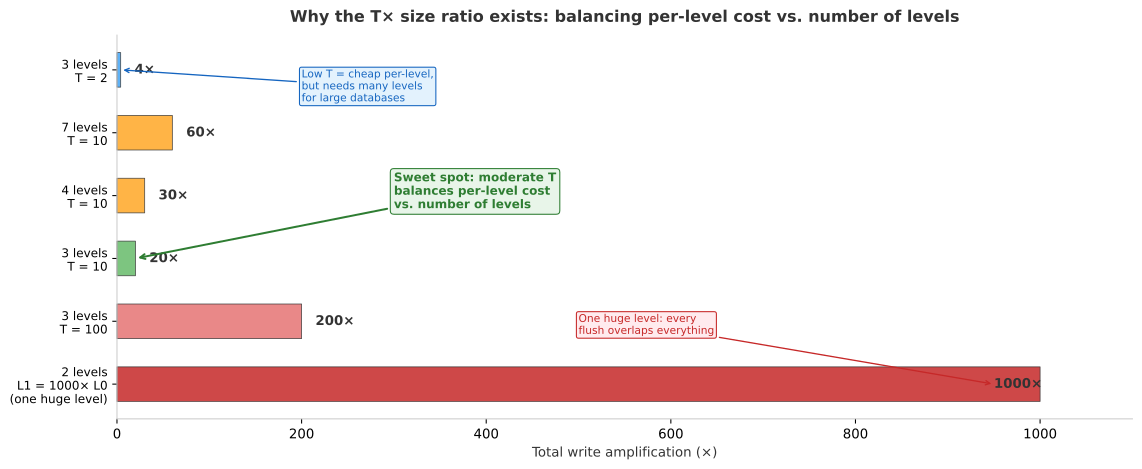
| 3 levels, T=10 | 20× |
| 4 levels, T=10 | 30× |
| 7 levels, T=10 | 60× |
| 3 levels, T=4 | 8× |
Why not skip intermediate levels and flush directly into one big sorted level? Because L0 files span the entire key space, so a single flush into a 1000-file level would overlap hundreds of files — write amp of hundreds per flush. Multiple levels amortize the cost: each compaction touches only ~T files.
Why T=10? Smaller T (say 2) means cheaper per-level compaction but many more levels — T=2 for a 64 GB database needs ~20 levels, so total write amp is 2 × 19 = 38×, and reads must check 20 levels. Larger T (say 100) means fewer levels but each compaction is expensive. T=10 balances both: 3–4 levels, 20–30× total, reads check only a few files.
Size-tiered compaction
Used by Cassandra, HBase, and RocksDB (“universal compaction”). The opposite tradeoff: optimize writes, pay on reads.
Size-tiered drops the non-overlapping invariant entirely. Files are grouped into tiers by size, and each tier holds multiple sorted runs whose key ranges overlap freely. When a tier accumulates enough similarly-sized runs (typically 4), they are all merge-sorted into one output run that is 4× larger. Because it’s larger, it now belongs to the next tier — that’s how data moves between tiers. Tiers are just size categories, not separate storage locations.
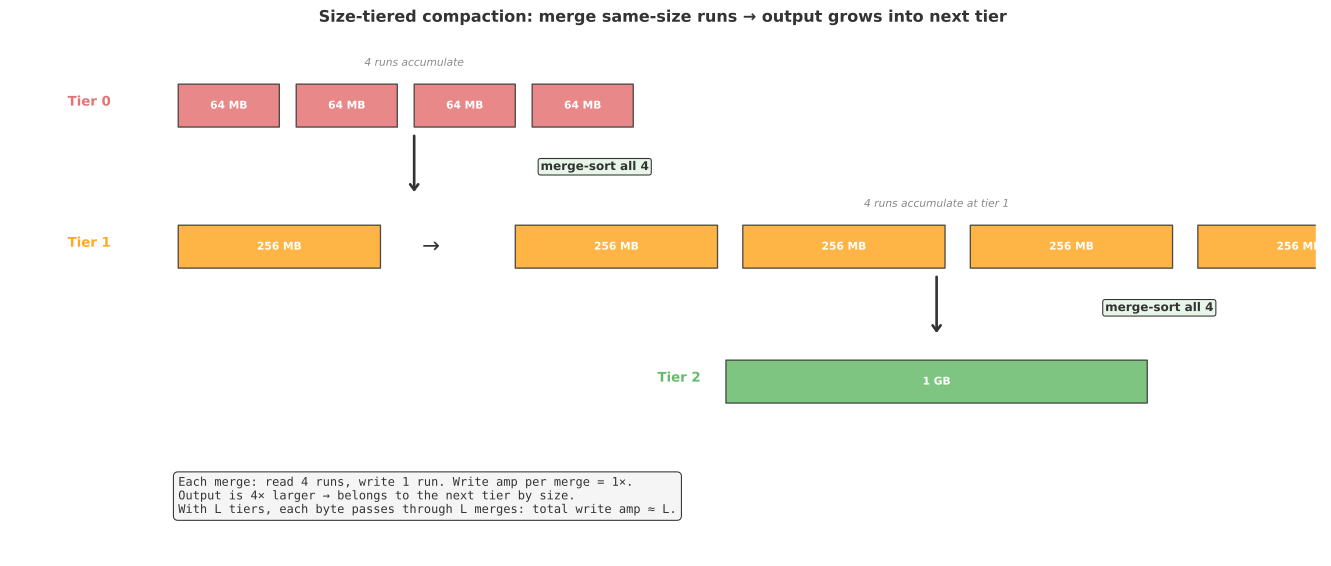
The critical difference from leveled: you merge all runs at a tier together, not one file against existing files at the next level. In leveled compaction, compacting 1 file into the next level forces you to read and rewrite the ~T existing files that already live there — that’s where the T× cost comes from. In size-tiered, the 4 runs being merged are ALL the input and ALL the output. Each byte is read once and written once. Write amplification per merge: 1×. With L tiers total, each byte passes through L merges: total write amp ≈ L.
For a 64 GB database: leveled with T=10 needs 7 levels → 60× write amp. Size-tiered with a merge threshold of 4 needs ~5 tiers → ~5× write amp.
The cost of dropping non-overlapping files:
- Reads — in leveled, you check 1 file per level (binary search on non-overlapping ranges). In size-tiered, the 4 runs at tier 2 might all contain key
foo— you must check every run at every tier. Bloom filters help but can’t eliminate the overlap. - Space — merging 4 runs of 1 GB each requires holding both the old runs (4 GB) and the new merged output (4 GB) simultaneously: temporary 2× disk usage. RocksDB’s docs warn about this for databases over 100 GB.
Leveled vs. size-tiered
You cannot have fast reads, cheap writes, and low disk overhead simultaneously — the RUM conjecture (Athanassoulis et al., 2016).
| Leveled | Size-tiered | |
|---|---|---|
| Used by | LevelDB, RocksDB (default), VictoriaMetrics | Cassandra, HBase, RocksDB (“universal”) |
| Write amplification | , e.g. 60× | ~, e.g. 6× |
| Read amplification | 1 file per level | All runs at each tier |
| Space during compaction | ~10% overhead | Up to 2× overhead |
| Best for | Read-heavy, point lookups | Write-heavy, sequential scans |
Monthly partitioning
Most LSM implementations operate a single merge tree for the entire database. As data grows, the tree gets deeper and write amplification climbs.
VictoriaMetrics partitions data into per-month directories, each with its own independent merge tree. This bounds tree depth to 2–3 levels (one month of data ≈ 150–200 GB) instead of 5–7 levels for a multi-year global tree — cutting write amplification from ~60× to ~20×.
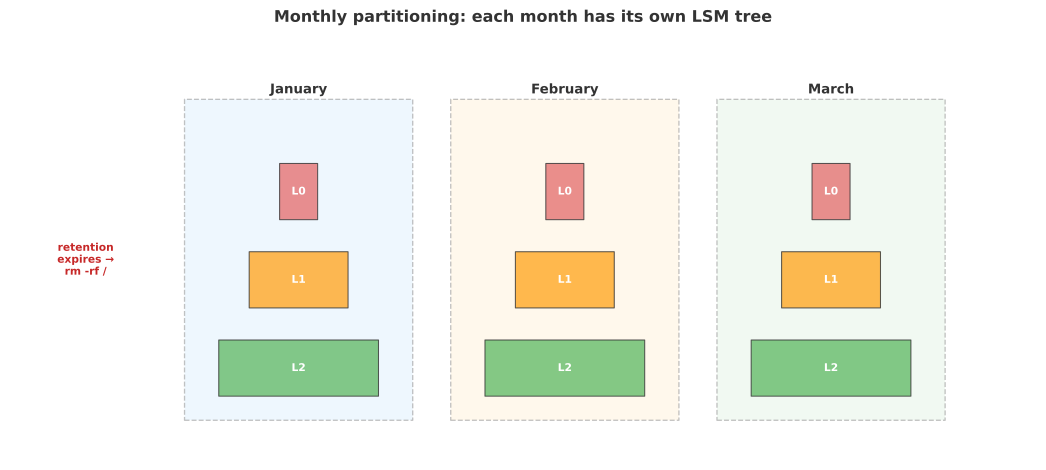
Retention-based deletion becomes a directory rm instead of tombstone compaction. Each month’s tree compacts independently, avoiding I/O contention across partitions. The tradeoff: cross-month queries must read from multiple trees and merge results in the query layer.
See also
- VictoriaMetrics — architecture, compression, cluster mode, and operational details
- TSDB Internals notebook — compression algorithms (delta-of-delta, Gorilla XOR), deduplication, and metrics cardinality
- Designing Metrics to Avoid High Cardinality — how to design metric schemas that don’t blow up the inverted index