VictoriaMetrics
VictoriaMetrics is an open-source TSDB (Time-Series Database) and monitoring solution created by Aliaksandr Valialkin in 2018. It was built to solve concrete pain points with Prometheus’s built-in storage: limited retention, high memory usage for large cardinality datasets, no native clustering, and compression that — while good — leaves room for improvement. VictoriaMetrics positions itself as a drop-in long-term storage backend for Prometheus, but it has grown into a full monitoring stack with its own scraping agent, alerting engine, and query language extensions.
The project is written in Go and available in two deployment models: a single-node binary (one process, zero dependencies, just point it at a data directory) and a cluster version that separates ingestion, storage, and querying into independently scalable components.
Interactive companions
Explore compression algorithms and storage mechanics hands-on in the TSDB Internals notebook — delta-of-delta encoding, Gorilla XOR, deduplication, and inverted index lookups with live controls.
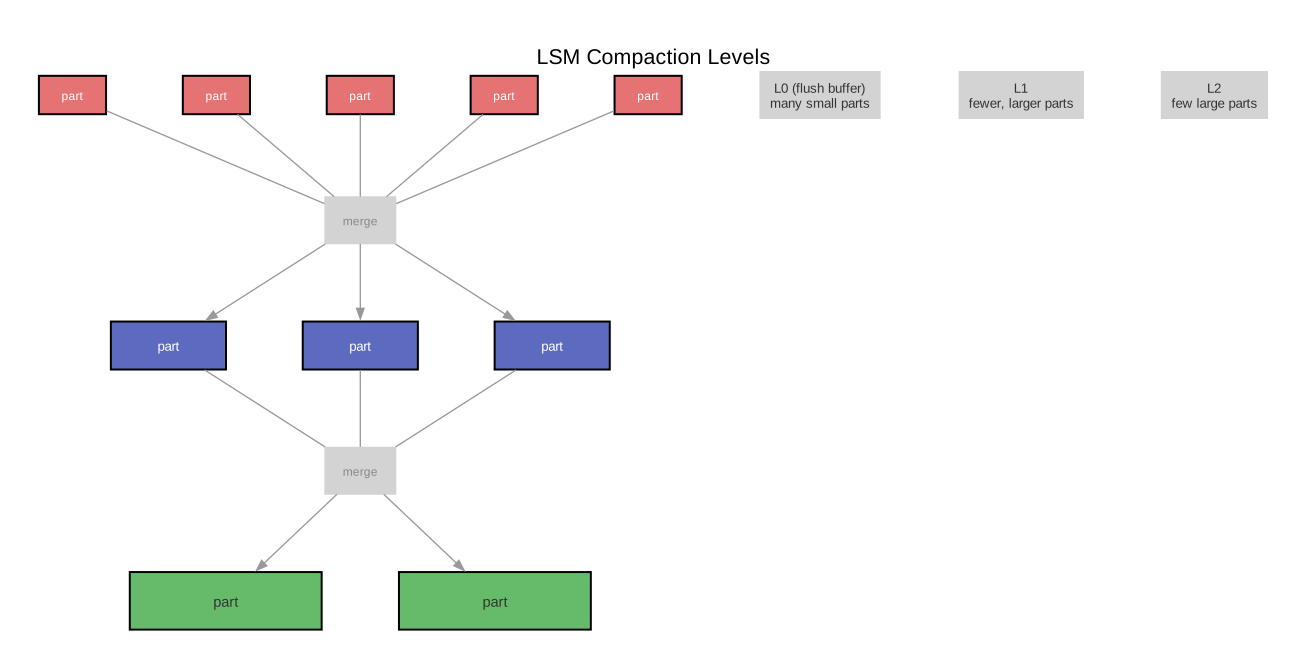
For a deep dive into how LSM compaction and write amplification work (including VictoriaMetrics’ monthly partitioning strategy), see the LSM Compaction note.
Why VictoriaMetrics exists
Prometheus stores metrics in its own TSDB on local disk. This works well for short retention windows (the default is 15 days), but creates problems at scale:
- Vertical scaling only. Prometheus is a single process. When the number of active time series exceeds what fits in RAM, scraping slows and queries time out. There is no built-in sharding or clustering.
- Retention vs. disk. Extending retention to months or years requires proportionally more disk. Prometheus compresses well (~1.3 bytes per sample), but at millions of active series, disk grows fast.
- Federation is fragile. Prometheus federation (one Prometheus scraping another’s
/federateendpoint) was designed for hierarchical aggregation, not as a general-purpose horizontal scaling mechanism. It introduces latency, loses resolution, and is operationally brittle. - No high availability (HA) story built in. The standard approach is running two identical Prometheus instances and deduplicating at query time (via Thanos or Cortex). This doubles resource usage.
Thanos (developed by Improbable, donated to the CNCF — Cloud Native Computing Foundation) and Cortex (now Mimir, from Grafana Labs) address these problems by bolting on a distributed layer around Prometheus. VictoriaMetrics takes a different approach: replace the storage engine entirely with one designed from the start for compression, long retention, and horizontal scaling.
Architecture deep-dive
Single-node
The single-node VictoriaMetrics is a single binary (victoria-metrics) that handles ingestion, storage, and querying in one process. Start it with:
./victoria-metrics \
  -storageDataPath=/var/lib/victoriametrics \
  -retentionPeriod=12 \
  -httpListenAddr=:8428
Key flags:
| Flag | Purpose | Default |
|---|---|---|
-storageDataPath | Directory for data files | victoria-metrics-data |
-retentionPeriod | How long to keep data. Accepts months (12), days (365d), hours (8760h) | 1 (1 month) |
-httpListenAddr | Listen address for HTTP API (ingestion + queries) | :8428 |
-dedup.minScrapeInterval | Deduplicate samples within this window (explained below) | 0s (disabled) |
-search.maxUniqueTimeseries | Safety limit on unique series per query | 300000 |
-memory.allowedPercent | Percentage of system RAM VictoriaMetrics may use for caches | 60 |
The single binary exposes multiple API endpoints:
/api/v1/write— Prometheus remote_write (Protocol Buffers with Snappy compression, the standard Prometheus remote write protocol)/api/v1/queryand/api/v1/query_range— PromQL/MetricsQL query endpoints, compatible with the Prometheus HTTP API/api/v1/import/*— native, JSON, CSV, and Prometheus exposition format import endpoints/snapshot/create— creates a consistent snapshot for backups (used byvmbackup)
The storage engine
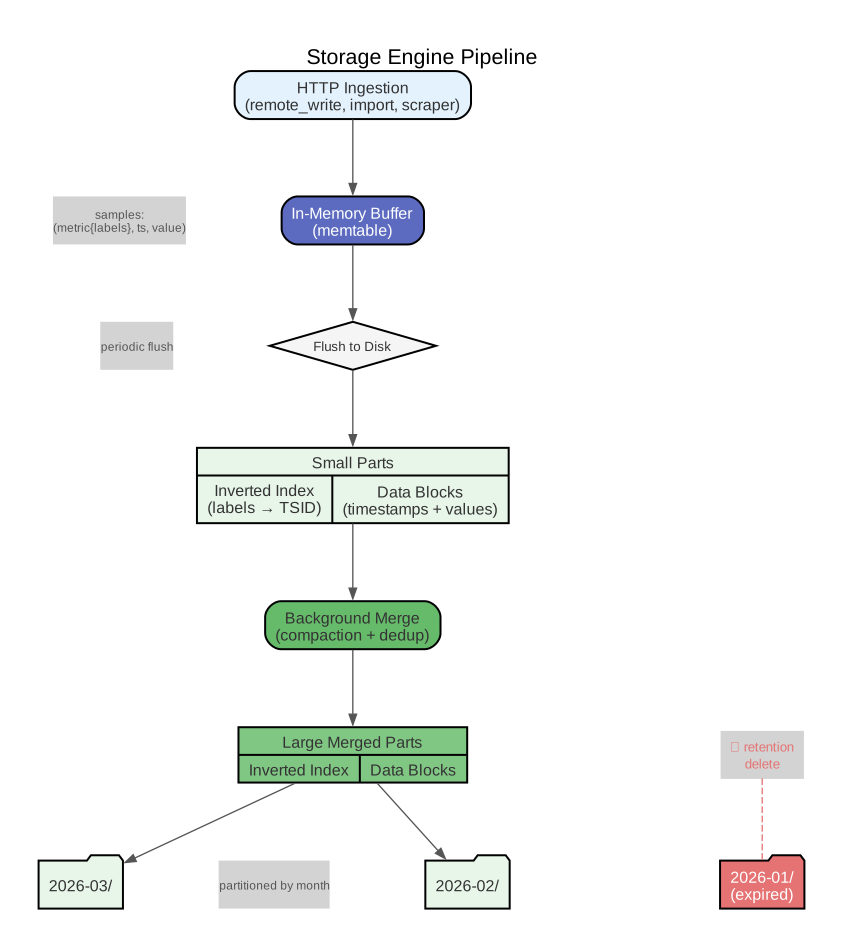
VictoriaMetrics uses a custom storage engine inspired by the LSM (Log-Structured Merge) tree family, but optimized specifically for time-series workloads. The project calls it a “merge tree” — distinct from ClickHouse’s MergeTree (though Valialkin previously worked on ClickHouse’s indexing, and some design ideas carry over).
How data flows from ingestion to disk
-
Incoming samples arrive via HTTP (remote_write, import, or the built-in scraper). Each sample is a triple:
(metric_name{labels}, timestamp, float64_value). -
In-memory buffer. Samples are first written to an in-memory buffer. VictoriaMetrics accumulates recent data in RAM and periodically flushes it to disk as immutable “parts.” This is analogous to the memtable in a classic LSM tree.
-
Parts on disk. Flushed data lands as small parts. Each part contains:
- An index mapping
(metric_name, labels)to an internal TSID (Time-Series ID — a compact numeric identifier assigned to each unique label set). This index is called the “inverted index” and is stored separately from the time-series data. - Data blocks containing timestamps and values for each TSID, compressed using the algorithms described below.
- An index mapping
-
Background merges. A background process continuously merges smaller parts into larger ones, similar to LSM compaction. Merging reduces the number of parts (improving query performance, since fewer files need to be scanned) and can apply deduplication during the merge.
- Partitioning by month. Data is split into per-month directories, each with its own independent merge tree. This bounds tree depth and makes retention-based deletion a simple directory
rm. See Monthly partitioning for the full explanation of why this matters for write amplification.
Compression
VictoriaMetrics achieves roughly 0.4 to 0.8 bytes per sample on typical monitoring data — significantly better than Prometheus’s ~1.3 bytes per sample. It does this through several layered techniques:
Timestamp compression — delta-of-delta encoding:
Timestamps in monitoring data are nearly regular (one sample every 15 seconds, for example). Delta encoding stores the difference between consecutive timestamps rather than the raw values. Delta-of-delta goes one step further: it stores the difference between consecutive deltas. For perfectly regular scrape intervals, the delta-of-delta is zero, which compresses to almost nothing.
Raw timestamps:    1000, 1015, 1030, 1045, 1060
Deltas:                   15,   15,   15,   15
Delta-of-delta:            0,    0,    0
The delta-of-delta values are then encoded with variable-length integers, so the common case (zero or small jitter) uses only 1-2 bits per sample.
Value compression — XOR encoding (Gorilla compression):
For float64 values, VictoriaMetrics uses the encoding scheme from the Gorilla paper (Facebook’s in-memory TSDB, published 2015). The insight: consecutive values in a time series are often identical or very close. XOR (exclusive-or) of two similar IEEE 754 floats produces a number with many leading and trailing zeros. By storing only the non-zero middle bits plus their position, most samples compress to 1-10 bits.
Value[n]:   3.14159  (IEEE 754: 0x400921FB54442D18)
Value[n+1]: 3.14160  (IEEE 754: 0x400921FB5B6DB6DB)
XOR:        0x0000000001F99BC3  -- mostly zeros, only ~25 meaningful bits
On top of these per-sample encodings, VictoriaMetrics applies block-level compression (zstd — Zstandard, a fast lossless compression algorithm developed by Facebook/Meta) to the encoded blocks before writing to disk.
The combination of domain-specific encoding (delta-of-delta for timestamps, XOR for values) plus general-purpose compression (zstd) is why VictoriaMetrics achieves roughly 2-3x better compression than Prometheus TSDB, which uses the same Gorilla encoding for values but a simpler scheme for timestamps and does not apply a second compression pass.
Cluster mode
For workloads that exceed what a single node can handle (typically above 10 million active time series, or when you need HA), VictoriaMetrics offers a cluster version with three component types:
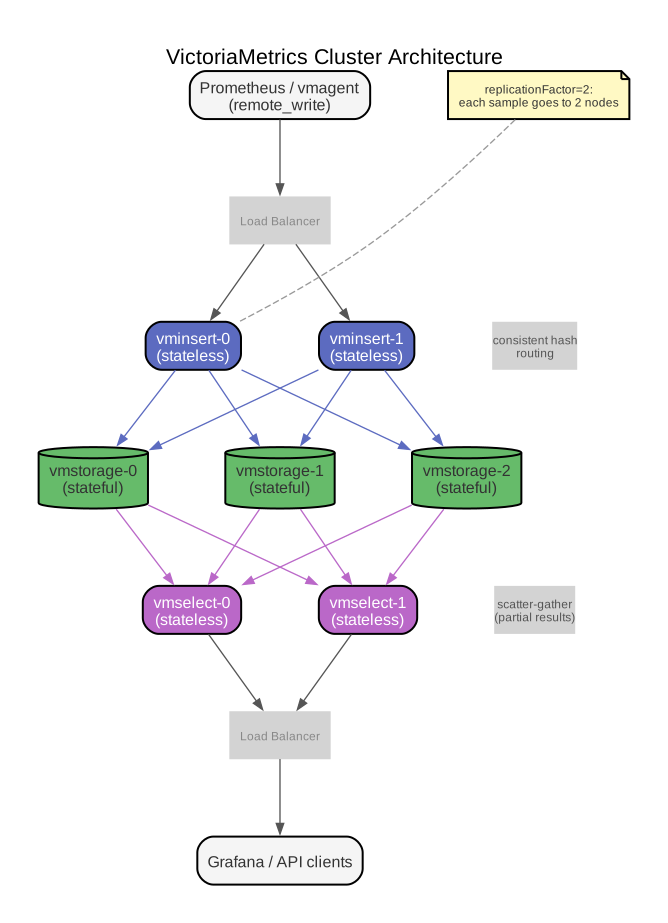
vminsert (stateless) — receives incoming data via Prometheus remote_write (and other protocols: InfluxDB line protocol, OpenTSDB, Datadog, OpenTelemetry). It hashes each time series by its label set using a consistent hashing algorithm and routes it to the appropriate vmstorage node. Because it is stateless, you can run any number of vminsert instances behind a load balancer.
vminsert \
  -storageNode=vmstorage-0:8400 \
  -storageNode=vmstorage-1:8400 \
  -storageNode=vmstorage-2:8400 \
  -replicationFactor=2
vmstorage (stateful) — stores time-series data on local disk using the same merge-tree engine as single-node VictoriaMetrics. Each vmstorage node is responsible for a shard of the data (determined by vminsert’s consistent hashing). It exposes an internal RPC API on port 8400 (for vminsert) and port 8401 (for vmselect).
vmstorage \
  -storageDataPath=/data/vmstorage \
  -retentionPeriod=12
vmselect (stateless) — handles queries. When a query arrives, vmselect fans it out to all vmstorage nodes in parallel, merges the partial results, and returns the final answer. Like vminsert, it is stateless and horizontally scalable.
vmselect \
  -storageNode=vmstorage-0:8401 \
  -storageNode=vmstorage-1:8401 \
  -storageNode=vmstorage-2:8401
Sharding and consistent hashing
vminsert uses jump consistent hashing (a fast, memory-efficient consistent hash from Google, 2014) to map each time series to a vmstorage node. When a vmstorage node is added or removed, only 1/N of the series need to be reshuffled (where N is the number of nodes). However, during reshuffling the affected series will temporarily exist on two nodes, which is why deduplication is important in cluster mode.
Replication
The -replicationFactor=N flag on vminsert causes each incoming sample to be written to N different vmstorage nodes. This provides data durability — if a vmstorage node dies, the data still exists on N-1 other nodes. On the query side, vmselect must be configured with -dedup.minScrapeInterval to deduplicate the replicated samples.
Consistency model: VictoriaMetrics cluster provides eventual consistency. There is no distributed consensus (no Raft, no Paxos). Writes are acknowledged as soon as the required number of vmstorage nodes confirm receipt. Queries may return slightly stale data during node failures or rebalancing. For monitoring workloads, this tradeoff is appropriate — exact-once semantics matter less than availability and throughput.
Multi-tenancy
The cluster version supports multi-tenancy natively. Each tenant is identified by accountID (and optionally projectID), encoded in the URL path:
# Ingestion for tenant 42:
POST http://vminsert:8480/insert/42/prometheus/api/v1/write

# Querying for tenant 42:
GET http://vmselect:8481/select/42/prometheus/api/v1/query?query=up
Tenants are isolated at the storage level — each tenant’s data is stored separately. There is no configuration needed to create a tenant; it is created implicitly on first write. Single-node VictoriaMetrics does not support multi-tenancy (there is one implicit tenant).
When single-node is enough vs. when you need cluster
| Criteria | Single-node | Cluster |
|---|---|---|
| Active time series | Up to ~10M (depends on RAM) | Tens of millions and beyond |
| Ingestion rate | Up to ~1M samples/second | Horizontally scalable |
| HA / replication | No (run two instances + dedup) | Built-in replication factor |
| Multi-tenancy | No | Yes, path-based |
| Operational complexity | Trivial — single binary, single data dir | Three component types, need orchestration |
| Typical use case | Single team, moderate scale | Platform team serving many teams/clusters |
The single-node version is surprisingly capable. The DFKI (German Research Center for Artificial Intelligence) case study reports running a single-node instance that uses one-third the storage of Prometheus while consuming less CPU and RAM. Start with single-node and migrate to cluster only when you have a concrete reason.
Prometheus compatibility
remote_write
The primary integration path is Prometheus’s remote_write feature. Add this to your prometheus.yml:
remote_write:
  - url: http://victoriametrics:8428/api/v1/write
    queue_config:
      max_samples_per_send: 10000
      capacity: 20000
      max_shards: 30
Prometheus continues scraping targets and writing to its local TSDB as before, but now also streams every sample to VictoriaMetrics in near-real-time. This gives you the best of both worlds during migration: Prometheus for short-term queries and operational alerting, VictoriaMetrics for long-term storage and heavy analytical queries.
The remote_write protocol uses Protocol Buffers serialization with Snappy compression. VictoriaMetrics supports the Prometheus remote_write protocol version 1 natively. Version 2 support (with native histograms) has been added in recent releases.
PromQL support
VictoriaMetrics accepts standard PromQL queries at the same API endpoints Prometheus exposes (/api/v1/query, /api/v1/query_range, /api/v1/series, /api/v1/labels, /api/v1/label/<name>/values). Grafana dashboards that work against Prometheus work against VictoriaMetrics with no changes — you just point the Prometheus datasource URL at VictoriaMetrics instead.
There are minor behavioral differences in edge cases:
- Staleness handling. Prometheus marks a series “stale” 5 minutes after the last scrape. VictoriaMetrics uses a different staleness algorithm that is less aggressive, which can cause phantom series to linger slightly longer in query results.
- NaN handling. Prometheus uses
NaNas a staleness marker internally. Some PromQL edge cases involvingNaNbehave differently in VictoriaMetrics. - Subquery alignment. VictoriaMetrics aligns subquery steps differently in some cases, which can produce slightly different results for complex nested subqueries.
For the vast majority of dashboards and alerting rules (well above 99%), these differences are invisible.
MetricsQL extensions
VictoriaMetrics extends PromQL with MetricsQL, which adds several useful features:
Implicit lookbehind window. In PromQL, rate(http_requests_total) is invalid — you must specify a window: rate(http_requests_total[5m]). In MetricsQL, the window defaults to max(step, scrape_interval), so rate(http_requests_total) just works. This is particularly convenient in Grafana, where the step changes dynamically with the time range.
keep_metric_names modifier. PromQL drops the metric name after applying functions like rate() or increase(). MetricsQL lets you keep it:
rate(http_requests_total[5m]) keep_metric_names
Additional rollup functions:
rollup(series[d])— returnsmin,max, andavgsimultaneously as three separate series. Useful for seeing the full range of a metric without writing three queries.rollup_rate(series[d])— likerollupbut for rate calculations.range_first(series[d])— returns the first value in the lookbehind window (PromQL has no equivalent).range_linear_regression(series[d])— returns the predicted value based on linear regression over the window.count_values_over_time(series[d])— counts how many times each distinct value appeared in the window.
Label manipulation extensions:
label_set(series, "label", "value")— adds or overwrites a label.label_del(series, "label")— removes a label.label_keep(series, "label1", "label2")— keeps only the specified labels.label_copy(series, "src", "dst")— copies a label value to a new label name.label_move(series, "src", "dst")— renames a label.
WITH templates (CTE-like syntax):
WITH (
  requestRate = rate(http_requests_total[5m]),
  errorRate = rate(http_errors_total[5m])
)
errorRate / requestRate
CTE stands for Common Table Expression — a feature from SQL that lets you name intermediate results and reference them later. MetricsQL’s WITH brings the same idea to time-series queries.
vmagent
vmagent is a lightweight metrics collection agent that replaces Prometheus’s scraping role. It reads the same prometheus.yml scrape configuration format, performs the same service discovery, and scrapes the same /metrics endpoints — but with several advantages:
Why use vmagent instead of Prometheus for scraping
-
Lower resource usage. vmagent does not store data locally (beyond the persistent queue). A Prometheus instance running primarily as a scraper still maintains its full TSDB, consuming significant RAM and disk. vmagent uses a fraction of the resources.
-
Persistent queue for network failures. When the remote_write destination is unreachable, vmagent buffers data to a persistent on-disk queue (
-remoteWrite.tmpDataPath) and replays it when connectivity returns. Prometheus’s remote_write queue is in-memory only by default and can lose data on process restart during an outage. -
Multiple remote_write destinations. vmagent can send data to multiple remote_write endpoints simultaneously, which is useful for mirroring data to separate VictoriaMetrics clusters (e.g., production and analytics) or migrating between systems.
-
Sharding across multiple vmagent instances. For very large scrape targets, you can shard the workload across multiple vmagent instances using the
-promscrape.cluster.membersCountand-promscrape.cluster.memberNumflags. Each instance scrapes only its assigned portion of targets.
Configuration
vmagent reads the same scrape_configs format as Prometheus:
# vmagent-config.yml
scrape_configs:
  - job_name: 'kubernetes-pods'
    kubernetes_sd_configs:
      - role: pod
        namespaces:
          own_namespace: true
    relabel_configs:
      - source_labels: [__meta_kubernetes_pod_annotation_prometheus_io_scrape]
        action: keep
        regex: true
      - source_labels: [__meta_kubernetes_pod_annotation_prometheus_io_path]
        action: replace
        target_label: __metrics_path__
        regex: (.+)
Launch vmagent with:
./vmagent \
  -promscrape.config=vmagent-config.yml \
  -remoteWrite.url=http://victoriametrics:8428/api/v1/write \
  -remoteWrite.tmpDataPath=/var/lib/vmagent-queue
vmagent-specific scrape config extensions
Beyond standard Prometheus scrape config, vmagent adds:
headers— send custom HTTP headers with scrape requests (useful for authentication):headers: - "Authorization: Bearer <token>" - "TenantID: team-a"stream_parse: true— scrape targets in streaming mode, reducing memory usage for targets that expose millions of metrics.series_limit— cap the number of unique time series a single target can expose, preventing cardinality explosions from misbehaving exporters. See Designing Metrics to Avoid High Cardinality for the full set of strategies.scrape_align_interval— align scrapes to a specific interval instead of Prometheus’s default random offset.
Service discovery
vmagent supports all Prometheus service discovery mechanisms: static_configs, dns_sd_configs, kubernetes_sd_configs, consul_sd_configs, ec2_sd_configs, gce_sd_configs, azure_sd_configs, file_sd_configs, and others. It also supports loading multiple scrape config files via the scrape_config_files directive:
scrape_config_files:
  - /etc/vmagent/configs/*.yml
  - https://config-server.internal/scrape_config.yml
vmagent dynamically reloads these files when they change, without restart.
vmalert
vmalert is VictoriaMetrics’ rule evaluation engine. It is not a replacement for Alertmanager — it replaces the rule evaluation component that runs inside Prometheus. The architecture looks like this:
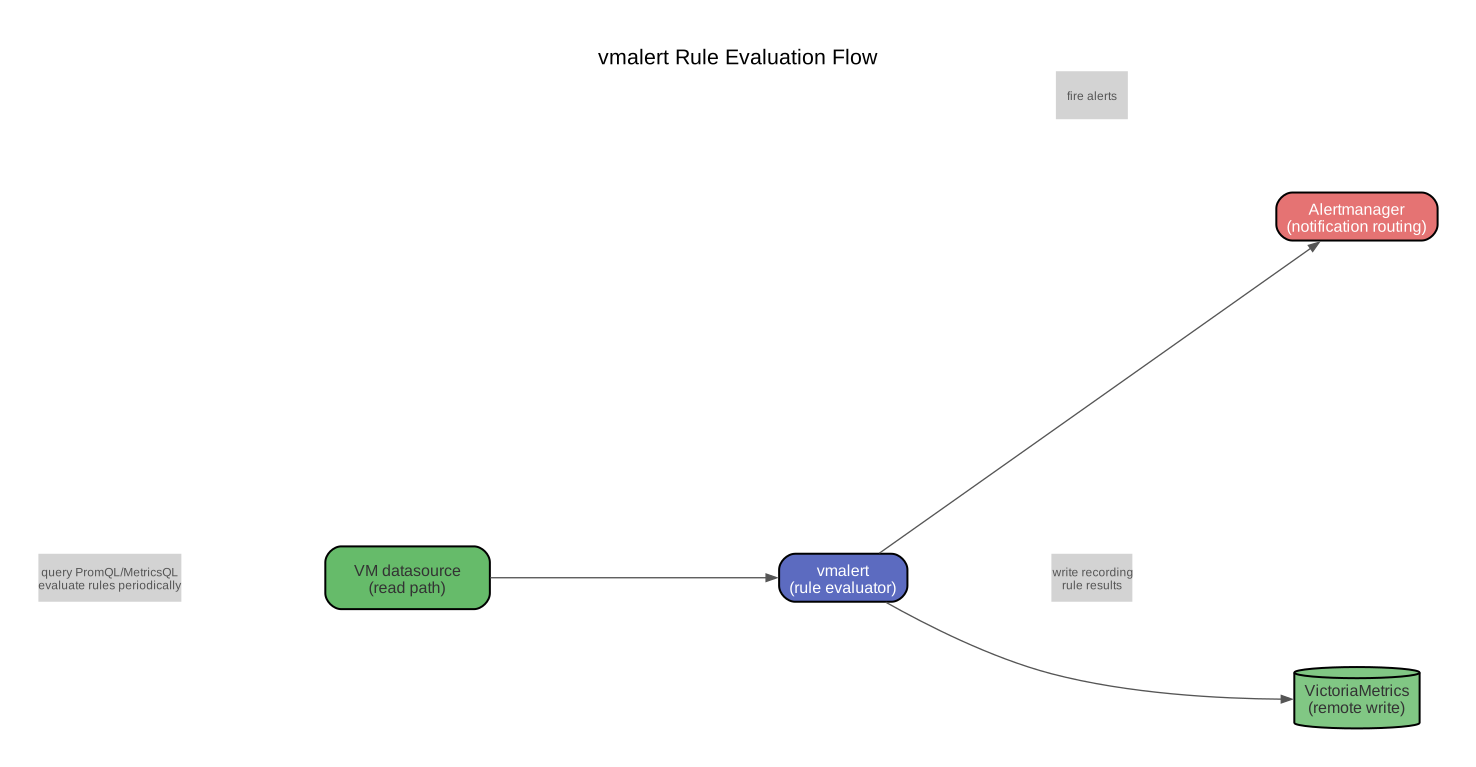
vmalert periodically evaluates alerting and recording rules (written in PromQL or MetricsQL) against a VictoriaMetrics datasource. When an alerting rule fires, vmalert sends the alert to one or more Alertmanager instances, which handle notification routing, grouping, silencing, and deduplication — exactly as they do with Prometheus.
Key differences from Prometheus rule evaluation
-
Decoupled from storage. In Prometheus, rule evaluation is tightly coupled to the local TSDB — rules query local data. vmalert queries VictoriaMetrics over HTTP, so it can evaluate rules against a cluster or a remote single-node instance. This separation means you can scale rule evaluation independently from storage.
-
MetricsQL support. Rules can use MetricsQL extensions (implicit lookbehind windows,
keep_metric_names, additional functions), not just standard PromQL. -
Multi-tenancy. When pointing at a VictoriaMetrics cluster, vmalert can evaluate rules for specific tenants by including the tenant ID in the datasource URL.
-
Multiple datasources. vmalert can query multiple VictoriaMetrics instances and write recording rule results to a different instance than the one it reads from.
Configuration
vmalert reads rule files in the standard Prometheus format:
# rules.yml
groups:
  - name: node-alerts
    interval: 30s
    rules:
      - alert: HighCPUUsage
        expr: 100 - (avg by(instance)(rate(node_cpu_seconds_total{mode="idle"}[5m])) * 100) > 90
        for: 5m
        labels:
          severity: warning
        annotations:
          summary: "High CPU on {{ $labels.instance }}"
          description: "CPU usage above 90% for 5 minutes."

      - record: job:http_requests:rate5m
        expr: sum by(job)(rate(http_requests_total[5m]))
Launch vmalert:
./vmalert \
  -rule=/etc/vmalert/rules/*.yml \
  -datasource.url=http://victoriametrics:8428 \
  -remoteWrite.url=http://victoriametrics:8428 \
-notifier.url=http://alertmanager:9093| Flag | Purpose |
|---|---|
-rule | Path or glob to rule files (reloaded on SIGHUP) |
-datasource.url | VictoriaMetrics instance to query for rule evaluation |
-remoteWrite.url | Where to write recording rule results |
-notifier.url | Alertmanager endpoint(s) for firing alerts |
-evaluationInterval | How often to evaluate rules (default 1m) |
Grafana integration
VictoriaMetrics works with Grafana’s built-in Prometheus datasource — no special plugin required. Configure a Prometheus datasource in Grafana and point it at VictoriaMetrics:
# Single-node
URL: http://victoriametrics:8428

# Cluster (vmselect)
URL: http://vmselect:8481/select/0/prometheus
(The /select/0/prometheus path is the cluster URL format, where 0 is the tenant accountID.)
All Prometheus-compatible dashboards (community dashboards from grafana.com, dashboards you have built) work without modification. The query editor sends PromQL, and VictoriaMetrics responds with the same JSON format Prometheus uses.
For MetricsQL-specific features (like WITH templates or keep_metric_names), you type them directly in the query editor — they work because VictoriaMetrics parses them server-side. Grafana does not need to understand MetricsQL syntax; it just sends the query string as-is.
There is also a dedicated VictoriaMetrics datasource plugin for Grafana (available in the Grafana plugin catalog) that adds:
- MetricsQL syntax highlighting and autocompletion in the query editor
- Exploration of metrics, labels, and label values via VictoriaMetrics-specific API endpoints
- Support for
WITHtemplates in the editor - Trace visualization for query execution analysis
The dedicated plugin is optional — the standard Prometheus datasource covers all functional requirements.
Operational aspects
Backups: vmbackup and vmrestore
VictoriaMetrics provides two utilities for backup and restore:
vmbackup creates a consistent snapshot of the data directory and uploads it to object storage (S3, GCS — Google Cloud Storage, Azure Blob Storage) or a local filesystem path:
# Full backup to S3
./vmbackup \
  -storageDataPath=/var/lib/victoriametrics \
  -snapshot.createURL=http://localhost:8428/snapshot/create \
  -dst=s3://my-bucket/vm-backups/full-2026-03-30

# Incremental backup (only new data since last backup)
./vmbackup \
  -storageDataPath=/var/lib/victoriametrics \
  -snapshot.createURL=http://localhost:8428/snapshot/create \
  -dst=s3://my-bucket/vm-backups/incremental-2026-03-30 \
  -origin=s3://my-bucket/vm-backups/full-2026-03-30
The backup process works by:
- Calling VictoriaMetrics’s
/snapshot/createAPI, which creates a filesystem-level snapshot using hard links (instant, no data copying). - Uploading the snapshot files to the destination.
- Calling
/snapshot/deleteto clean up the local snapshot.
vmrestore downloads a backup from object storage and places it in the data directory:
./vmrestore \
  -src=s3://my-bucket/vm-backups/full-2026-03-30 \
  -storageDataPath=/var/lib/victoriametrics
Then start VictoriaMetrics pointing at that data directory. Incremental backups are particularly efficient because they use the -origin flag to identify which parts already exist at the destination, uploading only new parts.
Retention
Retention is configured with -retentionPeriod. VictoriaMetrics enforces retention at the monthly partition level: when all data in a monthly partition is older than the retention period, the entire partition directory is deleted. This means actual retention can be up to one month longer than configured (if some data in the newest expired partition has not yet aged out).
For example, with -retentionPeriod=3 (3 months), data from up to ~4 months ago may still be queryable, depending on when the partition boundary falls.
Deduplication
Deduplication is critical when running multiple Prometheus instances scraping the same targets (HA setup) or when using replication in cluster mode. Configure it with:
-dedup.minScrapeInterval=30sThis tells VictoriaMetrics: “for any given time series, if multiple samples arrive within a 30-second window, keep only one.” The mechanism works during background merges — when parts are merged, duplicate samples within the dedup window are collapsed. Set this value to your scrape interval or slightly above it.
In cluster mode, deduplication is not guaranteed across vmstorage nodes. If two copies of the same sample land on different nodes (which happens during rebalancing or with -replicationFactor > 1), vmselect handles the dedup at query time when -dedup.minScrapeInterval is set on both vmselect and vmstorage.
Capacity planning
RAM: VictoriaMetrics uses RAM primarily for caches (inverted index lookups, recently queried series, merge buffers). A rough guideline: ~1 KB of RAM per active time series for comfortable operation. So 1 million active series needs ~1 GB of RAM. The -memory.allowedPercent flag (default 60%) caps how much of the system RAM VictoriaMetrics will use.
Disk: Depends on compression ratio, which varies with data characteristics. Typical monitoring data compresses to 0.4-0.8 bytes per sample. For a rough estimate:
disk_bytes = active_series * samples_per_second * bytes_per_sample * retention_seconds
Example: 1M active series, scraped every 15s (~66,667 samples/s), 0.6 bytes/sample, 6 months retention:
0.6 * 66667 * 86400 * 180 ≈ 622 GB
CPU: Ingestion is not CPU-intensive — compression is fast. Query load depends entirely on query complexity and concurrency. Most single-node deployments are bottlenecked by disk I/O or RAM before CPU.
Disk I/O: SSDs (Solid-State Drives) are strongly recommended. VictoriaMetrics performs many small random reads during queries and sequential writes during ingestion and merges. HDDs (Hard Disk Drives) work for ingestion-heavy, query-light workloads but will struggle under concurrent query load.
Migration from Prometheus
There are two migration paths:
1. Live streaming via remote_write (recommended for most cases). Add a remote_write section to your prometheus.yml (shown above). New data flows to VictoriaMetrics immediately. This does not migrate historical data.
2. Historical data migration via vmctl. vmctl is a CLI tool that reads Prometheus snapshots (created with promtool tsdb snapshot) or queries the Prometheus remote read API, and writes the data to VictoriaMetrics:
# From a Prometheus snapshot
./vmctl prometheus \
  --vm-addr=http://victoriametrics:8428 \
  --prom-snapshot=/path/to/prometheus/snapshot

# From Prometheus remote read API (slower but no snapshot needed)
./vmctl prometheus \
  --vm-addr=http://victoriametrics:8428 \
  --prom-addr=http://prometheus:9090
vmctl also supports migration from InfluxDB, OpenTSDB (an open-source TSDB built on HBase/Hadoop), and other VictoriaMetrics instances.
A typical migration sequence:
- Add
remote_writeto Prometheus pointing at VictoriaMetrics — new data starts flowing. - Use
vmctlto backfill historical data from a Prometheus snapshot. - Point Grafana at VictoriaMetrics (change the Prometheus datasource URL).
- Deploy vmalert to replace Prometheus rule evaluation.
- Deploy vmagent to replace Prometheus scraping (optional but reduces resource usage).
- Decommission Prometheus.
VictoriaMetrics Operator for Kubernetes
The VictoriaMetrics Operator is a Kubernetes operator that manages VictoriaMetrics components via CRDs (Custom Resource Definitions — Kubernetes extensions that let you define your own resource types and manage them with kubectl). It simplifies deployment, upgrades, and configuration of the entire VictoriaMetrics stack in Kubernetes.
CRDs provided
| CRD | What it manages | Prometheus Operator equivalent |
|---|---|---|
VMSingle | Single-node VictoriaMetrics | (no direct equivalent) |
VMCluster | Cluster: vminsert + vmselect + vmstorage | (no direct equivalent) |
VMAgent | vmagent instances with scrape configs | Prometheus (the scraping part) |
VMAlert | vmalert instances with rule evaluation | PrometheusRule evaluation |
VMAlertmanager | Alertmanager instances | Alertmanager |
VMRule | Alerting and recording rules | PrometheusRule |
VMServiceScrape | Scrape config for Kubernetes Services | ServiceMonitor |
VMPodScrape | Scrape config for Pods directly | PodMonitor |
VMNodeScrape | Scrape config for Node Exporters | (no direct equivalent) |
VMProbe | Blackbox probing config | Probe |
VMUser | vmauth user routing rules | (no direct equivalent) |
VMAuth | vmauth proxy configuration | (no direct equivalent) |
Compatibility with Prometheus Operator CRDs
A key feature: the VictoriaMetrics Operator can auto-discover and convert Prometheus Operator CRDs (ServiceMonitor, PodMonitor, PrometheusRule, Probe) into their VictoriaMetrics equivalents. This means if your cluster already uses the Prometheus Operator, you can deploy the VictoriaMetrics Operator alongside it and it will pick up your existing scrape configs and rules without any changes.
Enable this with the operator flag:
# In the operator's Helm values
operator:
  enable_converter_owner_ref: true
  prometheus_converter_enabled: true
Deployment via Helm
# Add the VictoriaMetrics Helm repo
helm repo add vm https://victoriametrics.github.io/helm-charts/

# Install the operator
helm install vm-operator vm/victoria-metrics-operator -n monitoring

# Deploy a single-node instance
cat <<EOF | kubectl apply -f -
apiVersion: operator.victoriametrics.com/v1beta1
kind: VMSingle
metadata:
  name: victoria-metrics
  namespace: monitoring
spec:
  retentionPeriod: "6"
  storage:
    storageClassName: fast-ssd
    resources:
      requests:
        storage: 100Gi
  resources:
    requests:
      memory: 4Gi
      cpu: "2"
    limits:
      memory: 8Gi
EOF
When to choose VictoriaMetrics over Prometheus
This is not about “VictoriaMetrics is better.” Both are production-grade. The choice depends on your specific constraints:
Choose VictoriaMetrics when:
- You need long retention (months to years). VictoriaMetrics’s compression means 2-3x less disk for the same data. At scale, this is a significant cost difference.
- You need to consolidate metrics from multiple Prometheus instances. VictoriaMetrics as a central remote_write target is simpler than Thanos or Mimir, with fewer moving parts.
- Your active series count exceeds ~5M. Single-node VictoriaMetrics handles this with less RAM than Prometheus. Cluster mode handles tens of millions.
- You want multi-tenancy. If you are a platform team serving multiple product teams, VictoriaMetrics cluster’s path-based multi-tenancy is simpler than running separate Prometheus instances per team.
- You want operational simplicity. Single-node VictoriaMetrics is one binary, one data directory, a handful of flags. Prometheus + Thanos is five+ components (Prometheus, Thanos Sidecar, Thanos Store, Thanos Query, Thanos Compactor, object storage).
- You are running in Kubernetes and already have Prometheus Operator CRDs. The VictoriaMetrics Operator’s auto-conversion makes migration nearly transparent.
Stick with Prometheus when:
- Your scale is modest (under ~1M active series, under 6 months retention). Prometheus works well here, and you avoid introducing a new system.
- You depend on Prometheus ecosystem tools that expect the Prometheus TSDB on disk (e.g.,
promtoolfor local debugging, TSDB admin commands). - Your team knows Prometheus deeply and the operational cost of switching exceeds the benefit. VictoriaMetrics is compatible, but “compatible” is not “identical” — there are edge cases in staleness, NaN handling, and subquery alignment that can surprise you.
- You are already invested in Thanos or Mimir and they are working well. Switching monitoring backends is disruptive; do it only if there is a clear ROI (Return on Investment).
See also
- Homelab Monitoring — covers the Prometheus/Grafana/Loki/Alertmanager stack and how the monitoring pipeline works end-to-end
- TSDB Internals — interactive notebook exploring compression algorithms, deduplication, and inverted index lookups
- LSM Compaction — write amplification, leveled vs. size-tiered compaction, and monthly partitioning
- Designing Metrics to Avoid High Cardinality — schema design, recording rules, index sharding, and when a dimension doesn’t belong in metrics