Angle Mod
Why angle mod exists
Traditional keyboards have row stagger — each row of keys is offset horizontally from the row above it, a leftover from mechanical typewriter design (see column stagger explanation). When you draw lines representing the natural up-and-down motion of each finger (assuming your arms approach the keyboard at roughly 70 degrees), the keys on the right hand line up reasonably well with those natural paths. But on the left hand, particularly the bottom row, the keys are significantly misaligned. The left ring finger’s bottom-row key, for instance, sits noticeably to the right of where the finger naturally drops.
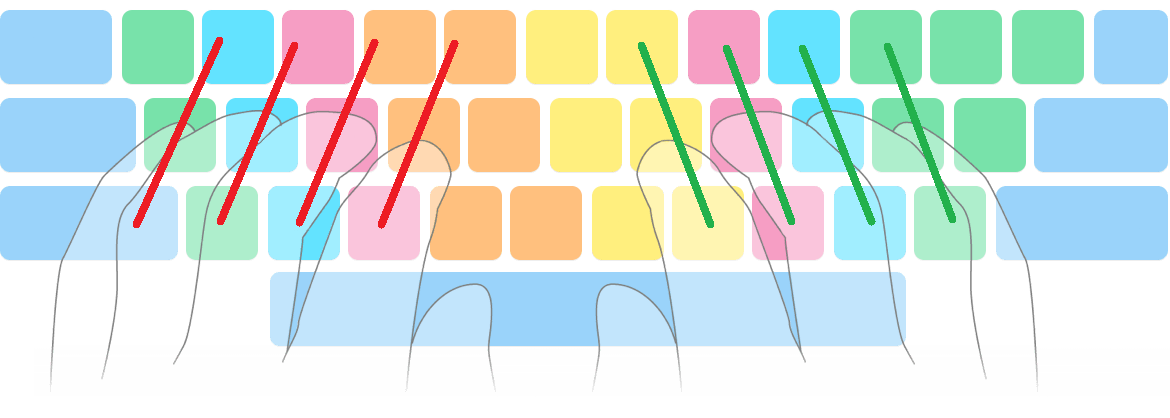
Angle mod (short for modification — the term comes from gaming and hardware modding culture, meaning a user-made tweak to an existing system) is a modified finger assignment that fixes this misalignment on the left hand’s bottom row. It was developed by the alternative keyboard layout community to make row-staggered keyboards more comfortable.
Angle mod is irrelevant for columnar/matrix keyboards
If you use a columnar keyboard like the ZSA Voyager, Corne, Sweep, or any other board where keys are arranged in straight vertical columns, angle mod does not apply to you. The entire point of angle mod is to compensate for row stagger, and columnar boards have no row stagger. Your columns are already aligned with your fingers’ natural motion. You can safely skip this technique — it is documented here so you understand references to it in layout discussions and documentation.
What angle mod changes
With standard finger assignment, the left bottom row is:
| Key position (QWERTY) | Standard finger |
|---|---|
| Z | Pinky |
| X | Ring |
| C | Middle |
With angle mod, those same physical keys are reassigned:
| Key position (QWERTY) | Angle mod finger |
|---|---|
| Z | Ring |
| X | Middle |
| C | Index |
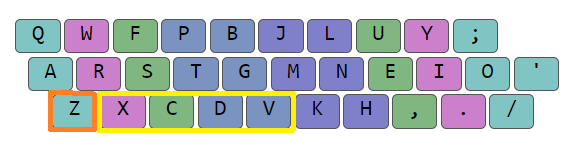
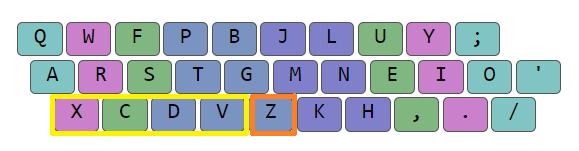
This shifts each finger’s bottom-row responsibility one position to the left, better matching the diagonal that row stagger creates on the left hand. The result is that the bottom row stagger becomes roughly symmetrical between the two hands — still not perfect on the top row, but a meaningful improvement overall.
ANSI vs ISO keyboard standards
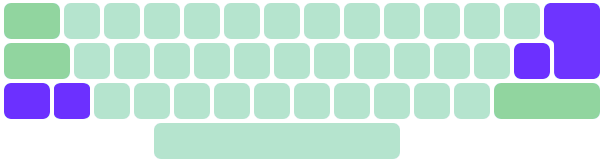
How angle mod is implemented depends on which physical keyboard standard you use. The two dominant standards differ in the shape of the left Shift key area:
ANSI (American National Standards Institute)
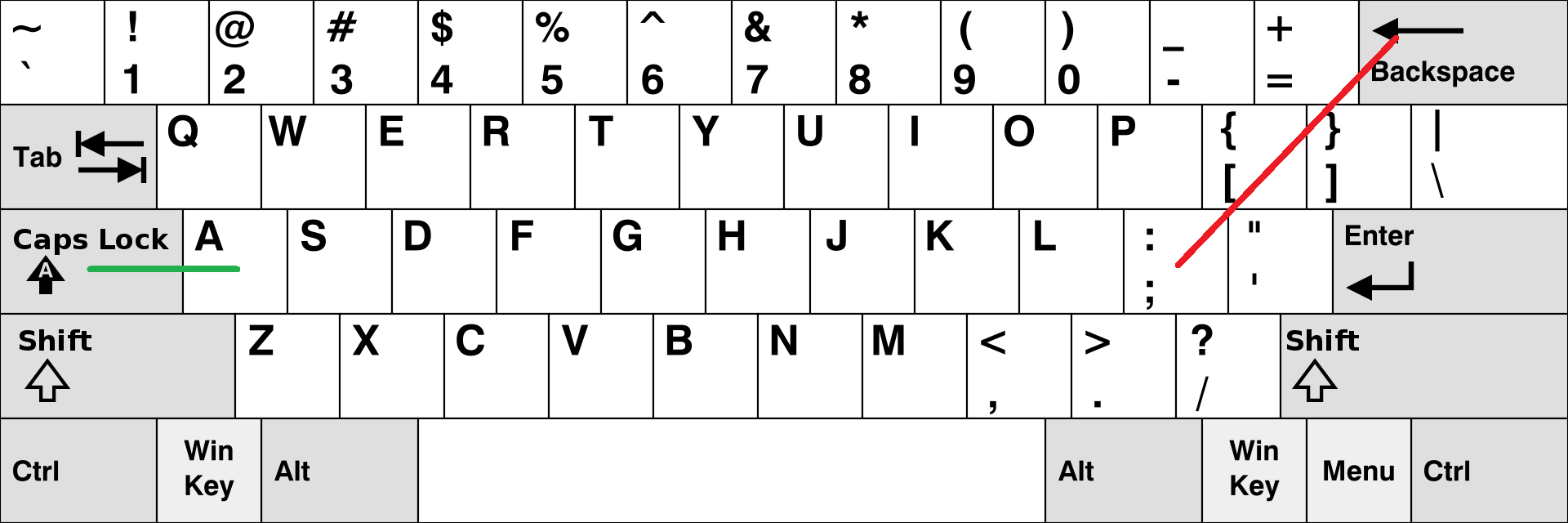
ANSI is the standard physical layout used in the United States and several other countries. Its defining characteristic in this context is a wide left Shift key that spans the full width beneath the left pinky and ring finger columns.
ISO (International Organization for Standardization)
ISO is the standard used across most of Europe and many other regions. Its left Shift key is split into two keys: a narrower Shift and an additional key to its right (often mapped to \ or < depending on the locale). This gives the bottom row one extra physical key compared to ANSI.
How the difference affects angle mod
On ISO keyboards, the extra key means the entire left bottom row can simply shift one position to the left. Every finger keeps the same number of keys it had before — the pinky still has three keys (it picks up the extra ISO key). The process is straightforward.
On ANSI keyboards, there is no extra key to absorb the shift. When the bottom-row letters move one position left, the pinky loses one key (going from three to two) and the index finger gains one (going from six to seven). This means the letter that was originally on the pinky’s bottom-row position gets relocated to the index finger’s inner column. For this reason, layouts designed for ANSI angle mod place a rare letter (like Z, Q, or X) in that pinky position, so the relocation has minimal impact on typing quality.
Convention in the layout community
When a layout is described as “angle modded” without further qualification, it almost always means ANSI angle mod, since that version works on any keyboard. ISO angle mod is exclusive to ISO keyboards.
Angle modding a layout: worked example
Take Colemak DH (a popular alternative layout) in its standard-fingering form:
q w f p b  j l u y ;
a r s t g  m n e i o
z x c d v  k h , . /
Step 1: The three left bottom-row keys assigned to ring, middle, and index (X C D) shift one position to the left.
Step 2: The letter that was on the left pinky’s bottom-row key (Z) has lost its position. It moves to the vacant spot on the left index finger’s inner column.
Result — angle modded Colemak DH:
q w f p b  j l u y ;
a r s t g  m n e i o
x c d v z  k h , . /
The critical thing to verify: the finger columns remain the same. Before and after angle modding, the left ring finger still types W R X, the left middle still types F S C, and the left index still types P T D (plus the inner column). Only the physical positions shifted — the logical groupings did not change.
Un-angle modding
Many layouts published online are presented in angle-modded form, because most layout designers assume row-staggered keyboards with angle mod. If you want to use such a layout on a matrix/columnar keyboard, you need to reverse the process:
- Move the inner-column letter (the one that was relocated from the pinky) back to the pinky’s bottom-row position.
- Shift the remaining left bottom-row letters one position to the right.
This restores straight vertical columns, which is what a matrix keyboard expects.
Un-angle modding Noctum
Noctum as published (angle modded):
f l d p v  z w o u ,
s n t h k  y c a e i
 x m g b j  r ' ; .
Un-angle modded for matrix:
f l d p v  z w o u ,
s n t h k  y c a e i
x m g b j  r ' ; .
(The bottom-row letters shift back into straight columns aligned with the home and top rows.)
Common errors
Angle cheat
Angle cheat is when someone uses angle mod fingering (the shifted finger assignments) on a layout that was designed for standard fingering, without actually rearranging the letters. This is harmful because it breaks the layout’s intended columns. Bigrams that the designer placed on separate fingers suddenly land on the same finger, creating uncomfortable Same Finger Bigrams (SFBs) — instances where one finger must press two keys in a row.
For example, if a layout places C and T on adjacent fingers in standard fingering, angle cheating might put them both on the index finger, turning every CT bigram into an SFB.
Using standard fingering on an angle-modded layout
The reverse error: taking a layout published in angle-modded form and typing it with standard finger assignments. This can be catastrophic. If the layout’s angle-modded columns placed H and E on adjacent fingers, standard fingering might collapse them onto one finger — and since HE is one of the most common bigrams in English, the resulting SFB rate can skyrocket (in one documented case, from 0.75% to 4.29%).
The fix is straightforward: either use angle mod fingering as the layout intends, or un-angle mod the layout first.
How to tell if a layout is angle modded
When layouts are shown as text, the formatting reveals the finger technique:
- Standard fingering: columns are strictly vertical. The bottom-row letters sit directly below their home-row counterparts.
- Angle mod: the left-hand bottom row is shifted one position to the right relative to the home row. Visually, the bottom row appears indented.
With practice, you can also tell by inspecting the columns. If assuming standard fingering produces nonsensical letter groupings (e.g. a pinky column with common letters that would create many SFBs), the layout is almost certainly angle modded.
Source
Derived from chapter 2 of Keyboard Layouts Doc (3rd Edition).