Nix — understand what Nix is and why the language exists
The Nix language is an expression language — there are no statements, only expressions that evaluate to values. The grammar is small; you can learn the syntax in a day. The idioms (especially around derivations and modules) take longer.
The language exists for one purpose: to describe derivations (build plans). It has no general-purpose I/O, no mutable state, no side effects.
Attribute sets
The fundamental data structure. An immutable map from strings to values (like a JSON object or Python dict, but lazy and immutable):
{ name = "hello"; version = "2.12"; meta = { description = "A program that produces a familiar greeting"; license = "GPL"; };}
Access with dot notation: pkgs.hello.meta.description.
Recursive attribute sets (rec { }) let attributes reference siblings:
rec { major = 2; minor = 12; version = "${toString major}.${toString minor}"; # "2.12"}
rec is common but has shadowing gotchas — let bindings are generally preferred when you need names to reference each other.
Functions
All Nix functions take exactly one argument. Multi-argument functions are curried (a function that returns a function):
# Single argumentx: x + 1# Calling it(x: x + 1) 5 # → 6# "Two arguments" — actually curryingadd = x: y: x + y;# This is: x: (y: x + y)add 3 4 # → 7
Attribute set destructuring — the pattern you’ll see everywhere in NixOS:
# Function that takes an attribute set and destructures it{ pkgs, lib, config }: pkgs.hello# The `...` accepts (and ignores) extra attributes the caller passes{ pkgs, lib, ... }: pkgs.hello# @ pattern — bind the whole set AND destructure itargs@{ pkgs, lib, ... }: args // { extra = true; }
The { pkgs, lib, ... }: pattern is how NixOS modules are written. Every module is a function that receives the system configuration (which contains many attributes) and returns what it provides. The ... is essential because the module system passes many attributes and each module only uses some.
Lexical scope
Nix is lexically scoped — when you see a name inside an expression, its meaning is determined by where it appears in the source code, not by who called it at runtime. To find what a name refers to, look upward in the file for the nearest enclosing let, function parameter, or with that defines it.
let greeting = "Hello"; mkMessage = name: "${greeting}, ${name}!"; # ^^^^^^^^ resolved by looking UP to the let bindinginmkMessage "world" # → "Hello, world!"
The alternative — dynamic scoping — would mean greeting is looked up in the caller’s scope, which makes code unpredictable and hard to reason about. Nix avoids this entirely.
let ... in ...
Local variable bindings:
let x = 10; y = x * 2; greet = name: "Hello, ${name}!";in greet "world" # → "Hello, world!"
let is lexically scoped. Bindings can reference each other (evaluated lazily). This is the preferred way to introduce local names.
with and inherit
with expr; body brings all attributes of expr into scope:
with pkgs; [ hello git curl vim ]# equivalent to:[ pkgs.hello pkgs.git pkgs.curl pkgs.vim ]
Convenient but makes scope implicit — harder for tools and humans to trace where a name came from. Common in NixOS modules as with lib; because lib has hundreds of utility functions.
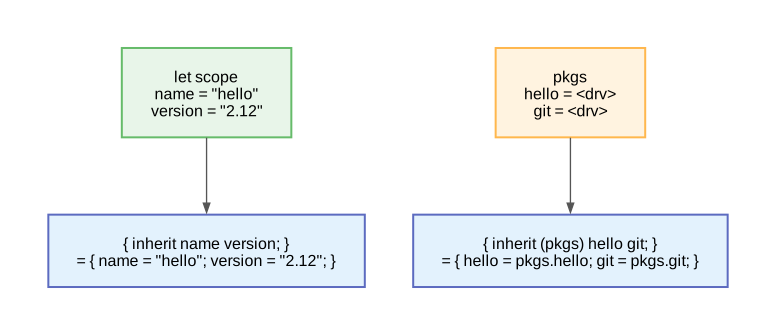
inherit pulls names downward: from an enclosing scope into an attrset (left), or from a named attrset into the current one (right).
inherit pulls names from the surrounding scope (or from a specific attrset) into the current attribute set. It exists to avoid the repetition of writing name = name;:
let name = "hello"; version = "2.12";in{ # Without inherit — you're writing the same name twice: name = name; # left = attrset key; right = value from the let above version = version; # With inherit — identical result, less noise: inherit name version;}
The name on the left (the new attrset key) and the name on the right (the value looked up in the enclosing scope) are always the same — that’s the whole point. You can’t rename with inherit; if you need a different key name, use explicit assignment.
inherit from a specific set — pulls attributes out of a named attrset:
This is extremely common in NixOS modules to pull specific packages into scope without writing pkgs. everywhere.
String interpolation
let name = "world"; in"Hello, ${name}!" # → "Hello, world!"# Derivations coerce to their store path when interpolated:"The binary is at: ${pkgs.hello}/bin/hello"# → "The binary is at: /nix/store/<hash>-hello-2.12/bin/hello"
Multiline strings use two single-quotes (not double-quotes). Leading whitespace is stripped uniformly based on the least-indented line:
'' #!/bin/bash echo "Hello" echo "World"''
This is called an “indented string” and is essential for writing inline shell scripts in Nix derivations.
Path literals vs string paths
This distinction catches beginners constantly:
./foo.nix # type: path (relative to current .nix file)../bar/baz.nix # type: path/absolute/path # type: path"/absolute/path" # type: string (NOT a path)
Why it matters: When a path literal is used as a build input, Nix automatically copies it into the store and replaces it with the store path. A string that looks like a path does NOT get copied — the build will try to access it at build time inside the sandbox and fail (the sandbox doesn’t expose your filesystem).
# Correct: copies ./src into the store before buildingsrc = ./my-project;# WRONG: tries to access /home/you/my-project inside the sandboxsrc = "/home/you/my-project";
Lazy evaluation
Nix evaluates expressions only when their value is actually needed:
let x = abort "this would crash"; y = 42;in y # → 42 (x is never evaluated, no crash)
Why this matters in practice:
nixpkgs defines ~100,000 packages. Without laziness, importing nixpkgs would evaluate all 100,000 definitions. With laziness, only the packages you reference are evaluated.
Attribute sets are lazy: pkgs.hello only evaluates the hello expression when you access it, not when pkgs is constructed.
Error messages can be surprising — you see an error from deep inside an expression that’s only forced when a specific output is requested.
For the full mechanics — thunks, WHNF, forcing rules, memoization, and how import nixpkgs {} actually evaluates step-by-step — see Nix Evaluation Model.
import
import reads a .nix file, evaluates its single top-level expression, and returns the result. That’s all it does — it’s a function from path to value.
import ./foo.nix# Returns whatever value foo.nix contains (an attrset, a function, a string, anything).
The critical question: what do you do with the result?
It depends on what the file contains:
# Case 1: file contains a plain value (rare in practice)# config.nix contains: { user = "alice"; shell = "/bin/bash"; }let cfg = import ./config.nix;in cfg.user # → "alice"# Case 2: file contains a function (the common pattern)# hello.nix contains: { pkgs }: pkgs.hello# import gives you the FUNCTION, not the result — you must call it:let buildHello = import ./hello.nix; # this is a functionin buildHello { pkgs = ...; } # NOW you get the derivation# Or combined in one expression (this is what you see everywhere):import ./hello.nix { pkgs = ...; }# This is actually: (import ./hello.nix) { pkgs = ...; }# Two operations: import returns a function, then {} calls it.
Why this matters for import nixpkgs {}:
import nixpkgs { system = "x86_64-linux"; }# Step 1: (import nixpkgs) → reads nixpkgs/default.nix → it's a FUNCTION# Step 2: that function is called with { system = "x86_64-linux"; }# Step 3: the function returns the giant pkgs attrset
You almost always bind the result to a name so you can use it later:
let pkgs = import nixpkgs { system = "x86_64-linux"; };in pkgs.hello # now you can access packages
This let pkgs = ... is a binding (giving a name to a value), not an assignment. See Nix Evaluation Model for why this distinction matters.
import vs imports — completely different things
NixOS configuration files contain an attribute called imports (plural, with an s):
This is not the import function. imports is a special attribute read by the NixOS module system. You give it a list of paths; the module system internally calls import on each one, gets back a function (every module is a function), calls it with { config, pkgs, lib, ... }, and merges the result into the overall system configuration. You never see the intermediate result — the module system handles it invisibly.
import ./foo.nix
imports = [ ./foo.nix ];
What
Builtin function — you call it, you get the result
Module system attribute — you declare paths, the system processes them