What is AGE?
AGE (Actually Good Encryption) is a file encryption tool created by Filippo Valsorda in 2019. Valsorda was the Go team’s security lead at Google and a long-time critic of GPG’s complexity. AGE is his answer to the question: “What if we designed file encryption from scratch, for how people actually use it?”
The design philosophy: do one thing well, produce no configuration files, require no key management infrastructure. AGE has a formal specification (age-encryption.org/v1) and two reference implementations: age (Go, the original) and rage (Rust, fully compatible).
The mental model
AGE does exactly one thing: encrypt files so that only specific people can decrypt them. The entire workflow is three concepts:
- Key pair — you generate a private key and a public key. The private key is a single line in a text file. The public key is a string you give to anyone who wants to encrypt files for you.
- Encrypt — you encrypt a file by specifying who should be able to decrypt it (their public keys). Only those people can read the result.
- Decrypt — the recipient decrypts the file using their private key.
There is no keyring, no trust model, no identity system, no configuration file, no algorithm choice. If you have someone’s public key, you can encrypt a file for them. If you have your private key, you can decrypt files encrypted for you. That’s it.
Key format and generation
AGE keys use Bech32 encoding — the same encoding used in Bitcoin SegWit addresses. Bech32 is text-safe by design (no Base64 needed, no armor mode, no binary-vs-text confusion) and includes a built-in checksum that detects typos.
Public key — starts with age1:
age1ql3z7hjy54pw3hyww5ayyfg7zqgvc7w3j2elw8zmrj2kg5sfn9aqmcac8p
Private key — starts with AGE-SECRET-KEY-1:
AGE-SECRET-KEY-1QQQQQQQQQQQQQQQQQQQQQQQQQQQQQQQQQQQQQQQQQQQQQQQQQQQQ
To generate a key pair:
age-keygen -o key.txt
# Prints to stderr: Public key: age1ql3z7hjy54pw3hyww5ayyfg7zqgvc7w3j2elw8zmrj2kg5sfn9aqmcac8p
# Writes to key.txt: AGE-SECRET-KEY-1QQQQ...
That is the entire key management story. No --full-generate-key wizard, no keyring database, no agent daemon. The private key is a file — guard it like any secret (file permissions, encrypted disk, etc.).
Encrypting and decrypting files
Encrypt a file for someone
You need their public key. The -r flag specifies who can decrypt the result:
age -r age1ql3z7hjy54pw3hyww5ayyfg7zqgvc7w3j2elw8zmrj2kg5sfn9aqmcac8p \
    -o secret.txt.age secret.txt
This produces secret.txt.age — an encrypted file that only the owner of the corresponding private key can read.
Decrypt a file
You need your private key file:
age -d -i key.txt -o secret.txt secret.txt.ageEncrypt for multiple people
Each person who should be able to decrypt gets their own -r flag:
age -r age1abc... -r age1def... -o secret.txt.age secret.txtAny one of those people can decrypt independently — they don’t need each other’s keys. Under the hood, AGE encrypts a random symmetric key separately for each public key and stores all the wrapped copies in the file header (see How it works below).
You can also list public keys in a file (one per line) and pass it with -R:
age -R recipients.txt -o secret.txt.age secret.txtEncrypt with a passphrase (no keys needed)
For quick one-off encryption where you don’t want to manage key pairs:
age -p -o secret.txt.age secret.txt
# Prompts for a passphrase interactively
AGE derives a key from the passphrase using scrypt — a memory-hard key derivation function (KDF) designed to resist brute-force attacks by requiring large amounts of RAM. To decrypt, you’ll need the same passphrase instead of a key file.
Encrypt to an SSH key
AGE can use existing SSH public keys — no need to generate separate AGE keys:
# Encrypt to an ed25519 SSH public key
age -R ~/.ssh/id_ed25519.pub -o secret.txt.age secret.txt

# Decrypt with the corresponding SSH private key
age -d -i ~/.ssh/id_ed25519 -o secret.txt secret.txt.age
This works with both ed25519 and RSA SSH keys. It is useful for encrypting secrets for machines where you already have SSH access — you already know their public keys.
How it works under the hood
AGE uses two cryptographic primitives, both considered state-of-the-art:
-
X25519 key agreement — an Elliptic Curve Diffie-Hellman (ECDH) key exchange on Curve25519. See Asymmetric Elliptic Curve Cryptography for the underlying mathematics (scalar multiplication on Curve25519, the discrete logarithm hardness assumption).
-
ChaCha20-Poly1305 symmetric encryption — an Authenticated Encryption with Associated Data (AEAD) cipher. ChaCha20 provides confidentiality (a stream cipher designed by Daniel J. Bernstein), Poly1305 provides integrity (a one-time authenticator). See Symmetric encryption for how AEAD ciphers work.
The encryption flow:
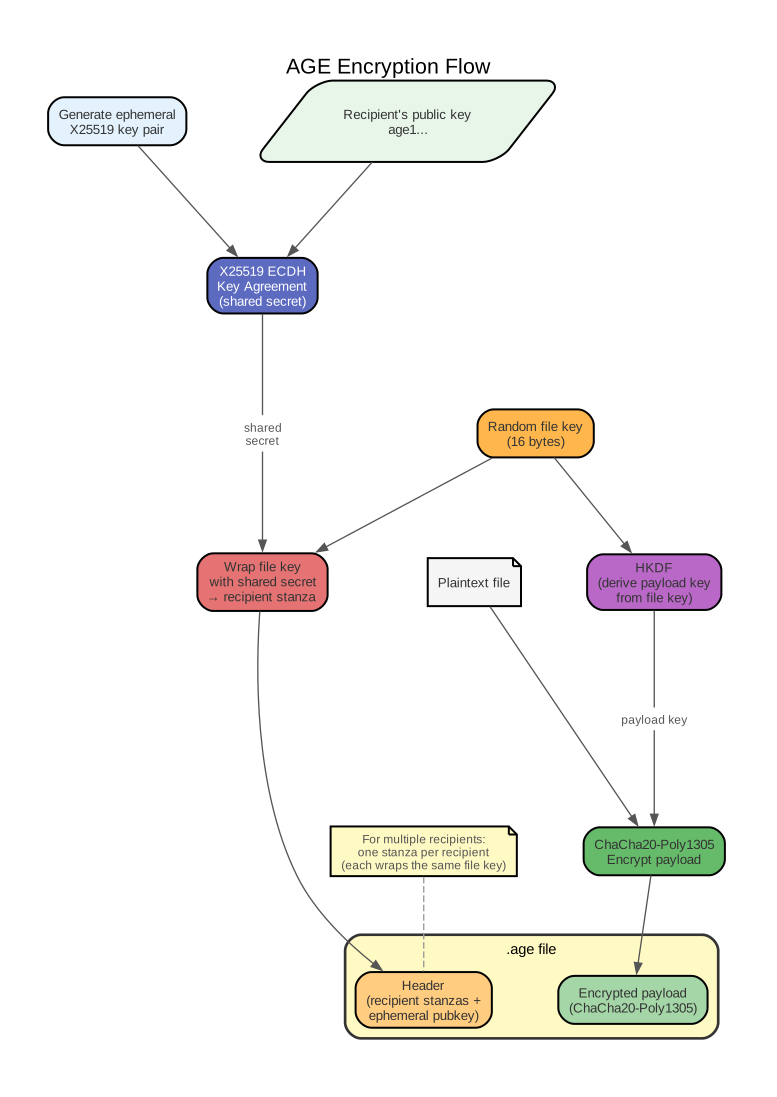
- AGE generates a random file key (16-byte symmetric key) and an ephemeral X25519 key pair (temporary, used only for this encryption).
- For each recipient’s public key, AGE computes a shared secret via X25519 ECDH, then uses that shared secret to encrypt (wrap) the file key. Each wrapped copy is stored as a recipient stanza in the file header.
- The file key is fed through HKDF (HMAC-based Key Derivation Function — see Key Derivation Functions (KDFs)) to derive a payload key.
- The actual file content is encrypted with ChaCha20-Poly1305 using the payload key.
- The output is: plaintext header (listing recipient stanzas + ephemeral public key) followed by the encrypted payload.
To decrypt, AGE tries the recipient’s private key against each stanza until one succeeds, recovers the file key, derives the payload key, and decrypts.
No algorithm negotiation
Unlike GPG, where sender and recipient must agree on algorithms (RSA vs ECC, AES vs 3DES, SHA-256 vs SHA-1), AGE has exactly one cipher suite. This eliminates downgrade attacks and configuration mismatches.
Why a separate file key?
The file key exists so that the same encrypted payload works for multiple recipients. Each recipient gets a differently-wrapped copy of the same file key, but the (potentially large) payload is encrypted only once. This is the same hybrid encryption approach that GPG uses, but with a simpler packet format.
When to use AGE vs GPG
| Scenario | Tool | Why |
|---|---|---|
| Encrypting files for yourself or known recipients | AGE | No infrastructure, one command |
| Encrypting dotfile secrets (chezmoi) | AGE | Simpler setup, chezmoi’s recommended backend |
| Signing git commits | GPG (or SSH signatures) | AGE does not support signing |
| Verifying package signatures (apt, rpm) | GPG | Package managers use OpenPGP |
| pass/password-store | GPG | pass is built on GPG (though gopass supports AGE) |
| Encrypted email | GPG | OpenPGP is the email encryption standard |
The heuristic: if you need signing or interoperability with existing OpenPGP infrastructure, use GPG. For everything else — especially personal file encryption — use AGE.
AGE intentionally does not support signing
Signing requires a key identity model (who signed this?), which brings back all the complexity AGE was designed to avoid (UIDs, trust models, keyservers). For signing, use GPG, SSH signatures (Git 2.34+), or minisign — a minimal signing tool by Frank Denis, the author of libsodium (a widely-used cryptography library).
Chezmoi integration
chezmoi is a dotfile manager that tracks configuration files in a Git repository and applies them to target machines. AGE is chezmoi’s recommended encryption backend for storing secrets (API keys, tokens, passwords) safely in version control.
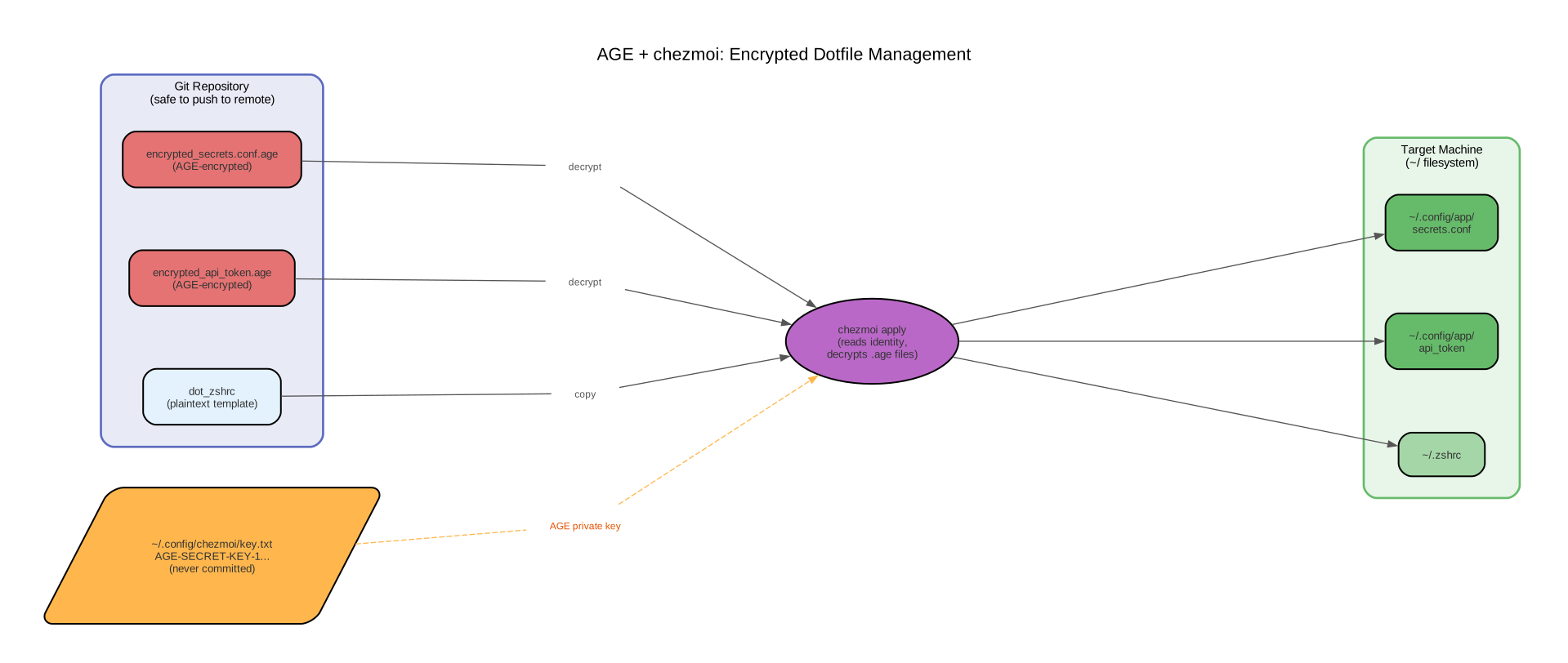
Setup: generate an AGE key pair, then configure chezmoi to use it:
age-keygen -o ~/.config/chezmoi/key.txt# ~/.config/chezmoi/chezmoi.toml
encryption = "age"
[age]
identity = "~/.config/chezmoi/key.txt"
recipient = "age1ql3z7hjy54pw3hyww5ayyfg7zqgvc7w3j2elw8zmrj2kg5sfn9aqmcac8p"Then add sensitive files with --encrypt:
chezmoi add --encrypt ~/.config/some-app/secrets.conf
# Creates encrypted_secrets.conf.age in chezmoi's source directory
chezmoi apply decrypts .age files on the fly using the identity file. For multiple machines, copy the private key (key.txt) to each machine securely — the chezmoi config and encrypted files are the same everywhere.
See also
- GPG — the traditional OpenPGP tool. Heavier, but supports signing and has wide ecosystem support.
- Asymmetric Elliptic Curve Cryptography — X25519 (AGE’s key agreement) is ECDH on Curve25519.
- Symmetric encryption — ChaCha20-Poly1305 (AGE’s bulk cipher) is an AEAD scheme.