Virtual File System
Linux manages to provide a file-like access to many sorts of resources (in-memory, locally attached, or networked storage) through an abstraction called the virtual file system (VFS).
The basic idea is to introduce a layer of indirection between the clients (syscalls) and the individual filesystems implementing operations for a concrete device or other kind of resource. This means that VFS separates the generic operation (open, read, seek) from the actual implementation details. In Linux a file is just a stream of bytes, it is up to the client to interpret it. Most common categories are:
- Local filesystems such as
ext3, XFS, FAT and NTFS for local block devices such as HDD and SSD - In memory filesystems such as
tmpfs - Pseudo filesystems like
procfsfor Kernel interfacing and device abstractions - Networked filesystems such as
nfs, Samba, Netware and others.
Filesystems syscall
There are more than 100 filesystem syscall, the following list provide the most important ones:
- Inodes: chmod, chown, stat
- Files: open, close, seek, truncate, read, write
- Directories: chdir, getcwd, link, unlink, rename, symlink
- Filesystems: mount, flush, chroot
- Others: mmap, poll, sync, flock
Note
Some syscall forward the implementation to the underlying FS, for other syscall the VFS layer provide a default implementation
VFS data structures
In linux/filesystem.h several key data structures are defined:
- inodes: capture ownerships, symlinks, pointer to data block, file types, access statistics, permissions and more
- file: represents an open file, including inode, path and current position
- dentry: directory entry, stores parent and children
- superblock: represents a file system including mounting information
- other
Logical Volume Manager
The logical volume manager introduces a level of indirection between physical entities such as drives and partitions and the file system, making possible to perform zero downtime expanding and automatic storage extension
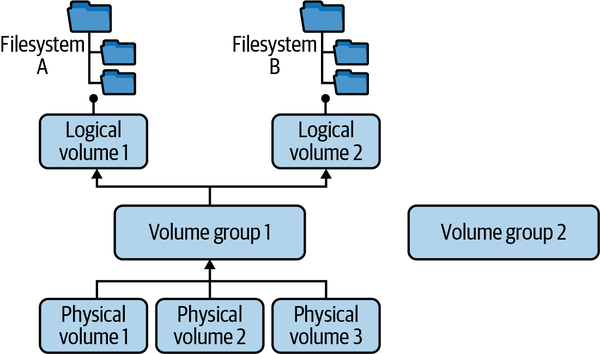
Physical volumes are pooled into volume groups** from which you can create several logical volumes, which are block devices that you can only use after you installed a filesystem.
Manipulating physical volumes, volume groups and logical volumes is done using a series of command-line utilities prefixed with pv, vg ad lv.
Creating and mounting filesystems
Creating filesystems, which in some OS is called formatting, under linux is performed via mkfs on a partition or logical volume
mkfs -t ext4 /dev/some_vg/some_lvAfter a filesystem is created, it is attached to the filesystem tree (which starts at /) with a mount operation:
- Transient mounting: use the command
mountthat takes the device/partition and the filesystem tree location as inputs. Additionally, it is possible to mount certain filesystems in read-only mode (-o) and usebindto mount directories on the filesystem tree - Permanent: modify /etc/fstab file
Once a filesystem is created, we need to ask ourselves how to organize content. The Linux foundation maintain the Filesystem Hierarchy Standard (FHS) and Linux distribution honors it, at least for most parts. What you might not remember:
devis for devicesetcfor system configurationoptis distro-specific, can contain package manager stuffmntandmediafor removable media such as USB sticksvarfor user program output, logs, caches, etc.
Pseudo filesystems
In Linux everything is a file, but not everything is a block device. Pseudo-file system provide the necessary abstraction to work with filesystem commands (ls, cd, cat) on non-block devices, wrapping some kernel interfaces such as:
- Information about a process
- An interaction with devices such as keyboards
- Utilities such as special devices you can use as data sources or sinks
Procfs
Inherited from Unix, meant for the Kernel to publish process related information so it can be consumed by programs such as ps. It contains two types of information mostly:
/proc/PIDcontains process relevant information- Other information such as mounts, networking, tTY drivers, memory, os version, etc
Within the /proc/PID, there are:
- directories such as file descriptors, network stats
- files such as the environment variable
- links such as the cwd
self is a special PID you can use with
/proc/self
Sysfs
Sysfs is way less chaotic than procfs and is Linux specific. You can find subfolders for block devices, the devices tree (under devices), Kernel loaded modules, a list of device classes and information about the available bus types on the system.
There is some overlap between sysfs and procfs
devfs
The /dev filesystem (devfs) hosts device special files for the following devices
- Block devices: Handle data in blocks—for example, storage devices (drives)
- Character devices Handle things character by character, such as a terminal, a keyboard, or a mouse
- Special devices: Generate data or allow you to manipulate it, including the famous /dev/null or /dev/random
For example, tr -dc A-Za-z0-9 < /dev/urandom | head -c 42 generates a 42-character random sequence containing uppercase and lowercase as well as numerical character
Regular filesystems
Common or regular filesystems is not an exact definition, and it is used to refer the filesystems that are typically used in Linux to manage block storage, including removable drives and read-only drives such as CD and DVD.
Ext4
A widely used filesystem, supported in Linux since 2008 used by default in many distributions nowadays. It’s a backward-compatible evolution of ext3(supported since 2001). Like ext3, it offers journaling—that is, changes are recorded in a log so that in the worst-case scenario (think: power outage), the recovery is fast. It’s a great general-purpose choice. The predecessor of its predecessor, exts2 is supported in Linux since 1993.
| version | supported since | File size (max) | Volume size | File # |
|---|---|---|---|---|
| extfs2 | 1993 | 2TB | 32TB | much larger than 4bn |
| extfs3 | 2001 | 2TB | 32TB | variable |
| extfs4 | 2008 | 16TB | 1EB | 4bn |
XFS
A journaling filesystem that was originally designed by Silicon Graphics (SGI) for their workstations in the early 1990s. Offering support for large files and high-speed I/O, it’s now used, for example, in the Red Hat distributions family.
Others
ZFS
Originally developed by Sun Microsystems in 2001, ZFS combines filesystem and volume manager functionality. While now there is the OpenZFS project, offering a path forward in an open source context, there are some concerns about ZFS’s integration with Linux.
FAT
This is really a family of FAT filesystems for Linux, with vfat being used most often. The main use case is interoperability with Windows systems, as well as removable media that uses FAT. Many of the native considerations around volumes do not apply.
In-memory file systems
In-memory allow pipes, dealing with network sockets as file, and debugging:
- debugfs: A special-purpose filesystem used for debugging; usually mounted with mount -t debugfs none /sys/kernel/debug.
- loopfs: Allows mapping a filesystem to blocks rather than devices. See also a mail thread on the background.
- pipefs: A special (pseudo) filesystem mounted on pipe: that enables pipes.
- sockfs: Another special (pseudo) filesystem that makes network sockets look like files, sitting between the syscalls and the sockets.
- swapfs: Used to realize swapping (not mountable).
- tmpfs: A general-purpose filesystem that keeps file data in kernel caches. It’s fast but nonpersistent (power off means data is lost).
Copy on write filesystems
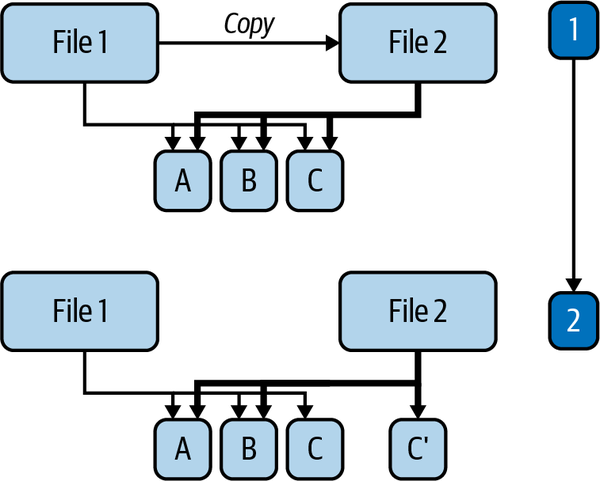
Copy-on-write filesystems are based on the idea that when a file composed of multiple blocks is copied, data pointers can point at the original copy. When one block is modified, only that block is cloned and data pointers are updated like in the following image
Union mounts
In Linux, when you mount a device or partitition or directory into one location, the previous content is masked. However, with union mounts, introduced in Unifying filesystems with union mounts [LWN.net], we combine the content of multiple locations into a resulting directory. Since union mounts are very relevant to containers, a number of filesystems have been developed:
-
Unionfs: Unionfs implements a union mount for CoW filesystems, it allows you to transparently overlay files and directories from different filesystems using priorities at mount time. It was widely popular and used in the context of CD-ROMs and DVDs.
-
OverlayFS: Introduced in 2009 and added to the kernel in 2014. With OverlayFS, once a file is opened, all operations are directly handled by the underlying (lower or upper) filesystems.
-
AUFS: Another attempt to implement an in-kernel union mount, has not been merged into the kernel yet. It is used to default in Docker
-
btrfs: Short for b-tree filesystem (and pronounced butterFS or betterFS), btrfs is a CoW initially designed by Oracle Corporation. Today, a number of companies contribute to the btrfs development, including Facebook, Intel, SUSE, and Red Hat.
Some useful CLI tools
# list block systems
lsblk --exclude 7
# Find used filesystems
findmnt -D -t nosquashfs # squashfs is a read only compressed fs
# get information about a filesystem object
stat .lsblk: List all block devicesfdisk, parted:Manage disk partitionsblkid: Show block device attributes such as UUIDhwinfo: Show hardware informationfile -s: Show filesystem and partition informationstat, df -i, ls -i: Show and list inode-related information
Hard links and symbolic links
A Linux file has an inode (the filesystem record that stores metadata such as owner, permissions, size, timestamps, block pointers, and link count). A directory entry maps a path name to an inode number.
A hard link is another directory entry pointing to the same inode. There is no “original” after the second name exists: both names refer to the same file contents, permissions, and ownership.
A symbolic link (symlink) is a different filesystem object whose file contents are a path string. When a program opens the symlink, pathname resolution follows that string to another path. The target can be on another filesystem, can be a directory, and can even be missing, which creates a dangling symlink.
| Property | Hard link | Symbolic link |
|---|---|---|
| What it stores | Another directory entry for the same inode | A path string |
| Inode | Same inode as the target file | Separate inode for the symlink itself |
| Cross-filesystem | No; inode numbers are local to one filesystem | Yes; it resolves by path |
| Directories | Normally disallowed for users | Allowed |
| If the original path is deleted | File data remains while any hard link exists | Symlink may become dangling |
| If file contents are modified | All hard-linked names see the same change | Usually modifies the resolved target |
“Hard symlink” is not a useful term. Use hard link when you mean another name for the same inode, and symlink or symbolic link when you mean a path-string pointer.
Hard links are useful for cheap local snapshots only when the linked files are immutable. A hard link does not copy file bytes; it adds another name to the same inode. If the live program modified that inode in place, every hard-linked name would see the mutation. Systems such as RocksDB make checkpointing cheap by hard-linking immutable SST files (Sorted String Tables - sorted on-disk data files) and copying mutable metadata such as CURRENT, MANIFEST, and write-ahead-log files.
Example:
printf "hello\n" > live.sst
ln live.sst snapshot.sst
ls -li live.sst snapshot.sst
rm live.sst
cat snapshot.sst
live.sst and snapshot.sst show the same inode number and link count before the delete. Removing live.sst removes one directory entry; the data remains reachable through snapshot.sst.