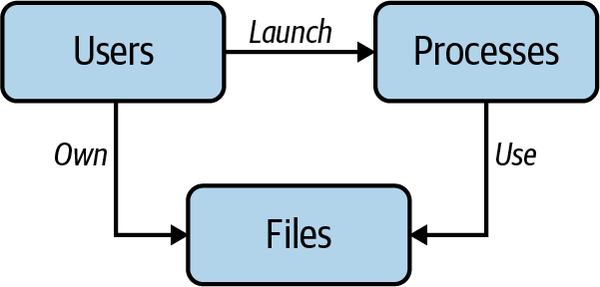
Linux is a multiuser operating system and as such has inherited the concept of a user from UNIX. Each user account is associated with a user ID that can be given access to executables, files, devices, and other Linux assets.
Sandboxing
Sandboxing can refer to a range of different methods, from jails to Containers to virtual machines, which can be managed either in the kernel or in user land. Usually there is something that runs in the sandbox—typically some application—and the supervising mechanism enforces a certain degree of isolation between the sandboxed process and the hosting environment.
Discretionary and mandatory access control
Linux borrows ideas from two popular models of access control:
- Discretionary: access to resources is restricted based on the identity of the user. A user with certain permissions can pass them to other users
- Mandatory: Users are assigned a clearance level, resources a security label. Users can access only resources whose clearance level is equal or lower than their own.
AppArmor and SELinux are well known implementations of access control for Linux. Most distributions have some form of discretionary access control with additional features.
Users
Linux users are typically of one of these two types:
- a system user or system account, used for background purposes, daemons, etc.
- regular users for human that interactively use Linux
Linux identify users via a user ID (UID), a 32-bit numerical value managed by Linux and users typically belong to one or more groups, identified by a group ID (GID) .
Root
roothas UID 0.
Different Linux distributions manage UID ranges differently, for example systemd powered distributions reserved 1 to 999 for system users, and 65534 for nobody, used to map remote users for example when using Network File Systemid
Users management
There are typically two options for user management in Linux:
- Local, using a local database and a collection of files with a somewhat confusing naming scheme
- Centralized
- Directory based, using LDAP protocol, a decades old suite of protocols
- Via a network, using Kerberos
- Using a configuration management system, such as Ansible, Puppet or SaltStack to ensure users are created consistently
Local user management quirks
Local user management uses four files:
- a user database in
/etc/passwd- a group database in
/etc/group- a user passwords file in
/etc/shadow- a group passwords file in
/etc/gshadowThe user database typically contains a GECOS field, plus information about the main group id, the shell, the home folder, and the password (typically an
xindicates the password is encrypted and stored in/etc/password).adduserandaddgroupcan be used to manage users and groups
File permissions
Everybody knows about file permissions r/w/x and chmod. However, there are at least two less known characteristics of Linux file permissions.
- Other type of access besides
r/w/xsis thesetuid/setgidpermission applied to an executable file. A user running a file inherits privileges of the owners or group of the filetis a sticky bit that prevents nonroot users from deleting files in directories unless they own the directory or file
- File modes (the first character shown by
ls -la). Beyond regular files (-as a first char) we have directories (d), symbolik linksI, sockets (s), pipes (p),bfor block files,cfor character special files,Cfor high performance (contiguous data) file and?for unknown file modes
700 as a file mode comes from the fact that possible combinations of r/w/x for each user group others are 7, so we can express permissions on files as three numbers from 0 to 7
Process Permissions
Process permissions involves multiple UIDS:
- The Real UID of who launched the process (which can be retrieved using the
getuidsyscall and from cli usingstat -c "%u %g" /proc/$pid/) - the Effective UID that a process can obtain using
geteuid - The saved set-user-ID are used in
suidcases when a process can assume privileges by switching its effective UID between the real UID and the set-user-id, for example for a process to be allowed to use certain network prots, it needs elevated privileges.getresuidsycall can be used to obtain the saved set-user-ID - Filesystem UID, these UID are used to determine permissions for file access. Not required anymore since kernel v2.0 but still supported
When a process is created via the fork(2) syscall, it inherits its parent UID since fork effectively duplicate the calling process. However, fork(2) is used in combination with syscall execve(2), which replaces the current process with a new program. In this call the process real UID is preserved while its effective UID and saved set-user-ID may change. For example, passwd has setuid which means when you run it your effective UID is root/0.
Linux Capabilities
In traditional UNIX you could only distinguish processes that run with UID 0 / root, and therefore bypassing permission checks, or unprivileged processes, with non zero UID and kernel doing permission checking.
In kernel v2.2 thanks to the introduction of the capabilities syscall this binary world has changed: the privileges associate with root are broken into distinct units that can be assigned on per-thread level. A normal process has zero capabilities and is governed by the Process Permissions described above. However, you can assign capabilities to executables. These are an example of common capabilities:
- CAP_CHOWN: Allows user to make arbitrary changes to files’ UIDs/GIDs
- CAP_KILL: Allows sending of signals to processes belonging to other users
- CAP_SETUID: Allows changing the UID
- CAP_SETPCAP: Allows setting the capabilities of a running process
- CAP_NET_ADMIN: Allows various network-related actions, such as interface config
- CAP_NET_RAW: Allows using RAW and PACKET sockets
- CAP_SYS_CHROOT: Allows calling chroot
- CAP_SYS_ADMIN: Allows system admin operations, including mounting filesystems
- CAP_SYS_PTRACE: Allows using strace to debug processes
- CAP_SYS_MODULE: Allows loading kernel modules
# Show overall capabilities defined in the system
capsh --print
# See capabilities flag in current process
grep Cap /proc/$$/status
Tip
getcap and setcap can be used to set capabilities on per-file basis
Seccomp profiles
Secure computing mode (seccomp) is a Linux kernel feature available since 2005. It is a sandboxing technique that allows to restrict which syscall a process can use by invoking the seccomp(2) syscall.
Such a syscall is used by Docker, and Kubernetes, for example.
Access control lists
This additional mechanism provides more flexibility on top of traditional File permissions , you can grant access to an individual user or group not in the group list of the current user.
To use acl, the filesystem need to be mounted with the acl option. You can set the default mount options of a filesystem using the tune2fs -o option partition command, for example:
tune2fs -o acl /dev/sdXY
The key commands to work with acl are:
setfacl, for examplesetfacl -m "u:user:permissions" <file/dir>getfacl, for examplegetfacl <file/dir>If ACL are enabled, thels -lcommand show a+after the Unix permissions like so
ls -l /dev/audio
crw-rw----+ 1 root audio 14, 4 nov.   9 12:49 /dev/audio
Follow up material:
- Linux Capabilities In Practice
- kernel.org/doc/ols/2008/ols2008v1-pages-163-172.pdf
- A seccomp overview [LWN.net]
- Sandboxing in Linux with zero lines of code
- Access Control Lists - ArchWiki
- An introduction to Linux Access Control Lists (ACLs) | Enable Sysadmin
“Access Control Lists” via ArchLinux
“An Introduction to Linux Access Control Lists (ACLs)” via Red Hat