The various Arrow libraries generally provide memory pool objects to control how memory is allocated and track how much has been allocated by the Arrow library. These memory pools are then utilized by data buffers and everything else within the Arrow libraries. The Go, Python, and C++ implementations of Arrow, they all have similar approaches to providing memory pools for managing and tracking your memory usage.
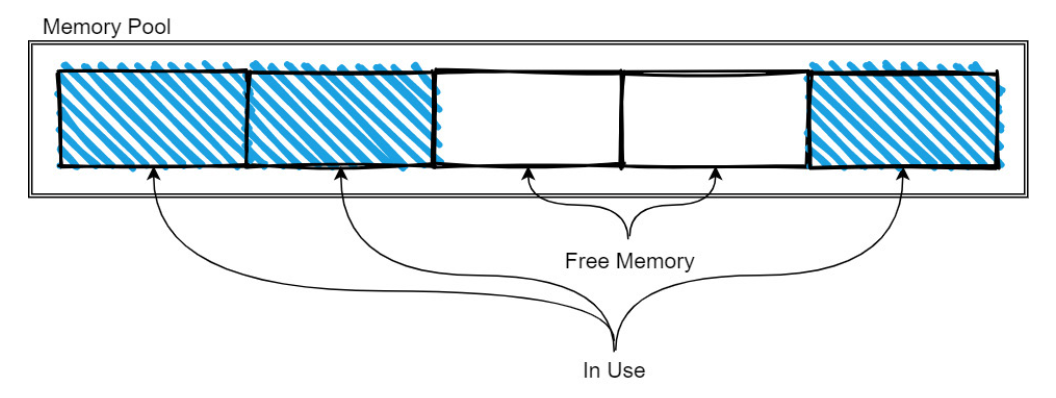
The exact management strategy will vary from implementation to implementation, but the basic idea is:
- As more memory is needed, the pool is expanded as it allocates more memory.
- When memory is freed, it is released back to the pool so that it can be reused by future allocations.
Memory pools are typically used for longer-lived and larger-sized data, such as the data buffers for arrays and tables, whereas small, temporary objects and workspaces will use the regular allocators for whatever programming language you’re working in. In most cases, a default memory pool or allocator will be used but many of the APIs allow you to pass in a specific memory pool instance to perform allocations with, as covered next.
Specific SDK
C++
The arrow::MemoryPool class is provided by the library for manipulating or checking the allocation of memory. A process-wide default memory pool will be initialized when the library is first initialized. This can be accessed in code via the arrow::default_memory_pool function.
Depending on how the library was compiled and the ARROW_DEFAULT_MEMORY_POOL environment variable, the default pool will either be implemented using the jemalloc library, the mimalloc library, or the standard C malloc functions (see C memory allocators)
Tip
The benefit of using custom allocators such as jemalloc or mimalloc is the potential for significant performance improvements. Depending on the benchmark, both have shown lower system memory usage and faster allocations than the old standby of malloc.
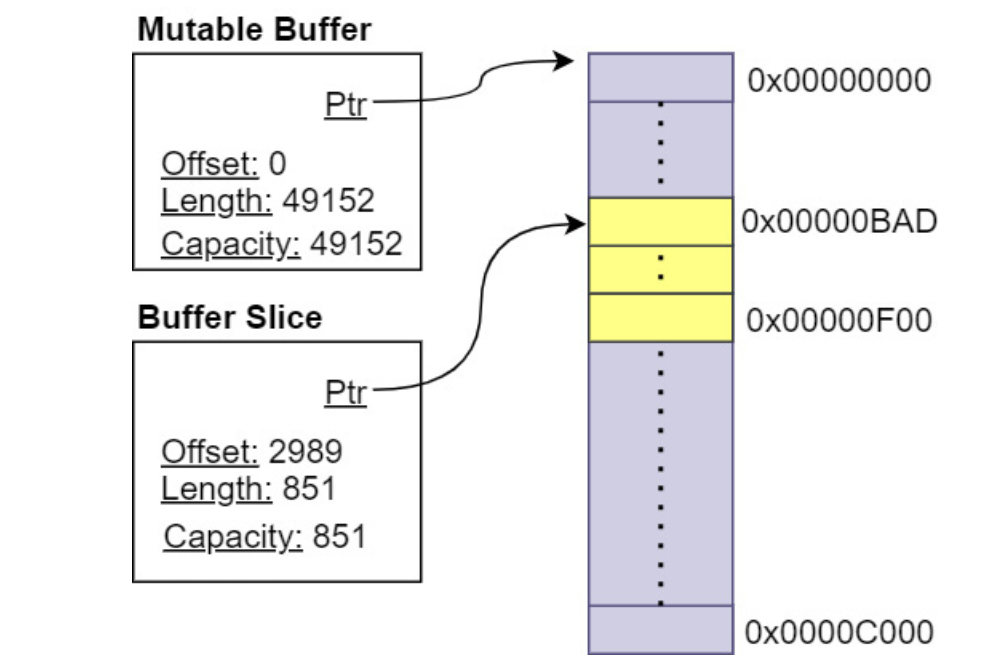
The arrow::Buffer class can be pre-allocated, similar to using standard containers such as std::vector via the Resize and Reserve methods by using a BufferBuilder object. Buffers will either be marked as mutable or not based on how they were constructed, indicating whether or not they can be resized and/or reallocated. The slice knows that it does not own the memory it points to, so when it is cleaned up, it won’t attempt to free the memory
InputStream object from Arrow have Read functions works well with Buffer, instances because in many cases, it will be able to slice the internal buffer and avoid copying additional data.
Python
The Python library is written on top of the C++ library, so all the functionalities are available via wrapper classes such as pyarrow.Buffer. Buffers can create parent-child relationships with other buffers by referencing each other via slices and memory views so that memory can be easily shared across different arrays, tables, and record batches instead of copied.
Anywhere that a Python buffer or memory view is required, a buffer can be used without you having to copy the data
import pyarrow as pa
data = b'helloworld'
buf = pa.py_buffer(data)
buf
<pyarrow.lib.Buffer object at 0x000001CB922CA1B0>
No memory is allocated when calling the py_buffer function. It’s just a zero-copy view of the memory that Python already allocated for the data bytes object. If a Python buffer or memory view is required, then a zero-copy conversion can be done with the buffer:
>>> memoryview(buf)
<memory at 0x000001CBA8FECE88>
There’s a to_pybytes method on buffers that will create a new Python bytestring object: this will make a copy of the data that is referenced by the buffer, ensuring a clean break between the new Python object and the buffer.
As expected, the default memory pool is accessible since we are just wrapping the C++ library.
>>> pa.total_allocated_bytes()
0
>>> **buf = pa.allocate_buffer(1024, resizable=True)**
>>> pa.total_allocated_bytes()
1024
>>> buf.resize(2048)
>>> pa.total_allocated_bytes()
2048
>>> buf = None
>>> pa.total_allocated_bytes()
>>> 0
Go
The Go library also provides buffers and memory allocation management with the memory package. There is a default allocator that exists that can be referenced by memory.DefaultAllocator, which is an instance of memory.GoAllocator. Relevant facts:
- Because the allocator definition is an interface, custom allocators would be easy to build if desired for given projects.
- If the C++ library is available, the “ccalloc” build tag can be provided when you’re building a project using the Go Arrow library
Using C++ memory pool objects rather than the default Go allocator is important if you need to pass memory back and forth between Go and other languages to ensure that the Go garbage collector doesn’t interfere.
Finally, there is the memory.Buffer type, which is the primary unit of memory management in the Go library. It works similarly to the buffers in the C++ and Python libraries
Performances impact
Memory management in Arrow makes possible several use cases of superior performance:
- parallelizing operations on subset of rows without data copy
- effective filtering via bitmaps
Parallelization operations on subset of rows
If you want to perform some analysis on a very large set of data with billions of rows and parallelize the operations on subsets of rows, by being able to slice the arrays and data buffers without having to copy the underlying data, this parallelization becomes faster and has lower memory requirements. Each batch you operate on isn’t a copy – it’s just a view of the data
Filtering out null rows
You want to incrementally filter out rows where every column is null.
- The naive approach would be to simply iterate the rows and copy the data to a new version of each column if at least one of them is not null at that index. This could become even more complex if you’re dealing with nested columns.
- With Arrow we can use a validity bitmap bit-wise or operation to get a single bitmap, and return a new slice for each group of rows
The Arrow C Data interface
For large datasets, one of the most expensive part of data science workflows is copying the data from the JVM to Python memory and converting the orientation in pandas from rows into columns.
The Arrow libraries provide a stable C data interface that allows you to share data across these boundaries without copying it by directly sharing pointers to the memory. .The interface is defined by a couple of header files that are simple enough that they can be copied into any project that is capable of communicating with C APIs, such as by using foreign function interfaces, or FFIs.
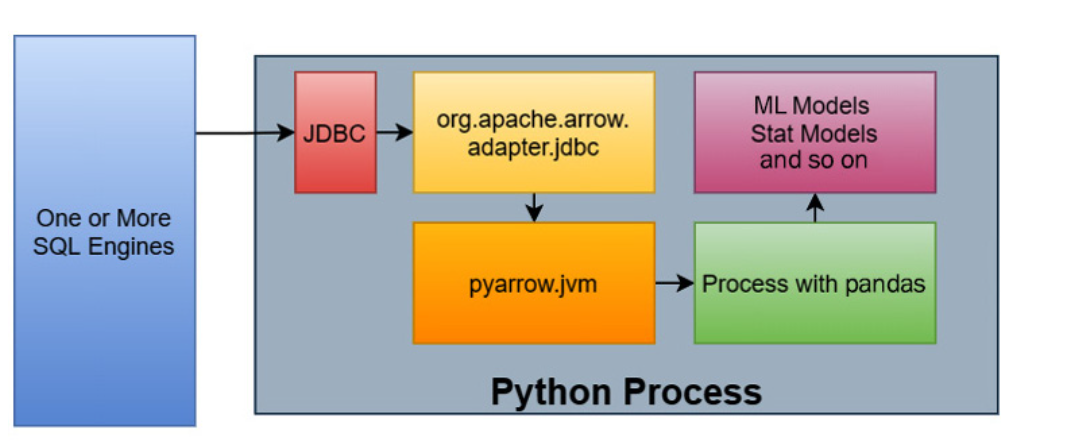
In this particular workflow, there is also a JDBC adapter for Arrow in the Java library that retrieves the results, converts the rows into columns in the JVM, and stores data as Arrow record batches in off-heap memory, which is not managed by the JVM itself.
Tip
Record-batches are off-heap but in the memory space of the process. If this happens across processes, then we need to have a shared memory via POSIX syscalls In reality with technology such as the JVM bridge, the Java Virtual Machine is started within the Python process