Originally in Linux software was distributed in tarballs, archives that contained the programs. However, tarballs suffer of several limitations:
- One the software was installed, there was no way to manage (updates,etc)
- Dependencies were not defined
The solution to address these problems is to develop new packaging strategies that also ships metadata together with the data, and software capable of using this metadata (package managers). Typical metadata includes version numbers, the list of files in the package, a description of the package, information about the packager, dependencies list, initialization scripts.
Type of package managers
Linux Package Managers are typically falling in three categories:
- Traditional package managers
- Next generation package managers
- Container based package managers
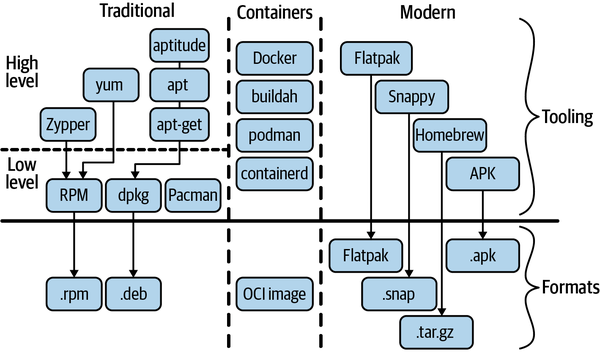
Traditional package managers use either the rpm or deb format, and higher-level package managers provide the capability of resolving and installing dependencies automatically as well as a better support for updates. See Linux Distributions for how package format maps to distro families. Containers-based tools use the OCI image standard as a format, while modern package managers have defined their own packaging format.
Modern package managers
Modern package managers often make use of containers and aim to be cross-distribution or target specific environments. For example, they can make it easy for Linux desktop users to install GUI apps.
- Snap: A Canonical Ltd.–designed and –promoted software packaging and deployment system. It comes with a refined sandboxing setup and can be used in desktop, cloud, and IoT environments.
- Flatpak: Optimized for Linux desktop environments, using cgroups, namespaces, bind mounts, and seccomp as its building blocks. While initially from the Red Hat part of the Linux distro universe, it is now available for dozens of distros, including Fedora, Mint, Ubuntu, Arch, Debian, openSUSE, and Chrome OS.
- AppImage: Has been around for years and promotes the idea that one app equals one file; that is, it requires no dependencies other than what is included in the targeted Linux system.
- Homebrew: Originally from the macOS world but available for Linux and enjoying increasing popularity. It’s written in Ruby and has a powerful yet intuitive user interface.