History of the Linux Kernel
In the early days of computing, such as the 40s, programmers developed on the bare hardware in the hardware language, making it impossible to run multiple applications and have multiple active users.
Early operating systems were developed in 1950s to provide a simpler development experience, such as the General Motors Operating Systems (GMOS) and the Fortran Monitor System (FMS) developed by the North American Aviation for IBM 709. In 1960s, the MIT and host of companies developed Multics and AT&T dropped out, to create Unics. Together with Unics the C Programming language was created. Twenty years later Andrea Tanenbaum created a microkernel for UNIX called MINIX, that inspired Linus Torvalds initial development of Linux in the early 1990s.
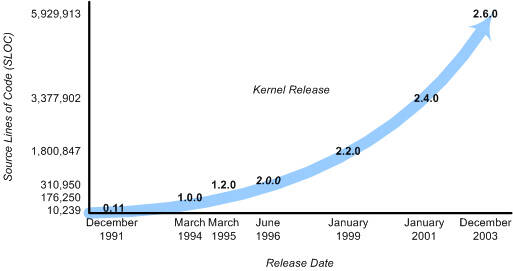
One of the most important decisions for Linux was its adoption of the GNU General Public License (GPL). Under the GPL, the Linux kernel was protected from commercial exploitation, and it also benefited from the user-space development of the GNU project (of Richard Stallman, whose source dwarfs that of the Linux kernel). This allowed useful applications such as the GNU Compiler Collection (GCC) and various shell support.
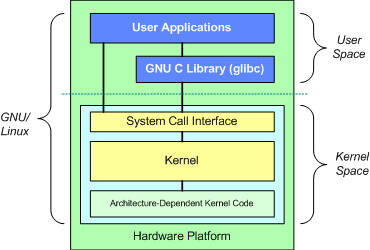
Major subsystems of the Linux kernel
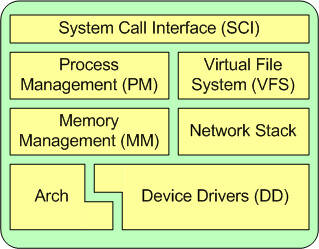
Process Management
Linux Kernel implements several units of work in process management:
- sessions: High-level user facing unit with optional terminal and a SID (session ID)
- process groups: One or more processes, only one process group per session could be in foreground, identified by PGID (process group ID)
- processes: Current process is exposed on
/proc/selfidentified by a PID - threads: implemented as processes that share memory and signal handlers with other processes. Have a Thread ID and Thread Group ID (there are also kernel threads but out of scope)
- tasks
task_structis the underlying structure used to implement processes and threads, capture scheduling information, etc, but is never exposed outside the kernel
Threads
The term process is typically used in user-space, but in Linux there is no separation between threads and process
The following diagram represents a simplified view of process states in Linux. A full diagram would also show zombie state, interruptible and uninterruptible sleep. More details available at Process states in Linux - Kernel Talks
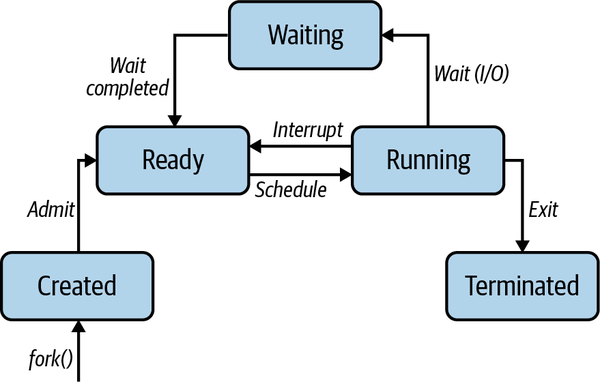
Each session is managed by a session leader, the Shells, which is cooperating tightly with the kernel using a complex protocol of signals and system calls.
Memory management
Both physical and virtual memory are divided into fixed-length chunks we call pages . Each process will have its own page table that maps virtual pages to physical pages in the main table like so
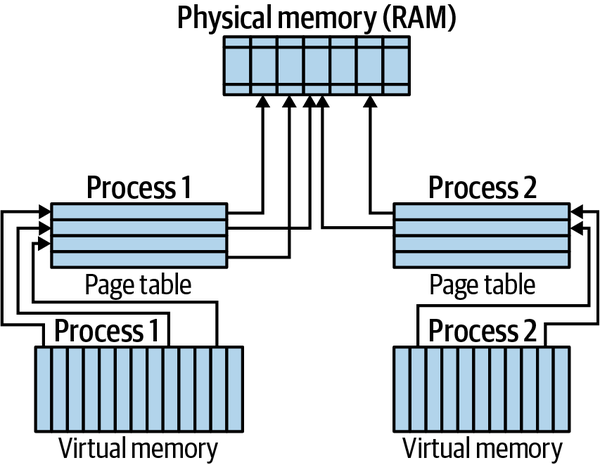
Multiple virtual pages can point to the same physical page via their respective process-level page tables and the CPU would in principle have to translate the virtual address to the corresponding physical address. To speed up the process, modern CPU have a small cache called translation lookaside buffer
Linux had a default page size of 4kb but since kernel v.26.3 it supports Hugepages - Debian Wiki, for example 64-Bit linux allows up to 128TB of virtual address space with 64TB of physical memory in total
# Total physical memory
grep MemTotal /proc/meminfo
# Total virtual memory
grep VmallocTotal /proc/meminfo
# Huge page information
grep Huge /proc/meminfo
Networking
The kernel networking subsystem owns network interfaces, protocol addresses, routing tables, packet processing, transport protocols, and sockets. Linux Networking explains those foundational objects, the userspace tools that configure them, and their packet-path handoffs; Linux Virtual Network Interfaces continues with the specialist devices used by containers, virtual machines, and userspace VPNs.
Filesystems
Linux Filesystems are also a complex topic. At high level one needs to understand that Virtual File System provides a common api abstraction such as open, close, read and write. File systems such as ext4 or btrfs are implemented as plug-ins for VFS.
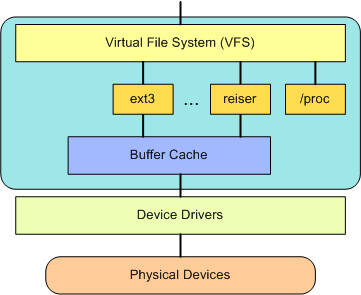
A driver manage a device, which can be actual hardware or virtual (pseudo-device such as a pseudo-terminal under /dev/pts).
It can be built statically into the Kernel or as a module, so it can be loaded when needed. The Interactive map of Linux kernel is an interesting tool to visualize all the parts of the Kernel. The Driver Model — The Linux Kernel documentation provides all the technical details required to implement a driver
# list devices
ls -al /sys/devices
# list mounted devices
mount
Syscalls
Linux has more than 300 syscalls depending on the architecture, which are typically invoked via the [C standard library]. The standard library is available in various implementations such as The GNU C Library - GNU Project - Free Software Foundation and musl libc
Wrapper libraries take care of repetitive low-handling tasks related to executing a syscall. System calls are implemented as Software Interrupts, causing an exception that transfers the control to an exception handler. Every time a syscall is invoked, the following steps need to be repeated:
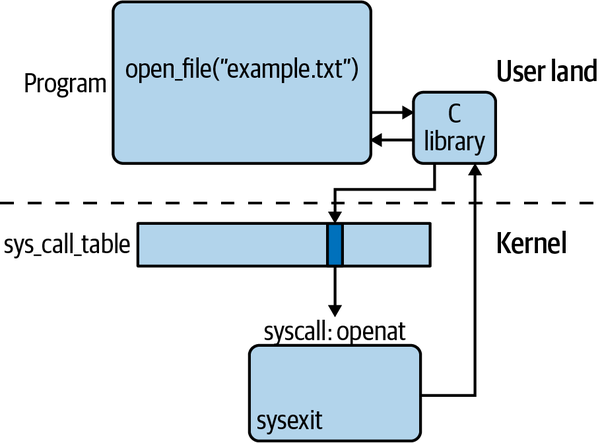
The syscall table, implemented as an array of function pointers in the variable called sys_call_table allows the kernel to know where to find the sys_call. The system_call() function acts as a multiplexer, saves the hardware context on the stacks, perform checks, and then invoke the function through the sys_call_table. After the syscall is completed with sysexit, the library restores the hardware context.
We can look at syscall in a certain program using strace like so:
strace ls
# Generate statistics
strace -c \
         curl -s https://mhausenblas.info > /dev/null
Example syscalls:
- Process management:
clone, fork, execve, wait, exit, getpid, setuid, setns, getrusage, capset, ptrace - Memory management:
brk, mmap, munmap, mremap, mlock, mincore - Networking:
socket, setsockopt, getsockopt, bind, listen, accept, connect, shutdown, recvfrom, recvmsg, sendto, sethostname, bpf - Filesystems:
open, openat, close, mknod, rename, truncate, mkdir, rmdir, getcwd, chdir, chroot, getdents, link, symlink, unlink, umask, stat, chmod, utime, access, ioctl, flock, read, write, lseek, sync, select, poll, mount, - Time:
time, clock_settime, timer_create, alarm, nanosleep - Signals:
kill, pause, signalfd, eventfd - Global:
uname, sysinfo, syslog, acct, _sysctl, iopl, reboot
Searchable Linux Syscall Table for x86_64
Kernel Extensions
A module is a program that you can load into a kernel on demand. That is, you do not necessarily have to recompile the kernel and/or reboot the machine. Nowadays, Linux detects most of the hardware automatically, and with it Linux loads its modules automatically.
# list the modules available
find /lib/modules/$(uname -r) -type f -name '*.ko*'
# list the loaded modules
lsmod
# this information is also available in /proc/modules
cat /proc/modules
# list dependencies for a module
modprobe --show-depends async_memcpy
Learn more
General
- The Linux Programming Interface
- Introduction — The Linux Kernel documentation
- Anatomy of the Linux kernel - IBM Developer
- [cs.cornell.edu/courses/cs614/2007fa/Slides/kernel architectures.pdf](https://oreil.ly/9d93Y
Memory
- Understand the Linux Virtual Memory Manager (700 pages)
- The Slab Allocator in the Linux kernel
- Memory Management — The Linux Kernel documentation
Device Drivers
- Linux Device Drivers, Third Edition
- How to install a device driver on Linux | Opensource.com
- Linux Device Drivers: Linux Driver Development Tutorial | Apriorit
Syscalls
- cs.montana.edu/courses/spring2005/518/Hypertextbook/jim/media/interrupts_on_linux.pdf
- System Calls — The Linux Kernel documentation
- Linux System Call Table
- syscalls.h - include/linux/syscalls.h - Linux source code v6.10.6 - Bootlin
- Searchable Linux Syscall Table for x86_64
EBF