The job of a bootloader is to make available to a newly powered processor the resources it needs to run a general-purpose operating system like Linux. At power-on, there not only is no virtual memory, but no DRAM until its controller is brought up. A bootloader then scans buses and interfaces in order to locate the kernel image and the root filesystem.
Popular bootloaders like U-Boot and GRUB have support for familiar interfaces like USB, PCI, and NFS, as well as more embedded-specific devices like NOR- and NAND-flash. Bootloaders also interact with hardware security devices like Trusted Platform Modules (TPMs) to establish a chain of trust from earliest boot.
MBR
The Master Boot Record or MBR is a 512 byte sector located in the first sector of an hard disk, and it is the first place where boot loaders begins to start. MBR contains both program code and partition table details.
The same way the MBR is a section in the first sector of the disk reserved for boot loading purpose, within each partition the first sector is also reserved for programmable code used in the booting process. The following image is an example of a setup using a mechanical disk, where the MBR is located in sector 1 of cylinder 0, head 0.
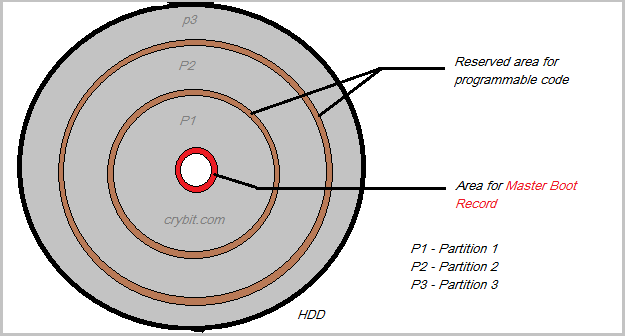
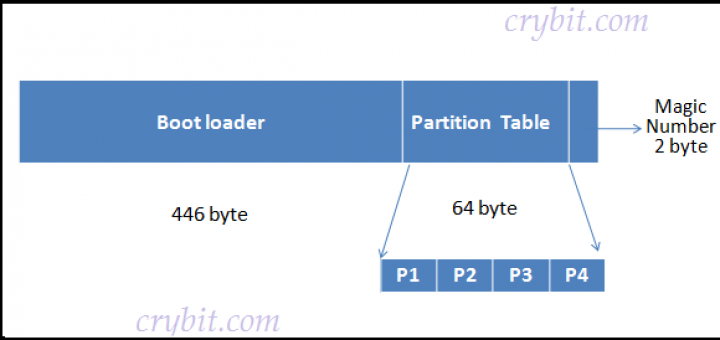
The MBR has the following parts:
- First 446 byte are the primary boot loader which contains both executable code and error message text
- 64 bytes (16 per partition)
- 2 bytes of a magic number used for validation check
Today Grand Unified Boot Loader (GRUB) v2 is the de-facto standard, but LILO (Linux Loader) is also still in use.
Multi-stage bootloaders
Because of the limitation of the MBR size, boot loading might need to happen in multiple stages. For example, LILO uses two stages, and GRUB supports an additional intermediate stage (1.5)
Tip
Both LILO and Grub are typically configured to be a primary boot loader (the stage 1 goes on MBR) and a secondary boot loader (stage 2 part, on a bootable partition) however in specialized setups, we can also have Grub only in bootable partitions
LILO
Lilo stores its configuration in /etc/lilo.conf. The following is an example configuration:
boot=/dev/hda
map=/boot/map
install=/boot/boot.b
prompt
timeout=50
message=/boot/message
lba32
default=linux

image=/boot/vmlinuz-2.4.0-0.43.6
	label=linux
	initrd=/boot/initrd-2.4.0-0.43.6.img
	read-only
	root=/dev/hda5

other=/dev/hda1
	label=dos
Grub v1
Grub v1 stores the configuration in /etc/grub.conf which is a link to /boot/grub/grub.conf
# grub.conf generated by anaconda
#
# Note that you do not have to rerun grub after making changes to this file
# NOTICE: You have a /boot partition. This means that
# all kernel and initrd paths are relative to /boot/, eg.
# root (hd0,0)
# kernel /vmlinuz-version ro root=/dev/sda3
# initrd /initrd-[generic-]version.img
#boot=/dev/sda
default=0
timeout=5
splashimage=(hd0,0)/grub/splash.xpm.gz
hiddenmenu
title CloudLinux Server (2.6.32-673.26.1.lve1.4.27.el6.x86_64)
root (hd0,0)
kernel /vmlinuz-2.6.32-673.26.1.lve1.4.27.el6.x86_64 ro root=UUID=15f2bf27-2e16-4b6f-bc86-fa74314aa8d5 rd_NO_LUKS rd_NO_LVM LANG=en_US.UTF-8 rd_NO_MD SYSFONT=latarcyrheb-sun16 crashkernel=auto KEYBOARDTYPE=pc KEYTABLE=us rd_NO_DM rhgb quiet nohz=off
initrd /initramfs-2.6.32-673.26.1.lve1.4.27.el6.x86_64.img
Grub v2
Grub v2 stores its configuration in /etc/grub2.cfg which is a link to /boot/grub2/grub2.cfg. The configuration file is read-only and cannot be modified directly, but rather the grub2-* cli tools should be used:
terminal_output console
if [ x$feature_timeout_style = xy ] ; then
set timeout_style=menu
set timeout=5
# Fallback normal timeout code in case the timeout_style feature is
# unavailable.
else
set timeout=5
fi
### END /etc/grub.d/00_header ###
BEGIN /etc/grub.d/10_linux ###
menuentry 'CentOS Linux (3.10.0-123.4.2.el7.x86_64) 7 (Core)' --class centos --class gnu-linux --class gnu --class os --unrestricted $menuentry_id_option 'gnulinux-3.10.0-123.el7.x86_64-advanced-fe0109f2-6f34-48ae-b51e-1f5fa78305b5' {
load_video
set gfxpayload=keep
insmod gzio
insmod part_msdos
insmod ext2
set root='hd0,msdos1'
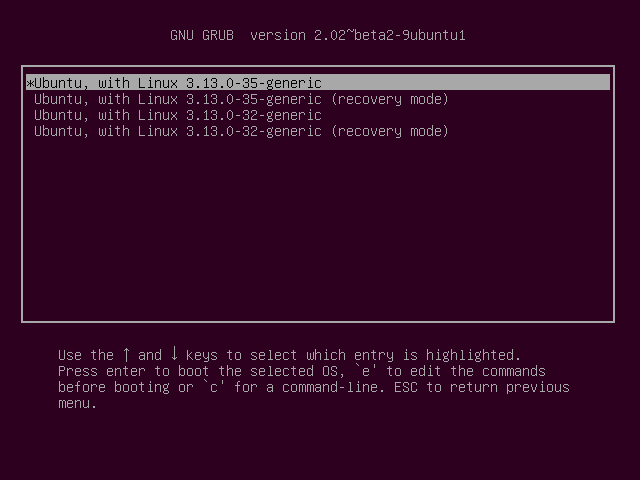
In the above configuration, the line starting with menuentry defines menu options / kernel options that would typically be displayed like so:
Single stage bootloaders
U-Boot
U-Boot is a minimal bootloader that is used in RaspberryPI, Nintendo, and other devices. Since it doesn’t provide syslog, when things go sideways it might bepainful to troubleshoot. However, it offers a Sandbox to test patches on the build host or in continuous integration. It can be installed like so:
git clone git://git.denx.de/u-boot; cd u-boot
make ARCH=sandbox defconfig
make; ./u-boot
printenv
help
With the Sandbox one can test tricky features like mock storage device repartitioning, TPM-based secret-key manipulation, and hotplug of USB devices. The U-Boot sandbox can even be single-stepped under the GDB debugger. Development using the sandbox is 10x faster than testing by reflashing the bootloader onto a board, and a “bricked” sandbox can be recovered with Ctrl+C.