Spark SQL Extension Framework
Spark provides several extension points that let external projects (Delta Lake, Iceberg, IndexTables, etc.) integrate deeply into the query lifecycle — from parsing SQL to optimizing logical plans to reading and writing data. This note covers the three main extension mechanisms and how they compose.
Prerequisites
- Apache Spark Query Planning and Execution — logical plans, physical plans, Catalyst optimizer
The three extension surfaces
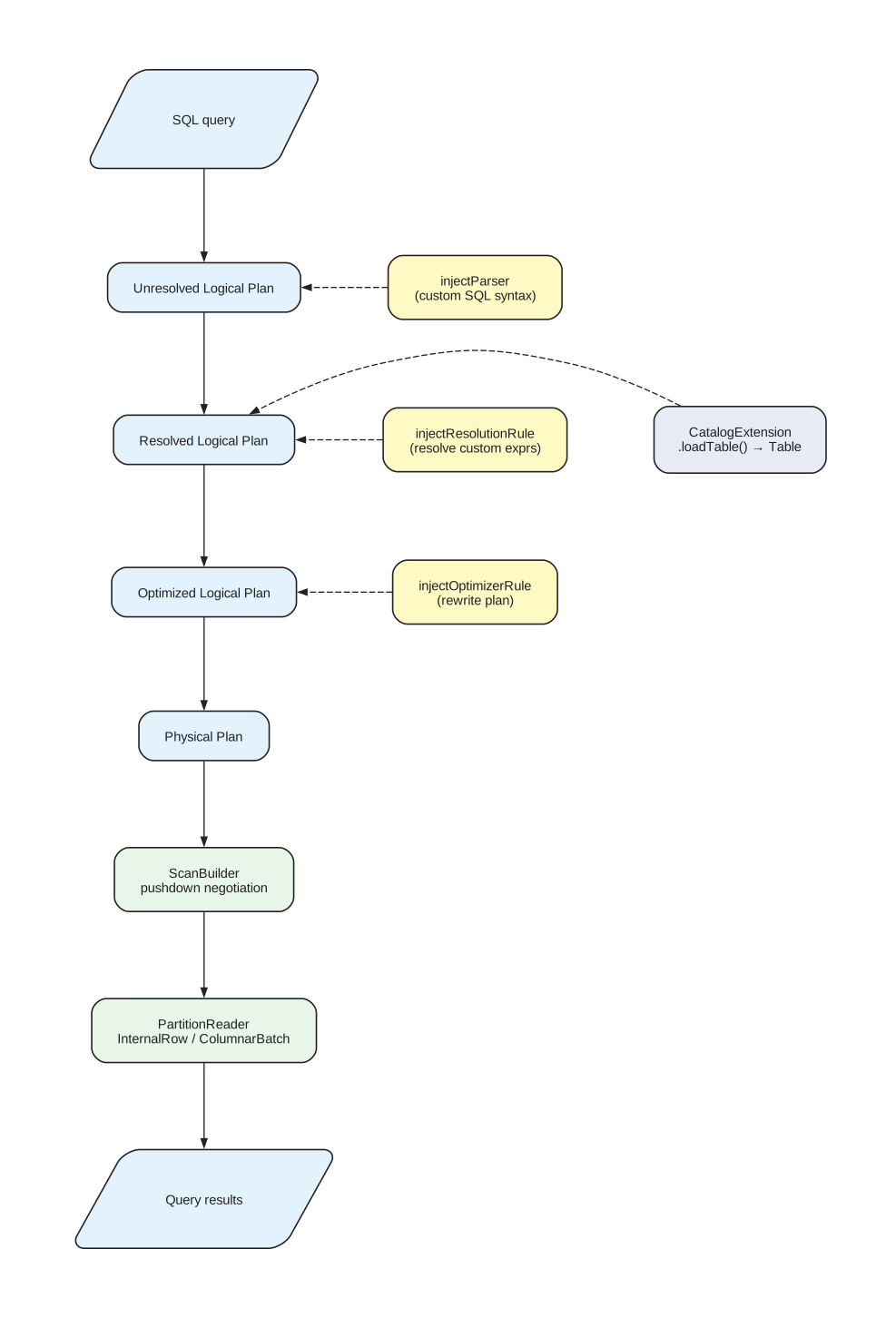
How the three extension surfaces hook into Spark’s query lifecycle. Yellow nodes are SparkSessionExtensions injection points, purple is the Catalog plugin, green is DataSource V2. Dashed arrows show where each extension feeds into the pipeline.
A Spark extension typically plugs into one or more of these surfaces:
| Surface | What it controls | Registration mechanism |
|---|---|---|
| SparkSessionExtensions | SQL parsing, Catalyst rules, custom functions | spark.sql.extensions config key |
| DataSource V2 API | Table reads and writes (schema, partitioning, pushdown) | spark.read.format("name") or catalog resolution |
| Catalog plugins | Table/namespace/function resolution by name | spark.sql.catalog.<name> config key |
Most real-world extensions use all three. For example, IndexTables registers a custom SQL parser and Catalyst rules via SparkSessionExtensions, implements TableProvider for the DataSource V2 read/write path, and provides a CatalogExtension for table-by-name resolution.
SparkSessionExtensions
SparkSessionExtensions is the hook that lets extensions inject behaviour into Spark’s query compilation pipeline. An extension class implements a function SparkSessionExtensions => Unit and is loaded at session startup via the spark.sql.extensions config key.
class MyExtensions extends (SparkSessionExtensions => Unit) {
  override def apply(extensions: SparkSessionExtensions): Unit = {
    extensions.injectParser(MyCustomParser)
    extensions.injectResolutionRule(MyResolutionRule)
    extensions.injectOptimizerRule(MyOptimizerRule)
    extensions.injectFunction(myFunctionDescription)
  }
}
spark.sql.extensions = com.example.MyExtensions
Injection points
| Method | What it injects | When it runs |
|---|---|---|
injectParser | Custom SQL parser that wraps the default parser | SQL text → unresolved logical plan |
injectResolutionRule | Rule[LogicalPlan] for resolving custom expressions | Analyzer phase (unresolved → resolved plan) |
injectOptimizerRule | Rule[LogicalPlan] for custom optimizations | Optimizer phase (resolved → optimized plan) |
injectFunction | Custom SQL function (FunctionDescription) | Available in SQL and DataFrame API |
injectCheckRule | Validation rule that can reject plans | After analysis, before optimization |
injectPlannerStrategy | Custom SparkStrategy for physical plan generation | Logical → physical plan translation |
Custom SQL parser
The injected parser wraps Spark’s default parser via a delegate pattern. It intercepts SQL strings that match custom syntax and returns custom logical plan nodes; everything else delegates to the default parser.
class MyParser(delegate: ParserInterface) extends ParserInterface {
  override def parsePlan(sql: String): LogicalPlan = {
    if (isMyCustomSyntax(sql)) {
      parseMyCommand(sql)  // returns a custom LogicalPlan node
    } else {
      delegate.parsePlan(sql)
    }
  }
  // delegate all other methods to the default parser
}
For complex grammars, extensions use ANTLR (ANother Tool for Language Recognition — a parser generator that produces lexers and parsers from .g4 grammar files). IndexTables defines ~30 custom SQL commands this way (MERGE SPLITS, PURGE, PREWARM, etc.) — the ANTLR parser produces AST nodes, and a visitor converts them to Spark LogicalPlan nodes (typically RunnableCommand subclasses).
Catalyst rules
Resolution and optimizer rules are both Rule[LogicalPlan] — they pattern-match on plan nodes and return transformed plans. The difference is when they run:
- Resolution rules run during analysis, when Spark resolves table names, column references, and function calls. Use these to resolve custom expressions that Spark doesn’t know about.
- Optimizer rules run after resolution, when Spark rewrites the plan for efficiency. Use these to push custom predicates down or rewrite expressions.
case class MyResolutionRule(spark: SparkSession) extends Rule[LogicalPlan] {
  override def apply(plan: LogicalPlan): LogicalPlan = plan.transformUp {
    case filter @ Filter(condition, child) if hasMyExpression(condition) =>
      // resolve custom expression references
      resolveMyExpression(filter)
  }
}
Real-world example: IndexQuery pushdown
IndexQuery pushdown through Catalyst describes how IndexTables uses a single rule class (
V2IndexQueryExpressionRule) as both a resolution rule and an optimizer rule — bindingIndexQueryExpressionnodes during resolution, then extracting them into a custom filter tree during optimization for the scan builder to retrieve.
DataSource V2 API
The DataSource V2 API (introduced in Spark 2.3, stabilized in 3.0) is how extensions define how data is read and written. The API is trait-based — a table implementation mixes in the capabilities it supports.
Core traits
TableProvider                  ← entry point: resolves a path/options to a Table
  └─ Table
       ├─ SupportsRead         ← can produce a ScanBuilder
       │    └─ ScanBuilder
       │         ├─ SupportsPushDownFilters
       │         ├─ SupportsPushDownRequiredColumns
       │         ├─ SupportsPushDownAggregates
       │         ├─ SupportsPushDownLimit
       │         └─ build() → Scan → Batch → InputPartition[] → PartitionReader
       │
       ├─ SupportsWrite        ← can produce a WriteBuilder
       │    └─ WriteBuilder → BatchWrite → DataWriterFactory → DataWriter
       │
       └─ SupportsMetadataColumns  ← virtual columns (e.g., _metadata, _indexall)
The trait tree for a DataSource V2 table. Extensions mix in only the traits they support — Spark negotiates capabilities at runtime.
Pushdown negotiation
Spark calls pushdown methods on the ScanBuilder before calling build(). The builder reports which filters/columns/aggregates it can handle natively:
class MyScanBuilder extends ScanBuilder
  with SupportsPushDownFilters
  with SupportsPushDownRequiredColumns
  with SupportsPushDownLimit {

  override def pushFilters(filters: Array[Filter]): Array[Filter] = {
    val (supported, unsupported) = filters.partition(canPushDown)
    this.pushedFilters = supported
    unsupported  // Spark will apply these itself post-read
  }

  override def pruneColumns(schema: StructType): Unit = {
    this.requiredSchema = schema
  }

  override def pushLimit(limit: Int): Boolean = {
    this.pushedLimit = Some(limit)
    true  // we handled it
  }
}
The scan builder returns unsupported filters back to Spark, which applies them as a post-read filter. This is the same pattern used by Parquet, ORC, JDBC, and every DataSource V2 implementation.
Partition readers
planInputPartitions() returns an array of InputPartition objects — one per data file, split, or chunk. Spark distributes these across executors. Each executor creates a PartitionReader that produces either InternalRow (row-based) or ColumnarBatch (columnar) output.
Columnar readers (PartitionReader[ColumnarBatch]) are significantly faster for analytical workloads because they avoid row-by-row overhead. IndexTables uses columnar readers backed by the Arrow C data interface — the Rust search engine produces Arrow batches that Spark consumes directly without deserialization.
Catalog plugins
Spark’s pluggable catalog system lets extensions resolve table names to Table objects. There are two levels:
CatalogPlugin
The base interface. Provides namespace operations (create/list/drop databases).
class MyCatalog extends CatalogPlugin with TableCatalog {
  override def loadTable(ident: Identifier): Table = {
    // resolve table name to a Table implementation
  }
}
Registered via: spark.sql.catalog.my_catalog = com.example.MyCatalog
Then: SELECT * FROM my_catalog.db.table
CatalogExtension
A variant that wraps the default session catalog rather than replacing it. This lets extensions intercept table lookups for tables they manage while delegating everything else to the built-in catalog.
class MyCatalogExtension extends CatalogExtension {
  override def setDelegateCatalog(delegate: CatalogPlugin): Unit = {
    this.delegate = delegate
  }

  override def loadTable(ident: Identifier): Table = {
    if (isMyTable(ident)) myTableImpl(ident)
    else delegate.loadTable(ident)
  }
}
This is the pattern used by Delta Lake (DeltaCatalog), Iceberg (SparkCatalog), and IndexTables (IndexTables4SparkCatalog).
CALL procedures
The CALL statement invokes stored procedures registered by a catalog. The catalog resolves the procedure name and executes it.
CALL my_catalog.system.procedure_name(arg1, arg2)A procedure implements:
trait Procedure {
  def name: String
  def call(args: Seq[Any]): Seq[Row]
}
The catalog exposes procedures via listFunctions and loadFunction. This is how Iceberg exposes operations like rewrite_data_files and expire_snapshots as SQL-callable procedures.
Registration: how Spark discovers each piece
Each surface has its own registration mechanism. They are completely independent — no shared base class, no cross-references at registration time.
TableProvider (format-based access)
Registered via Java SPI (Service Provider Interface — Java’s built-in plugin discovery mechanism). The extension ships a file at META-INF/services/org.apache.spark.sql.sources.DataSourceRegister containing the fully-qualified class name. The class implements DataSourceRegister.shortName() to return a human-friendly name:
class MyTableProvider extends TableProvider with DataSourceRegister {
  override def shortName(): String = "myformat"
  override def getTable(...): Table = new MyTable(...)
}
# META-INF/services/org.apache.spark.sql.sources.DataSourceRegister
com.example.MyTableProvider
Users reference it by short name or FQCN:
spark.read.format("myformat").load("s3://bucket/path")
spark.read.format("com.example.MyTableProvider").load("s3://bucket/path")
Catalog plugin (name-based access)
Registered purely via Spark config — no SPI, no classpath scanning:
spark.sql.catalog.my_catalog = com.example.MyCatalog
Users reference tables through the catalog name as the first segment of a multi-part identifier:
SELECT * FROM my_catalog.production.usersSparkSessionExtensions (query compilation hooks)
Registered via Spark config:
spark.sql.extensions = com.example.MyExtensions
Spark instantiates the class and calls apply(extensions: SparkSessionExtensions) at session startup. The extension injects parsers, rules, and functions into the session’s compilation pipeline.
How Spark decides which path to use
When a user references data, Spark’s CatalogManager decides:
- Multi-part name starting with a registered catalog (e.g.,
my_catalog.db.table) → catalog path. Spark callsMyCatalog.loadTable()which returns aTableobject. format("name").load(path)→ TableProvider path. Spark discovers theTableProvidervia SPI or FQCN and callsgetTable().- Unqualified name (e.g.,
SELECT * FROM users) → goes through the default session catalog. If aCatalogExtensionwraps the default catalog, it gets first look.
Both paths produce the same type: a Table object that implements SupportsRead, SupportsWrite, etc. From that point on, the DataSource V2 machinery is identical regardless of how the table was discovered.
How extensions share state
The three surfaces are registered independently and never hold references to each other. This raises a practical question: if a Catalyst rule (injected via SparkSessionExtensions) needs to pass data to a ScanBuilder (created by the Table that came from the catalog), how does it get there?
There are two categories of shared state:
Configuration (static)
SparkSession serves as the implicit coordination point for configuration. Every component grabs it independently via SparkSession.active to read spark.<extension>.* config keys, Hadoop configuration (cloud credentials, endpoints), and sessionState.catalogManager for table resolution. But SparkSession carries no extension-specific query-time state.
Query-time state (the hard problem)
Spark’s pushdown API only supports a fixed set of filter types (EqualTo, GreaterThan, StringStartsWith, etc.). If an extension invents a custom predicate, there is no way to pass it through pushFilters(). The extension must find a side channel.
The standard workaround is a companion object with ThreadLocal + WeakHashMap on the ScanBuilder. The Catalyst rule stores custom data in the companion object keyed by the DataSourceV2Relation node; the ScanBuilder retrieves it using the same key. This works because Catalyst rule execution and scan planning happen on the same driver thread for a given query — the ThreadLocal provides per-query isolation (not synchronization), so concurrent queries on different threads don’t interfere.
Real-world example
How extensions share state at query time describes how IndexTables implements this pattern — including the code, the relation re-resolution hazard, and how it bridges
indexqueryexpressions from Catalyst rules to the scan builder.
How extensions compose
Given the registration and state-sharing mechanisms above, here is how all three surfaces work together at runtime:
spark.sql.extensions = com.example.MyExtensions
spark.sql.catalog.my_catalog = com.example.MyCatalog
At session startup:
- Spark loads
MyCatalogas a catalog plugin - Spark calls
MyExtensions.apply()— custom parser, rules, and functions are injected - When a query arrives:
- The custom parser handles extension-specific SQL syntax
- If the query references
my_catalog.db.table, the CatalogManager routes toMyCatalog.loadTable(), which returns aTableobject - If the query uses
.format("myformat").load(path), Spark uses the TableProvider instead — but both paths return the sameTableclass - Resolution rules resolve custom expressions in the logical plan
- Optimizer rules extract custom predicates and store them in the companion object
Table.newScanBuilder()returns a ScanBuilder that reads custom predicates from the companion object and merges them with standard pushed filters- The physical plan uses custom
PartitionReaderimplementations
The surfaces never reference each other directly. They converge on the Table object (which both the catalog and the TableProvider produce) and the companion object (which bridges Catalyst rules and the ScanBuilder).
See also
- Apache Spark Query Planning and Execution — the query lifecycle these extensions hook into
- IndexTables for Spark — a real-world extension using all three surfaces
- IndexTables Internals — how IndexTables implements DataSource V2, Catalyst rules, and the Arrow FFI bridge
- Introduction to Apache Iceberg — another extension using CatalogExtension + DataSource V2