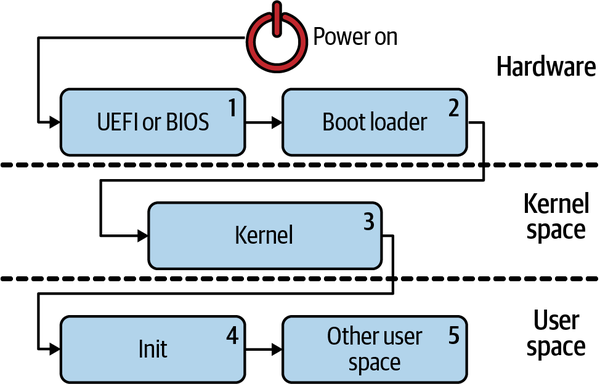
The Linux Boot process is composed of multiple parts as shown in the picture below:
- After the Power On Self Test (POST) is completed, the UEFI or BIOS would initialize the hardware and invoke the boot loader
- The Boot Loader has one goal: to bootstrap the kernel. Depending on the boot medium, the details may differ slightly.
- The kernel is extracted and loaded in memory
- The init system launches the process with PID 1 and all the daemons (service processes)
- User-space initialization take place (shell, display manager, graphical server, etc)
Tip
There are a range of boot loader options, both current (e.g., GRUB 2, systemd-boot, SYSLINUX, rEFInd) and legacy (e.g., LILO, GRUB 1).
Starting the kernel
Provisioning
Upon completion of its tasks, the bootloader will execute a jump to kernel code that it has loaded into main memory and begin execution, passing along any command-line options that the user has specified.
Tip
What kind of program is the kernel? file /boot/vmlinuz indicates that it is a bzImage, meaning a big compressed one.
The Linux source tree contains an extract-vmlinux tool that can be used to uncompress the file:
scripts/extract-vmlinux /boot/vmlinuz-$(uname -r) > vmlinux
file vmlinux
vmlinux: ELF 64-bit LSB executable, x86-64, version 1 (SYSV), statically
linked, stripped
The kernel is an Executable and Linking Format (ELF) binary, like Linux userspace programs. That means we can use commands from the binutils package like readelf to inspect it. Compare the output of, for example:
readelf -S /bin/date
readelf -S vmlinux
How does the kernel start?
Userspaces program entrypoint is main() but before that it is necessary o create an execution context that involves:
- file descriptors for stdio,stderr, stdin
- the stack
- the heap
ELF files have an interpreter, such as Python or Bash:
file /bin/date
/bin/date: ELF 64-bit LSB shared object, x86-64, version 1 (SYSV), dynamically
linked, interpreter /lib64/ld-linux-x86-64.so.2, for GNU/Linux 2.6.32,
BuildID[sha1]=14e8563676febeb06d701dbee35d225c5a8e565a,
stripped
but in the case of userspace programs, the creation of these resources is delegated to glibc using the _start() function, but the Kernel has no interpreter. We can reverse engineer using GDB and a version of the Kernel with debug symbols
gdb vmlinux
## show the ELF section (init.text)
info files
## Listing the start in init.text shows that the program starts at arch/x86/kernel/head_64.S or arch/arm/kernel/head.S.
The code will show that after calling start_cpu0 assembly function to create the stack and decompresses the lz image of the kernel, a call to start_kernel() occurs.
>
start_kernel()is themain()of the Kernel
From start_kernel() to PID 1
The kernel’s hardware manifest
At boot, the kernel needs information about the hardware beyond the processor type for which it has been compiled. The instructions in the code are augmented by configuration data that is stored separately. There are two main methods of storing this data: Device Trees, used by Arm devices, mostly embedded, and ACPI tables (Linux), used by x86-family and many enterprise-grade ARM64
From start_kernel() to userspace
The code in init/main.c is surprisingly readable and, amusingly, still carries Linus Torvalds’ original copyright from 1991-1992. The lines found in dmesg | head on a newly booted system originate mostly from this source file:
- The first CPU is registered with the system
- global data structures are initialized
- the scheduler, interrupt handlers (IRQs), timers, and console are brought one-by-one, in strict order, online.
Until the function timekeeping_init() runs, all timestamps are zero. This part of the kernel initialization is synchronous, meaning that execution occurs in precisely one thread, and no function is executed until the last one completes and returns. As a result, the dmesg output will be completely reproducible, even between two systems, as long as they have the same device-tree or ACPI tables. Linux is behaving like one of the RTOS (real-time operating systems) that runs on MCUs, for example QNX or VxWorks. The situation persists into the function rest_init(), which is called by start_kernel() at its termination. rest_init() spawns a new thread that runs kernel_init(), which invokes do_initcalls() and a second thread on the boot processor that begins running cpu_idle() while waiting the scheduler to assign it work
Tip
Users can spy on initcalls in action by appending initcall_debug to the kernel command line, resulting in dmesg entries every time an initcall function runs.
initcalls pass through seven sequential levels: early, core, postcore, arch, sybsys, fs, device and late. It probes and set-up processor peripherals (buses, network, storage, display, etc) and load kernel modules.
kernel_init() also sets up Symmetric Multiprocessing , which hotplugs CPU, managing their lifecycle with a state machine similar to USB sticks, taking individual core offlines, waking them up, etc. The power-management system’s invocation of CPU hotplug with the BCC tool called offcputime.py.
Note that the code in init/main.c is nearly finished executing when smp_init() runs, because the boot processor has completed most of the one-time initialization that the other cores need not repeat.
Per core initialization
Per-CPU threads must be spawned for each core to manage:
- interrupts (IRQs)
- workqueues
- timers
- power events on each
The pso -o can be used to to see the per-cpu threads that services softirqs and workqueues.
ps -o pid,psr,comm $(pgrep ksoftirqd)
 PID PSR COMMAND
   7   0 ksoftirqd/0
  16   1 ksoftirqd/1
  22   2 ksoftirqd/2
  28   3 ksoftirqd/3

ps -o pid,psr,comm $(pgrep kworker)
PID  PSR COMMAND
   4   0 kworker/0:0H
  18   1 kworker/1:0H
  24   2 kworker/2:0H
  30   3 kworker/3:0H
[ . .  . ]
Near its end, kernel_init() tries to:
- an Initial Ram FS (initramfs) that can execute the
initprocess on its behalf. - an Initial Ram Disk (initrd) that can execute the
initprocess on its behalf. - If it finds none, the kernel directly executes
inititself.
In modern Linux disrtribution, the initramfs has replaced initrd
Info
If the Kernel tries to execute init directly on the root filesystem, it will fail unless all necessary drivers are built into the kernel itself
The need for Initial Ram Disk
An initrd serves as an intermediary, temporary root filesystem that lets the kernel load necessary modules, drivers, and scripts to set up the environment before mounting the main root filesystem. It is typically located under /boot and is helpful for multiple reasons: :
- Hardware Support: The kernel often doesn’t have all drivers and modules compiled in. The initrd includes essential drivers (e.g., for storage, filesystems, or networking) to ensure the system can load the main root filesystems. Without initrd, the kernel might not even recognize the hard drive or other critical hardware.
- Filesystem Requirements: Some filesystems (like LVM, RAID, or encrypted filesystems) require extra setup steps before they can be accessed. The initrd can set up these filesystems so the kernel can mount them later.
- Portable Configuration: Distributions use initrd to handle diverse hardware configurations. For instance, a single generic kernel can support many systems when paired with a modular initrd that loads specific drivers as needed.
From Initrd to Initramfs
The process that leads to a full startup with initrd is the following:
- The initrd loaded into memory and a minimal Linux environment is initialized (essential drivers, basic devices, root fs)
- The initrd locates and prepare the root fs, performing mounts, decrypting filesystems, loading kernel memory
- The initrd uses a
pivot_rootorswitch_rootto move from the initrd environment to the root file system /sbin/initis invoked. In latest version, it is a symlink to/lib/systemd/systemd/, see Systemd. Init is invoked as a primary init process with PID 1
Using a file-system rather than a disk brings the following benefits:
- it can be directly extracted into RAM as the root file system since it uses cpio format, a sequential archive format that’s fast to extract
- the memory can be dynamically allocated, so there is no fixed-size limitation as initrd
- the process is faster because there is no reason to perform
pivot_rootorswitch_root
For this reason, initramfs has replaced initrd.
Debugging and inspecting Kernel
The dmesg (display message or driver message) command in Linux displays kernel-related messages, particularly those related to hardware events and drivers. These messages are stored in the kernel ring buffer and can be very useful for debugging hardware, driver, and system boot issues. It can be used in watch mode -w or in combination with less or grep.
Systemd
Systemd was born as a simple replacement for initd but provides additional features such as logging, network configuration, network time synchronization. Its adoption started with Fedora in 2011 and since 2015 is used in Ubuntu, Debian and many other distributions, making it the de-facto init system currently executed by all modern versions of Linux [[sys Compared to init, systemd is also capable of starting services when dependencies are met rather than in alphabetical order, making startup faster
Tip
If you don’t know if you are using systemd, you can run
stat /sbin/init
Units
Systemd distinguish a number of units such as: service, timer, mountpoint, swap, network socket, device (for udev or sysfs filesystems), path, slice(for cgroups) and uses the following paths:
- /lib/systemd/system for package-installed units
- /etc/systemd/system for System admin–configured units
- /run/systemd/system for nonpersistent runtime modifications
Systemctl crash course
Systemctl is a command line used to interact with systemd.
Listing units
systemctl list-units --type=service
systemctl list-units --type=service --state=running
systemctl list-units --failed
Listing dependencies
systemctl list-dependencies sshd.serviceChecking service enablement
systemctl is-enabled htg-example.serviceStarting, stopping, restarting service or getting a status
sudo systemctl start htg-example.service
sudo systemctl status htg-example.service
sudo systemctl stop htg-example.service
sudo systemctl restart htg-example.service
Enabling at startup / disabling at startup
sudo systemctl enable htg-example.service
sudo systemctl enable --now htg-example.service
sudo systemctl disable htg-example.service
Utilities
Systemd comes with multiple utilities such as bootctl to manage the available boot loaders and check the bootloader status, timedatectl to set time and date, coredumpctl to process saved core dumps.
Journalctl
The journal is a binary file managed by systemd-journald and provides a centralized location for all messages logged by systemd components. It provides options to filter the journal, such as the -u (unit) to specify the service you’re interested and the -S (since) option to show entries that have happened since the time you provide.
journalctl -S "08:00:00" -u htg-example.serviceSources
https://opensource.com/article/18/1/analyzing-linux-boot-process