What is GPG?
GNU Privacy Guard (GPG) is a free, open-source implementation of the OpenPGP standard. The lineage:
- PGP (Pretty Good Privacy) — the original proprietary encryption tool, created by Phil Zimmermann in 1991. Zimmermann released it as freeware to protect civil liberties activists; the US government investigated him for three years under arms export regulations because strong cryptography was classified as a munition.
- OpenPGP — the open standard extracted from PGP’s format. Currently defined by RFC 9580 (2024), which supersedes the long-lived RFC 4880 (2007). OpenPGP specifies the packet format, key structures, algorithms, and trust model. Any tool that follows RFC 9580 is interoperable.
- GPG (GnuPG) — the free implementation of OpenPGP, written by Werner Koch starting in 1999. It is the default OpenPGP tool on Linux and macOS. When someone says “GPG key” they mean an OpenPGP key managed by the
gpgbinary.
PGP vs GPG vs OpenPGP
PGP is the brand (now owned by Broadcom). OpenPGP is the protocol. GPG is the tool most people actually use. They all produce interoperable keys and messages.
The OpenPGP packet format
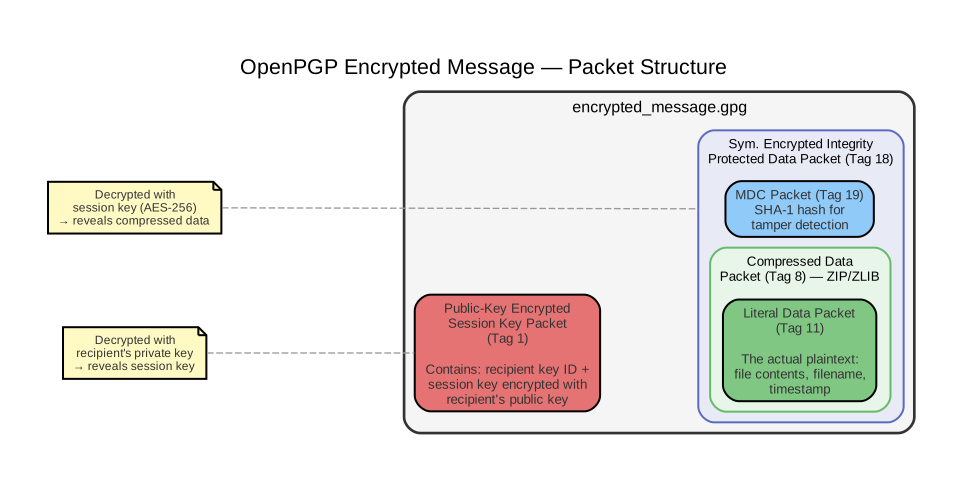
Everything in OpenPGP is a packet — a typed, length-prefixed binary blob. An encrypted file, an exported key, a signature — all are sequences of packets. The major tag types:
| Tag | Name | Purpose |
|---|---|---|
| 2 | Signature | Certifies a key, signs data, or signs a document |
| 4 | One-Pass Signature | Signals that a signature follows the data (optimization) |
| 5 | Secret-Key | Primary private key material |
| 6 | Public-Key | Primary public key material |
| 7 | Secret-Subkey | Subkey private key material |
| 8 | Compressed Data | Wraps compressed payload (ZIP, ZLIB, BZIP2) |
| 9 | Symmetrically Encrypted Data | Data encrypted with a session key |
| 11 | Literal Data | The actual plaintext payload |
| 13 | User ID | Name + email associated with a key |
| 14 | Public-Subkey | Subkey public key material |
| 18 | Sym. Encrypted Integrity Protected Data | Data encrypted with session key + integrity check (modern default) |
| 20 | AEAD Encrypted Data | Authenticated encryption (RFC 9580) |
How hybrid encryption works in OpenPGP
The naive approach would be: encrypt the data directly with the recipient’s public key. But this does not work for two reasons:
-
Asymmetric algorithms can only encrypt tiny amounts of data. RSA can encrypt at most key-size minus padding bytes per operation — about 200 bytes for RSA-2048. You cannot feed a 10 MB file into RSA. ECDH (Elliptic Curve Diffie-Hellman) is even more constrained: it produces a shared secret (32 bytes), not an encrypted ciphertext of arbitrary length. Asymmetric crypto solves the key distribution problem (“only Alice can read this”), not the bulk encryption problem (“encrypt this large file fast”).
-
Even if you could, it would be absurdly slow. RSA encryption involves modular exponentiation on numbers thousands of bits wide. AES-256 encrypts data at gigabytes per second on modern CPUs (using hardware AES-NI instructions). RSA is roughly 1,000x slower per byte.
Hybrid encryption combines the strengths of both: use asymmetric crypto for its unique property (only the intended recipient can decrypt), but apply it only to a tiny symmetric key. Then use fast symmetric crypto for the actual data.
The steps:
- Generate a random session key (e.g., 256-bit AES key — 32 bytes).
- Encrypt the session key with the recipient’s public key (RSA or ECDH). This produces a Public-Key Encrypted Session Key packet (tag 1). This is the only asymmetric operation — and it operates on just 32 bytes.
- Encrypt the actual data with the session key using a symmetric cipher (AES-256, ChaCha20, etc.). This produces a Symmetrically Encrypted Data packet (tag 9/18/20). This step runs at hardware speed regardless of file size.
- Bundle both packets into the output file.
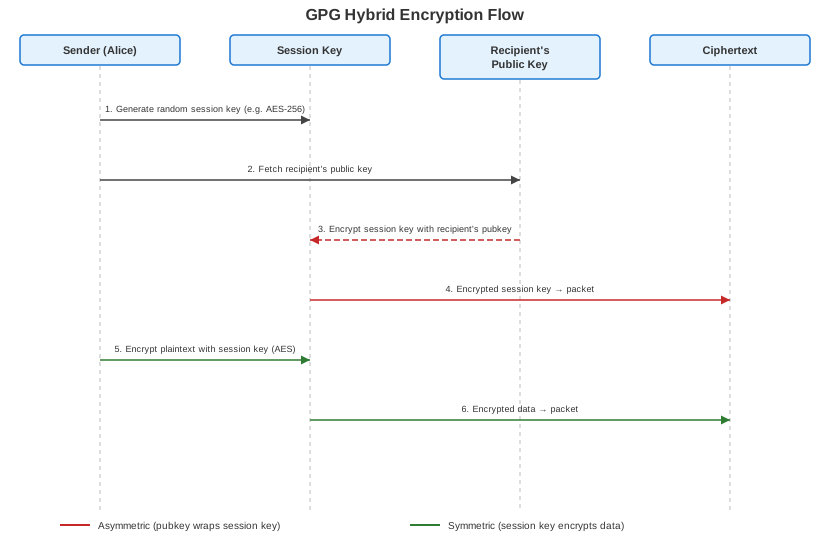
The recipient reverses the process: decrypt the session key with their private key (fast — it’s 32 bytes), then use the session key to decrypt the data.
For multiple recipients, GPG encrypts the same session key separately with each recipient’s public key — one tag-1 packet per recipient. The bulk data is encrypted only once.
Here is how these packets nest inside an encrypted file:
Key anatomy
An OpenPGP key is not a single key — it is a key bundle containing a primary key and zero or more subkeys.
Primary key vs subkeys
The primary key is the root of identity. Its fingerprint is what people refer to as “your GPG key.” Subkeys are subordinate keys bound to the primary key by a signature. Each key (primary or sub) has one or more capability flags:
| Flag | Meaning | Typical assignment |
|---|---|---|
| C (Certify) | Can sign other keys and UIDs | Primary key only |
| S (Sign) | Can sign data and messages | Subkey |
| E (Encrypt) | Can encrypt data | Subkey |
| A (Authenticate) | Can authenticate (SSH, etc.) | Optional subkey |
A typical key layout:
pub   ed25519 2024-01-15 [C]              ← primary key: certify only
      A1B2C3D4E5F6A1B2C3D4E5F6A1B2C3D4E5F6A1B2   ← fingerprint
uid           [ultimate] Alice <alice@example.com>  ← user ID
sub   ed25519 2024-01-15 [S] [expires: 2026-01-15] ← signing subkey
sub   cv25519 2024-01-15 [E] [expires: 2026-01-15] ← encryption subkey
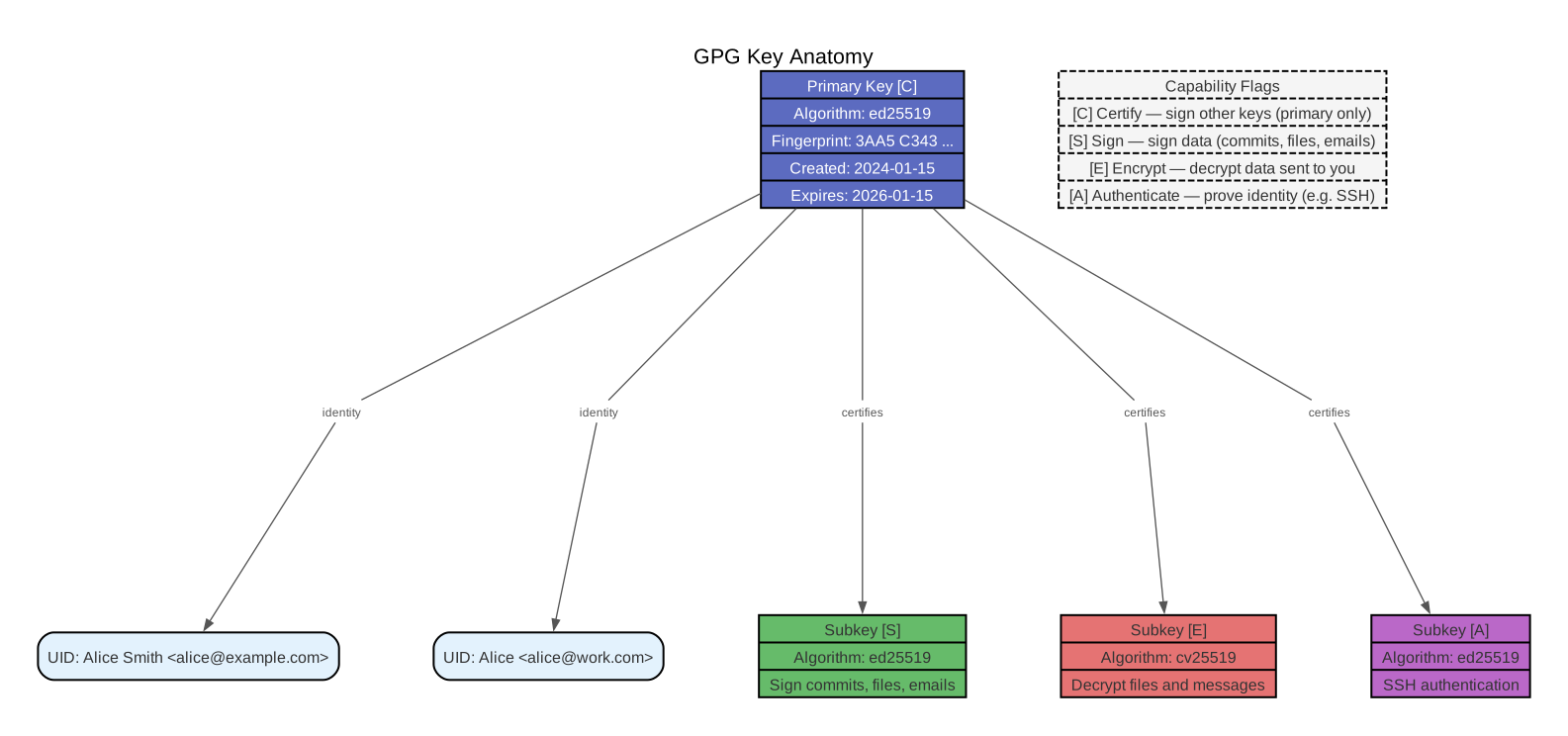
Why subkeys? The primary key is the one thing that cannot be replaced. It is the root of your identity: other people’s trust signatures point to its fingerprint, and every subkey’s validity derives from its certification by the primary key. If the primary key is compromised, everything must be rebuilt from scratch — new key, new fingerprint, re-establish trust with everyone.
Subkeys exist to keep the primary key out of harm’s way. You generate subkeys for daily operations (signing, encrypting, authenticating) and lock the primary key somewhere safe. The primary key only needs to come out for rare administrative tasks: creating a new subkey, adding a UID, or signing someone else’s key.
What happens when a subkey is compromised
Say your laptop is stolen and the attacker extracts your [S] signing subkey. The damage is limited:
- Revoke the compromised subkey. You need the primary key for this — it is the only key with the [C] (Certify) capability, which means it is the only key that can issue revocation signatures for subkeys. Run
gpg --edit-key→ select the subkey →revkey. This produces a revocation signature — a special signature packet (tag 2, reason code 0x20) that is appended to the key. Once appended, any tool that processes the key will see the subkey is revoked. - Generate a replacement subkey. Again using the primary key:
gpg --edit-key→addkey. The new subkey gets a fresh fingerprint but is certified by the same primary key. - Publish the updated key. Upload to a keyserver or distribute to contacts directly.
Your fingerprint, your UIDs, and everyone’s trust signatures are untouched. Nobody needs to re-verify your identity.
How revocation propagates (and why it’s weak)
In a PKI (Public Key Infrastructure) system like TLS/HTTPS, revocation is centralized: a Certificate Authority (CA) publishes a CRL (Certificate Revocation List) or runs an OCSP (Online Certificate Status Protocol) responder. Browsers and clients check these in real time before trusting a certificate.
OpenPGP has no central authority. Revocation propagation is best-effort and recipient-initiated:
- Keyservers are append-only. When you upload your updated key (now containing the revocation signature), the keyserver merges the new packets into the existing key. It never deletes — it only appends. The revocation signature becomes part of the key’s public record.
- Recipients must actively refresh. A recipient who already has your public key will not learn about the revocation unless they run
gpg --refresh-keys(which contacts keyservers and downloads any new packets for keys in the local keyring). GPG does not do this automatically. If a recipient never refreshes, they will continue trusting the revoked subkey indefinitely. - No real-time checking. There is no equivalent of OCSP. When a recipient verifies a signature or encrypts a file to your key, GPG checks the local copy of your key — whatever was last imported or refreshed. There is no network call to check “is this subkey still valid right now?”
- Direct distribution is faster but doesn’t scale. You can email your updated key to contacts, post it on your website, or push it to a Git repository. This reaches people immediately but only works for a known, small recipient set.
The practical consequence: there is a window between revocation and propagation where the compromised subkey is still trusted by people who haven’t refreshed. This window can be hours, days, or forever — depending entirely on recipient behavior.
PGP revocation is fundamentally weaker than PKI revocation
In PKI, the CA can revoke a certificate and clients learn about it within hours (CRL refresh) or seconds (OCSP). In PGP, there is no authority to push revocations — recipients must pull. This is the tradeoff of a decentralized trust model: no single point of failure, but also no single point of enforcement.
Short-lived subkeys as a mitigation
Because revocation propagation is unreliable, a practical defense is to make subkeys expire quickly — typically 6 months to 1 year. The idea:
- Even if a subkey is compromised and the revocation never reaches everyone, the subkey will expire on its own within the expiration window.
- You rotate subkeys on a regular schedule: before the current ones expire, generate new subkeys with the primary key and publish the updated key.
- Recipients who refresh keys periodically (or who receive the updated key) will pick up the new subkeys automatically.
This doesn’t eliminate the propagation gap, but it puts an upper bound on how long a compromised subkey can be misused. It’s the closest PGP gets to the short-lived certificates used in modern systems like Let’s Encrypt (a free, automated CA that issues TLS certificates valid for only 90 days).
Keeping the primary key offline
The entire subkey model only works if the primary key is not on the same laptop that gets stolen. Common strategies:
- Hardware token (YubiKey, Nitrokey) — the primary key lives on a smartcard. It can sign (certify) but the private key material never leaves the device, even if the machine is compromised. GPG communicates with the token via the
scdaemon(smartcard daemon). - Air-gapped machine — the primary key lives on a machine that is never connected to a network. You export subkeys to your daily machine and transfer revocations/new subkeys via USB drive.
- Encrypted offline backup — the primary key is exported (
gpg --export-secret-keys) and stored on an encrypted drive, then deleted from the local keyring (gpg --delete-secret-keysfollowed by re-importing only the subkeys). Less secure than a hardware token but better than having the primary key on a networked machine.
User IDs (UIDs)
A UID is a Name + Email string associated with the key (e.g., Alice <alice@example.com>). A single key can have multiple UIDs — one per email address. Each UID is certified (signed) by the primary key.
Key IDs and fingerprints
Keys are identified by their fingerprints — a hash of the key material:
- Fingerprint (v4): 40-character hex string. The authoritative identifier. Example:
A1B2C3D4E5F6A1B2C3D4E5F6A1B2C3D4E5F6A1B2 - Long key ID: last 16 characters of the fingerprint.
- Short key ID: last 8 characters. Do not use — collisions are trivially constructible.
Expiration vs revocation
- Expiration: a date after which the key is no longer valid. Can be extended by the key owner at any time before (or even after) it expires. It is a safety net, not a permanent action.
- Revocation: a permanent, irrevocable statement that the key should not be used. Generated with a revocation certificate (create one immediately after key generation and store it securely). Cannot be undone.
Trust model
OpenPGP needs a way to answer: “I have Alice’s public key — but is it really Alice’s?” Two models exist:
Web of Trust (WoT)
The original OpenPGP trust model. Users sign each other’s keys after verifying identity (e.g., at a key signing party — an in-person event where participants exchange fingerprints and verify government IDs). Trust is transitive:
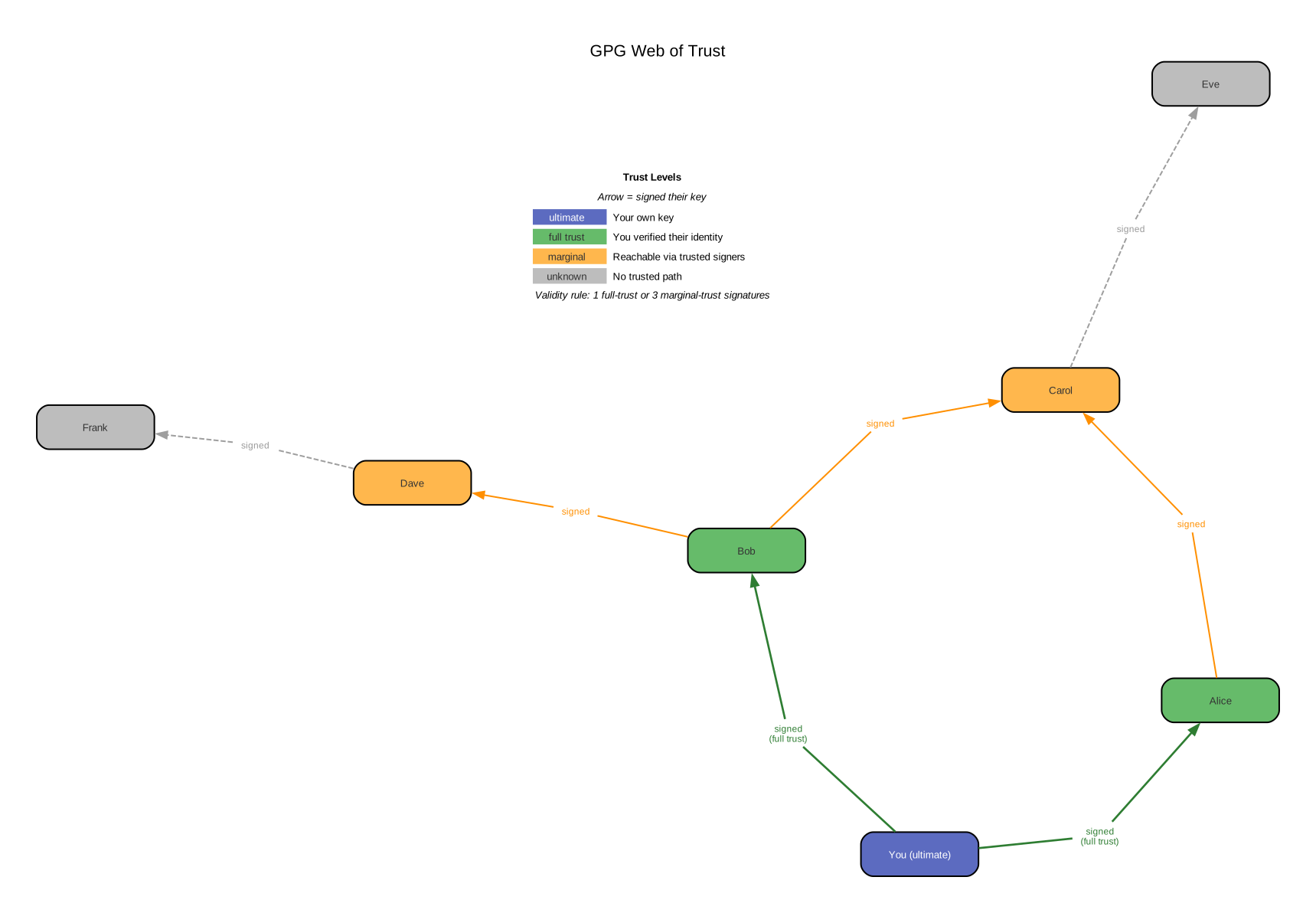
- Unknown: no trust information.
- Never: explicitly distrusted.
- Marginal: partially trusted (3 marginal signatures = valid by default).
- Full: fully trusted (1 full signature = valid).
- Ultimate: the key owner themselves.
WoT never scaled because it requires in-person verification, creates a public social graph, and is too complex for casual users.
TOFU (Trust On First Use)
The pragmatic alternative (GPG 2.1+). The first time you see a key for alice@example.com, GPG records it. If a different key later claims the same email, GPG warns you. Similar to how SSH handles known_hosts. Enable with --trust-model tofu or --trust-model tofu+pgp (hybrid).
Keyservers
Public directories where users upload their public keys so others can find them:
- SKS keyserver pool (legacy): federated, append-only, no identity verification. Suffered spam and certificate flooding attacks. Largely deprecated.
- keys.openpgp.org (modern): requires email verification before publishing. Strips UIDs that haven’t been verified. The recommended keyserver today.
ASCII armor
Binary OpenPGP packets are not text-safe — they cannot be pasted into an email body or a chat message. ASCII armor is GPG’s solution:
- Take the binary packets.
- Base64-encode them.
- Add header/footer lines (
-----BEGIN PGP PUBLIC KEY BLOCK-----/-----END PGP PUBLIC KEY BLOCK-----). - Add a CRC24 checksum line.
That is all armor is. The --armor (or -a) flag on any GPG command produces the text-safe version instead of binary. Armor is ~33% larger than binary (the overhead of Base64).
-----BEGIN PGP PUBLIC KEY BLOCK-----

mDMEZaB... (base64-encoded packets)
=ABCD       (CRC24 checksum)
-----END PGP PUBLIC KEY BLOCK-----
The three operations
Encrypt
Encrypts a file so only the recipient(s) can read it. Uses hybrid encryption (see above).
# Encrypt file.txt for recipient alice@example.com
gpg -e -r alice@example.com file.txt
# Produces: file.txt.gpg (binary)

# Same, but ASCII-armored output
gpg -ea -r alice@example.com file.txt
# Produces: file.txt.asc
Multiple recipients: -r alice@example.com -r bob@example.com. Each recipient gets their own encrypted copy of the session key, so any one of them can decrypt.
Sign
Creates a cryptographic signature proving the data came from you and was not modified.
How it works: GPG hashes the data (e.g., SHA-256), then encrypts the hash with your private signing key. Anyone with your public key can decrypt the hash and compare it to their own hash of the data.
Three signature modes:
| Mode | Command | Output | Use case |
|---|---|---|---|
| Detached | gpg --detach-sign file | file.sig (separate file) | Software releases, binary files |
| Inline | gpg -s file | file.gpg (data + signature merged) | Archives |
| Clearsign | gpg --clearsign file | file.asc (plaintext readable + signature appended) | Email, text documents |
# Detached signature (most common for files)
gpg --detach-sign -a release.tar.gz
# Produces: release.tar.gz.asc

# Clearsign (readable text + signature)
gpg --clearsign message.txt
# Produces: message.txt.asc (human-readable with signature block appended)
Verify
Checks a signature against the signer’s public key.
# Verify a detached signature
gpg --verify release.tar.gz.asc release.tar.gz

# Verify a clearsigned file
gpg --verify message.txt.asc
GPG outputs Good signature from "Name <email>" on success. It also shows trust level — an “untrusted” good signature means the cryptography checks out but you haven’t verified the key belongs to who it claims to be.
Task-oriented command reference
Generate a key pair
# Interactive (asks for name, email, algorithm)
gpg --full-generate-key

# Quick (ed25519, no interaction)
gpg --quick-generate-key "Alice <alice@example.com>" ed25519
List keys
# Public keys in your keyring
gpg --list-keys                    # or: gpg -k

# Secret (private) keys
gpg --list-secret-keys             # or: gpg -K

# With subkey details and fingerprints
gpg --list-keys --with-subkey-fingerprints
Export a public key
# Binary format
gpg --export alice@example.com > alice.pub.gpg

# ASCII-armored (for sharing)
gpg --armor --export alice@example.com > alice.pub.asc
Export a secret key (for backup)
# ASCII-armored secret key (will prompt for passphrase)
gpg --armor --export-secret-keys alice@example.com > alice.secret.asc
Protect secret key exports
This file contains your private key material. Store it encrypted (e.g., on an encrypted USB drive) and delete the plaintext copy immediately after backup.
Import a key
# Import from file (works for both public and secret keys)
gpg --import alice.pub.asc
Encrypt and decrypt
# Encrypt
gpg -e -r alice@example.com document.pdf

# Decrypt (GPG auto-detects the matching secret key)
gpg -d document.pdf.gpg > document.pdf
Sign a git commit
# One-time: tell git which key to use
git config --global user.signingkey A1B2C3D4E5F6A1B2

# Sign a single commit
git commit -S -m "signed commit"

# Sign all commits by default
git config --global commit.gpgsign true
Delete a key
# Delete a public key
gpg --delete-keys alice@example.com

# Delete a secret key (must delete secret key before public key for the same identity)
gpg --delete-secret-keys alice@example.com
Edit a key
# Interactive key editor (add UID, extend expiry, add subkey, etc.)
gpg --edit-key alice@example.com

# Inside the editor:
# gpg> adduid        — add a new email/name
# gpg> expire        — change expiration on selected key
# gpg> addkey        — add a new subkey
# gpg> save          — save and exit
The keyring
GPG stores all keys — your own and everyone else’s — in a local database called the keyring. The keyring lives in ~/.gnupg/ and consists of several files:
| File | Contents |
|---|---|
pubring.kbx | All public keys (yours and imported contacts). KBX is a “keybox” format introduced in GPG 2.1, replacing the older pubring.gpg. |
private-keys-v1.d/ | A directory containing one file per private key, each named by its keygrip (a hash of the key’s mathematical parameters, different from the fingerprint). Private keys are stored encrypted — the passphrase protects them (see Passphrases below). |
trustdb.gpg | Trust assignments: which keys you’ve marked as marginally/fully/ultimately trusted. |
tofu.db | TOFU (Trust On First Use) records: which key was first seen for each email. Only exists if TOFU trust model is enabled. |
gpg.conf | Configuration: default keyserver, default cipher preferences, trust model, keyid format, etc. |
gpg-agent.conf | Configuration for the gpg-agent daemon (see gpg-agent and pinentry below). |
The keyring is not a file you can inspect with standard tools — it is a structured database. You interact with it exclusively through gpg commands:
# List all public keys in the keyring
gpg -k

# List all secret (private) keys
gpg -K

# Show detailed info including subkey fingerprints and trust
gpg --list-keys --with-subkey-fingerprints --with-colons
Keys can silently expire, be revoked (after a --refresh-keys), or have their trust level change. GPG does not proactively notify you — you discover stale state when an operation fails. This is why gpg --refresh-keys (which contacts keyservers to pull updates for all keys in your keyring) should be run periodically.
Inspecting keyring contents
gpg --list-keys --with-colonsproduces machine-parseable output. Each line starts with a record type:pub(public key),sub(subkey),uid(user ID),fpr(fingerprint). This format is stable across GPG versions and is used by scripts and tools likepass.
Keyring vs AGE’s model
AGE has no keyring. A private key is a single line in a text file. A public key is a string you copy-paste. There is no database, no trust state, no background refresh. This is the fundamental design difference: GPG manages a directory of identities with trust metadata; AGE manages individual keys with no metadata at all.
Passphrases
When you generate a GPG key, GPG asks for a passphrase. This passphrase is not the encryption key — it is a password that protects the private key file on disk.
The mechanism: GPG takes your passphrase, derives a symmetric key from it using a KDF (Key Derivation Function — specifically S2K, String-to-Key, defined in the OpenPGP spec), and encrypts your private key material with that symmetric key before writing it to ~/.gnupg/private-keys-v1.d/. Every time GPG needs to use your private key (to sign, decrypt, or certify), it must first decrypt the key material — which requires the passphrase.
What the passphrase protects against: someone who gains read access to your ~/.gnupg/ directory (stolen laptop, compromised backup, shared filesystem) cannot use your private key without knowing the passphrase. Without the passphrase, the private key file is encrypted gibberish.
What the passphrase does NOT do:
- It does not encrypt messages. The asymmetric key pair does that.
- It is not needed by recipients. Recipients use your public key, which is not passphrase-protected.
- Sharing your passphrase with someone does not let them decrypt messages — they also need the encrypted private key file from your
~/.gnupg/directory. - Changing your passphrase (
gpg --change-passphrase) does not change your key pair. It re-encrypts the same private key material with a new symmetric key derived from the new passphrase.
S2K (String-to-Key)
OpenPGP’s S2K mechanism converts a passphrase into a symmetric key. The modern variant (Iterated and Salted S2K, or Argon2 in RFC 9580) uses a salt and many iterations to make brute-force attacks expensive — similar in purpose to scrypt (used by AGE for passphrase mode) or bcrypt. A weak passphrase is still vulnerable regardless of the KDF — the KDF only slows down the attacker, it doesn’t compensate for “password123”.
gpg-agent and pinentry
GPG never asks for your passphrase directly. Instead, it delegates to a chain of two helper programs: gpg-agent and pinentry.
gpg-agent
gpg-agent is a long-running daemon (background process) that acts as an intermediary between GPG and your private keys. Its responsibilities:
- Passphrase caching. When you type your passphrase for the first time, gpg-agent stores it in memory for a configurable duration. Subsequent GPG operations within that window don’t require re-entering the passphrase.
- Private key operations. Since GPG 2.1, the
gpgbinary never touches private keys directly. All private key operations (signing, decrypting, certifying) go through gpg-agent via a Unix domain socket at~/.gnupg/S.gpg-agent. - SSH agent emulation. With
enable-ssh-supportingpg-agent.conf, gpg-agent can replacessh-agent, serving GPG authentication subkeys ([A] capability) as SSH keys.
Configuration lives in ~/.gnupg/gpg-agent.conf:
# Cache passphrase for 1 hour (3600 seconds)
default-cache-ttl 3600

# Maximum cache lifetime regardless of use (2 hours)
max-cache-ttl 7200

# Use a specific pinentry program
pinentry-program /opt/homebrew/bin/pinentry-mac
gpg-agent starts automatically when GPG needs it. You can also manage it manually:
# Restart the agent (e.g., after config changes)
gpgconf --kill gpg-agent
gpg-agent --daemon

# Check if the agent is running
gpg-connect-agent /bye
pinentry
pinentry is the program that displays the actual passphrase prompt — the dialog box (on desktop) or terminal prompt (on servers) where you type your passphrase. It is a separate binary, invoked by gpg-agent when it needs a passphrase that is not cached.
Multiple implementations exist for different environments:
| Program | Environment | Notes |
|---|---|---|
pinentry-mac | macOS GUI | Native macOS dialog. Can integrate with Keychain. |
pinentry-gnome3 | GNOME desktop | Native GNOME dialog. |
pinentry-gtk-2 | GTK desktop | Generic GTK dialog. |
pinentry-qt | KDE/Qt desktop | Qt-based dialog. |
pinentry-curses | Terminal (interactive) | Text-based UI using ncurses. |
pinentry-tty | Terminal (basic) | Plain text prompt. No UI. |
gpg-agent decides which pinentry to use based on (in order of priority):
- The
pinentry-programline ingpg-agent.conf(explicit choice). - The
PINENTRY_USER_DATAenvironment variable (used by some integrations). - The system default (usually
pinentrysymlink, which may point to any of the above).
The full chain
When you run gpg -s file.txt (sign a file), the actual flow is:
gpg binary
  → connects to gpg-agent via Unix socket (~/.gnupg/S.gpg-agent)
    → gpg-agent checks passphrase cache
      → if cached: performs the signing operation, returns result
      → if not cached: launches pinentry
        → pinentry displays passphrase prompt to user
        → user types passphrase
        → pinentry sends passphrase back to gpg-agent
        → gpg-agent caches passphrase, decrypts private key, signs data
  → gpg receives signed data, writes output
scdaemon (smartcard daemon)
If your private keys live on a hardware token (YubiKey, Nitrokey), a third daemon enters the chain: scdaemon (smartcard daemon). It communicates with the hardware token via CCID (Chip Card Interface Device — a USB protocol for smartcards) and provides the private key operations that gpg-agent requests. The token performs the cryptographic operations internally — the private key material never leaves the hardware.
gpg → gpg-agent → scdaemon → hardware token (YubiKey, etc.)
Common debugging scenarios
| Symptom | Likely cause | Fix |
|---|---|---|
| ”No pinentry” or passphrase prompt never appears | Wrong or missing pinentry-program in gpg-agent.conf | Set correct path: pinentry-program /opt/homebrew/bin/pinentry-mac |
| ”gpg: decryption failed: No secret key” | Agent not running, or agent socket stale | gpgconf --kill gpg-agent && gpg-agent --daemon |
| Passphrase prompt appears too often | Cache TTL too short | Increase default-cache-ttl in gpg-agent.conf |
| Passphrase prompt never appears (always cached) | Cache TTL too long, or Keychain integration | Decrease max-cache-ttl, or check Keychain Access |
| SSH not using GPG key | enable-ssh-support not set, or SSH_AUTH_SOCK not pointing to gpg-agent | Add enable-ssh-support to gpg-agent.conf, set export SSH_AUTH_SOCK=$(gpgconf --list-dirs agent-ssh-socket) in shell config |
| ”IPC connect call failed” | Socket path too long or agent crashed | gpgconf --kill gpg-agent and restart |
When to use GPG today
Use GPG for:
- Package signing — apt (Debian/Ubuntu), rpm (Red Hat/Fedora), and Homebrew all verify packages with GPG signatures.
- Git commit signing — proves commits came from you. GitHub and GitLab both verify GPG signatures on commits. (SSH signatures are an alternative since Git 2.34.)
- Verifying software releases — many projects publish
.ascdetached signatures alongside tarballs. - pass/password-store — the Unix password manager
passencrypts each password as a GPG-encrypted file. See also pass. - Legacy systems — existing workflows that depend on OpenPGP (encrypted email with Thunderbird/Enigmail, enterprise key management).
Do not use GPG for:
- Encrypting files for personal use or known recipients — use AGE instead. Simpler key format, no keyring, no configuration.
- Encrypting dotfile secrets (chezmoi, etc.) — use AGE. It is chezmoi’s recommended backend.
- Anything where the recipient list is small and known — AGE’s model (explicit recipient keys, no trust infrastructure) is a better fit.
See also
- AGE — modern, simple file encryption. Recommended over GPG for personal file encryption.
- Asymmetric Elliptic Curve Cryptography — GPG uses ECC (ed25519 for signing, cv25519 for encryption) as an alternative to RSA.
- Symmetric encryption — GPG’s hybrid encryption uses symmetric ciphers (AES, ChaCha20) for bulk data encryption.