Apache Iceberg key features allow to customize how data is written and read, removing old data, and enable other optimizations.
Compaction strategies
Compacting data files can significantly improve query performance and should be repeated periodically to prevent performance degradation. When compacting, we are effectively rewriting data files using a specific compaction strategy:
- binpack that tries to achieve certain minimum sizes (i.e. file size, row group size in parquet)
- sort and z-ordering that tries to put data close to accellerate certain query patterns
CALL catalog.system.rewrite_data_files(
	table => 'streamingtable',
	strategy => 'binpack',
	where => 'created_at between "2023-01-26 09:00:00" and "2023-01-26 09:59:59" ',
	options => map(
		'rewrite-job-order','bytes-asc',
		'target-file-size-bytes','1073741824',
		'max-file-group-size-bytes','10737418240',
		'partial-progress-enabled', 'true'
	)
)
Sorting and z-orders
Sorting is a global property of a table, allowing to limit the number of data files to be read. However, adding new data will make the table un-sorted and also sorting works hierarchically.
SELECT * from A where C > 10won’t work if we sorted by B and C. For this reason, we can use z-orders, which buckets data assigning equal weights to each column. We can invoke using Spark SQL Extensions call procedure a re-ordering operation like so:
CALL catalog.system.rewrite_data_files(
table => 'people',
strategy => 'sort',
sort_order => 'zorder(age,height)'
)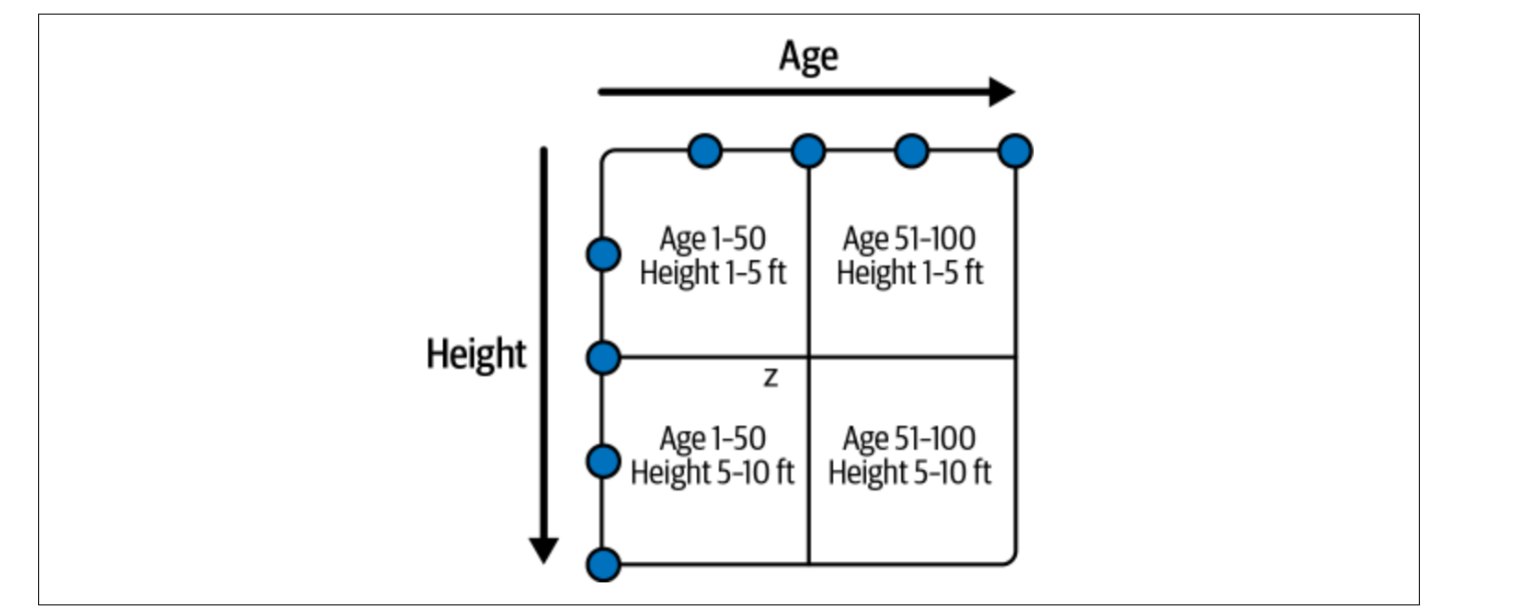 Again, z-order suffers of the same problem: adding new data might require full re-write.
Partitions
Partitions instead provide an easy way to group data together without needing rewrites, however traditional Hive style partitions were based on folders. Apache Iceberg support hidden partitions which means they are not based on folder structure.
Queries do not need specifically to use the partitioning columns. While in Hive partitioning by day of a timestamp value required creating a new column, in Iceberg the metadata file keeps track of transforms (i.e. truncate, month, day, etc functions that we want to partition for)
CREATE TABLE catalog.MyTable (...) PARTITIONED BY months(time) USING iceberg;
CREATE TABLE catalog.MyTable (...) PARTITIONED BY truncate(name, 1) USING
iceberg;
CREATE TABLE catalog.voters (...) PARTITIONED BY bucket(24, zip_code) USING iceberg;
Configurable ceopy on write / merge on read
These are two common update strategies with different trade-offs:
- copy on write makes write more expensive
- merge on read makes read more expensive but write faster Merge on read can use one of two type of delete files:
- a positional delete file
- an equality delete files Positional delete files are fast to use when merging, because they provide an indicator of what is the location of the data that needs to be ignored. However, to generate them, one needs to read the entire file where a row has been updated or modified. On the contrary, equality do not contain a row index, making very fast to generate them but merging more expensive
CREATE TABLE catalog.people (
	id int,
	first_name string,
	last_name string
) TBLPROPERTIES (
	'write.delete.mode'='copy-on-write',
	'write.update.mode'='merge-on-read',
	'write.merge.mode'='merge-on-read'
) USING iceberg;
# After table creation
ALTER TABLE catalog.people SET TBLPROPERTIES (
	'write.delete.mode'='merge-on-read',
	'write.update.mode'='copy-on-write',
	'write.merge.mode'='copy-on-write'
);
Deletion of old data
Deletion of old data can be typically done in two ways:
- deleting expired snapshots, making them inaccessible (a new metadata file will be created)
- deleting orphaned data files, which can be created by failed jobs/data pipelines
## The last parameter is the minimum number of snapshots to be retained
CALL catalog.system.expire_snapshots('MyTable', TIMESTAMP '2023-02-01
00:00:00.000', 100)
CALL catalog.system.expire_snapshots(table => 'MyTable', snapshot_ids =>
ARRAY(53))

CALL catalog.system.remove_orphan_files(table => 'MyTable')
Configuring metrics collection
Metrics collection is a powerful but can make operation slow if you have many columns, so you can disable or customize it for specific columns like so:
ALTER TABLE catalog.db.students SET TBLPROPERTIES (
'write.metadata.metrics.column.col1'='none',
'write.metadata.metrics.column.col2'='full',
'write.metadata.metrics.column.col3'='counts',
'write.metadata.metrics.column.col4'='truncate(16)',
);
While the default is lower and upper bounds plus count, truncate can be used for example to truncate a string up to a certain length and use the truncated value for counts and bounds
Rewriting manifests
If you have a large number of manifests, querying might take time even if the data is adequately organized on disk. In this case one can rewrite the manifests:
CALL catalog.system.rewrite_manifests('MyTable')
# second parameter is caching, which makes it faster but can cause OOM
CALL catalog.system.rewrite_manifests('MyTable', false)
Write distribution mode
In massive parallel processing systems, workers execute a job or a task. If there is no specific write distribution node data will be assigned to those tasks arbitrarily.
For example, if you have 10 records that belong in partition A distributed across 10 tasks, you will end up with 10 files in that partition with one record each, which isn’t ideal. We can configure write distribution to avoid this:
- none: there is no special distribution. This is the fastest during write time and is ideal for presorted data.
- hash: the data is hash-distributed by partition key.
- range: the data is range-distributed by partition key or sort order.\
ALTER TABLE catalog.MyTable SET TBLPROPERTIES (
	'write.distribution-mode'='hash',
	'write.delete.distribution-mode'='none',
	'write.update.distribution-mode'='range',
	'write.merge.distribution-mode'='hash',
);
Enabling object-store layout
Because of the architecture and how object stores handle parallelism, there are often limits on how many requests can go to files under the same prefix. This becomes a problem in partitions with lots of files, as queries can result in many requests to these partitions and can then run into throttling, which slows down the query.
ALTER TABLE catalog.MyTable SET TBLPROPERTIES (
	'write.object-storage.enabled'= true
);
Enabling object-storage will distribute files in the same partition across many prefixes, including a hash to avoid potential throttling.
Data bloom filters
Writing of bloom filters for a particular column in your Parquet files (this can also be done for ORC files) via your table properties:
ALTER TABLE catalog.MyTable SET TBLPROPERTIES (
	'write.parquet.bloom-filter-enabled.column.col1'= true,
	'write.parquet.bloom-filter-max-bytes'= 1048576
);
Engines may take advantage of these bloom filters to help make reading the datafiles even faster by skipping datafiles where bloom filters clearly indicate that the data you need doesn’t exist.