An ad product slice is a concrete ad format or placement family that cuts through the whole ads system: advertiser setup, eligibility, indexing, retrieval, serving, rendering, metrics, billing, measurement, and support workflows. Instead of learning the platform one subsystem at a time, a product slice gives one end-to-end path to trace.
Examples include a home-feed takeover, sponsored search result, shopping product ad, video mid-roll, high-impact sponsorship, app-install format, or native article placement. The product name matters less than the cross-system contract: what can be sold, where it can render, how it is counted, and how operators debug it.
Product Slice As Learning Path
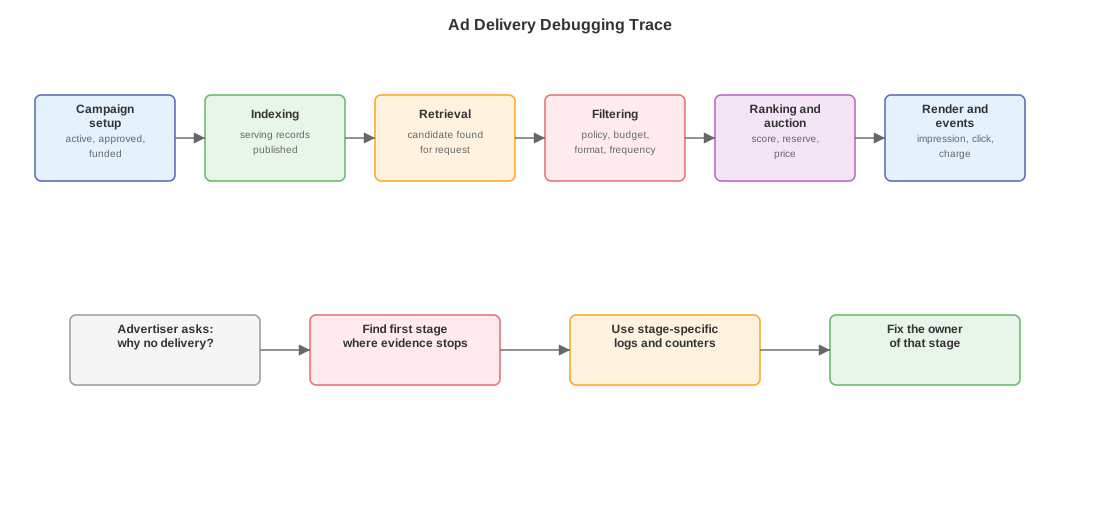
The diagram shows the debugging version of a product slice. When delivery fails, locate the first stage where evidence stops: campaign setup, indexing, retrieval, filtering, auction, render, or event processing.
RunCo buys a high-visibility feed placement for a shoe launch. The seller promises delivery in a specific market and date range. The creative must meet special format rules. The product has dedicated metrics and support playbooks. To understand whether the campaign is working, you need the whole slice:
| Layer | Product-slice question |
|---|---|
| Sales / order line | Which sale terms were committed: market, dates, surface, placement, quantity, price, and guarantee? |
| Advertiser control plane | Which campaign/ad group/ad objects represent that deal or format? |
| Validation and policy | Is the advertiser, creative, landing page, category, market, and date range allowed? |
| Indexing | Did the objects publish into serving indexes for the right placement and market? |
| Retrieval | Does the request retrieve the campaign when the matching surface appears? |
| Filtering | Does policy, budget, format, frequency, pacing, or product rule remove it? |
| Ranking / allocation | Does the product compete in auction, reserve, sponsorship, or guaranteed-allocation logic? |
| Render | Can the client load and display the creative in the promised format? |
| Metrics | Are insertions, impressions, viewability, clicks, spend, and product-specific counters recorded? |
| Measurement | Are attribution, lift, third-party verification, or advertiser outcome streams connected? |
Why Product Slices Matter
Subsystem notes can make ads look like independent components: control plane, indexing, serving, reporting, measurement. A product slice exposes the contracts between them.
Format constraints connect creative review to render. A video product may need duration, aspect ratio, protocol support, autoplay behavior, and measurement hooks that a static image product does not.
Placement constraints connect product surfaces to retrieval and allocation. A top-of-feed unit, search unit, article native slot, and video break produce different request context and different eligible creatives.
Commercial constraints connect sales and serving. A guaranteed or reserved product may use order lines, booking dates, market slots, caps, or sponsorship rules that ordinary auctioned demand does not.
Measurement constraints connect product promises to event definitions. A product sold on viewable impressions, completed views, clicks, reach, or lift needs different event checks and report fields.
Delivery Debugging
Delivery debugging asks why an ad did not serve, underdelivered, overdelivered, or produced unexpected metrics. The fastest path is stage order. Do not start with model quality if the campaign never reached retrieval.
| Stage | Evidence to check | Failure class |
|---|---|---|
| Campaign setup | Object status, budget, flight dates, bid strategy, target market, selected placement. | Advertiser config or sales setup. |
| Creative review | Approval state, asset format, landing URL, category labels, render metadata. | Policy or creative compatibility. |
| Indexing | Serving version, retrieval keys, forward-index record, freshness timestamp. | Propagation or index build. |
| Retrieval | Candidate-source output for a representative request. | Candidate not found. |
| Filtering | Filter/trimmer reason codes: budget, frequency, policy, format, privacy, stock, pacing. | Candidate found but removed before ranking. |
| Ranking / auction | Score, reserve, bid, price support, allocation constraints, competing demand. | Candidate lost after scoring. |
| Render | Client response, asset load, tracker calls, viewport state. | Selected ad did not become a measured impression. |
| Event processing | Insertion/impression/click joins, billing event, report aggregation, attribution match. | Served ad did not appear in the expected metric. |
The answer should name the first stage where the expected evidence disappears. “No impressions” is too late and too broad. “The campaign was indexed but removed by the frequency-cap filter before ranking” is actionable.
Product Slice Before Internals
A good learning order is:
- Pick one ad product or placement family.
- Identify what the advertiser configures and what the seller promises.
- Trace one valid request from surface to retrieval, filtering, allocation, render, and events.
- Read the debugging docs or playbooks for the product.
- Only then dive into the internals of retrieval, ranking, auction, or measurement.
This order keeps a service name from becoming the whole mental model. The product slice shows which systems have to line up before any one subsystem deserves deep attention.