Ads attribution and incrementality are two different ways to connect ad exposure to business outcomes. Attribution assigns reporting credit for observed conversions to prior ad touchpoints. Incrementality estimates how many outcomes the ads caused compared with a baseline where comparable users did not receive the ads.
The distinction matters because both use conversion events, but they answer different questions. Attribution asks, “which campaign, ad group, creative, click, or impression gets credit in the report?” Incrementality asks, “how many purchases, installs, signups, or brand responses would not have happened without the ads?”
Two Measurement Questions
The diagram shows the split. Attribution follows observed touchpoints and conversions. Lift compares a treatment group against a control or holdout group.
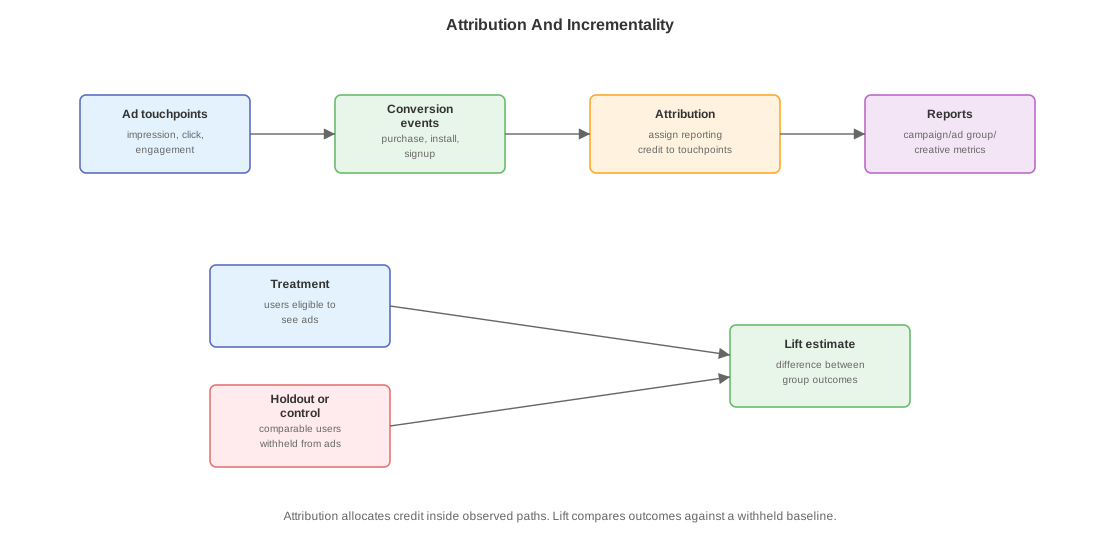
RunCo advertises running shoes. A user sees a feed ad on Monday, clicks a search ad on Wednesday, and buys shoes on Friday. Attribution decides how that Friday purchase appears in reports. A lift study asks whether users who were eligible to see RunCo ads bought more often than comparable users who were withheld from RunCo ads.
| Measurement concept | Question it answers | Example output |
|---|---|---|
| Matched conversion | Can this purchase be linked to a prior ad touchpoint or user identifier? | Order R123 matched to a click id. |
| Attributed conversion | Which ad touchpoint receives reporting credit under the attribution rule? | Purchase credited to the Wednesday click. |
| Modeled conversion | What conversions are estimated when direct matching is incomplete? | Report adds modeled purchases for privacy-limited traffic. |
| Incremental conversion | How many conversions did ads cause above the baseline? | RunCo generated 1,200 incremental purchases. |
| Lift estimate | Difference between treatment and control outcomes, scaled to the study design. | Purchase rate rose by 8% among exposed-eligible users. |
What A Conversion Is Here
A conversion is an advertiser-defined outcome event that the ads system receives after the ad touchpoint. It can be a purchase, signup, app install, add-to-cart, lead form submission, subscription, booking, or another business event the advertiser configured as valuable. In the RunCo example, the conversion is a shoe purchase.
The ad platform usually does not observe RunCo’s purchase directly from serving. RunCo or a measurement partner has to send a conversion event back through one of several paths:
| Source | Example conversion event | How the platform receives it |
|---|---|---|
| Browser tag | User buys shoes on runco.com; checkout page fires purchase. | JavaScript tag or pixel sends event fields from the browser. |
| Server-side conversion API | RunCo backend records order R123. | RunCo server sends order_id, timestamp, value, and match keys to the platform. |
| Mobile measurement partner | User installs RunCo’s app and buys in-app. | Attribution partner sends install or in-app event postbacks. |
| Offline upload | User buys in a store after seeing ads. | Advertiser uploads hashed identifiers, order id, timestamp, and value. |
| Clean-room or privacy workflow | Advertiser and platform compare records without sharing raw user data. | Aggregated or privacy-constrained match results feed reporting. |
The conversion event needs fields for timing, deduplication, value, and matching:
| Field | Why it matters |
|---|---|
| Event name | Tells the platform whether this is purchase, signup, lead, install, or another configured outcome. |
| Event timestamp | Lets attribution check whether the event happened before the lookback window expired. |
| Event id / order id | Lets deduplication count the business event once if browser and server paths both send it. |
| Value | Lets reports and bidding use purchase value or revenue in addition to conversion count. |
| Match keys | Let the platform connect the conversion to an earlier touchpoint: click id, logged-in user id, hashed email, mobile ad id, or another allowed identifier. |
A raw conversion becomes a matched conversion only if the platform can connect it to an allowed user or event key. It becomes an attributed conversion only if an attribution rule assigns it to an earlier impression, click, or engagement. It can remain unmatched or unattributed even though RunCo really received the purchase.
How Matching Works Under Privacy Limits
Conversion matching only works when the advertiser and platform have a permitted way to connect the conversion event to an earlier ad touchpoint. Privacy settings, consent state, browser limits, app tracking rules, and platform policy decide which keys are allowed. If no allowed key exists, the conversion may stay unmatched, be counted only in aggregate, or enter a modeled-conversion estimate.
Common matching paths:
| Matching path | What connects the conversion to the ad touchpoint | Privacy constraint |
|---|---|---|
| Click id | The ad click sends the user to RunCo with a click identifier in the landing URL. RunCo stores it and sends it back with the purchase. | Works best for click-through attribution; depends on the click id surviving redirect, storage, consent, and backend capture. |
| Platform login | The user was logged into the ad platform when the ad touchpoint happened, and the conversion event carries a key the platform can match to that account. | Strong match, but only when policy and consent allow that identity use. |
| Hashed first-party data | RunCo sends normalized and hashed email, phone, name/address, or similar first-party customer fields with the conversion. The platform tries to match those hashes against its user records. | Hashing reduces raw-data exposure but does not make the data free to use; consent, terms, and allowed-purpose rules still matter. |
| Browser tag or first-party cookie | A tag on RunCo’s site observes the conversion and sends event data plus whatever first-party identifiers are allowed. | Browser restrictions, cookie lifetime, consent banners, tracking prevention, and ad blockers can remove or shorten the match path. |
| Server-side conversion API | RunCo’s backend sends the conversion directly to the platform with event id, timestamp, value, and match keys. | More reliable than browser-only tags, but still requires allowed identifiers and dedupe against any browser event for the same order. |
| Mobile attribution / app framework | A mobile measurement partner or platform attribution framework reports installs or in-app events. | Device identifiers may require consent; privacy-preserving frameworks may return delayed or aggregated attribution rather than user-level matches. |
| Clean room or confidential matching | Advertiser and platform compare first-party datasets inside a controlled environment or confidential-computing workflow. | Usually limits raw-data exposure and often returns aggregated or constrained outputs rather than arbitrary row-level joins. |
| Modeled conversion | Statistical model estimates conversions when direct matching is incomplete. | Preserves aggregate reporting continuity, but it is an estimate, not an observed user-level match. |
Logged-in users and email are two important paths, but they are not the only paths. A click id can match a purchase without the advertiser knowing the platform account. A server-side conversion API can improve delivery of the event without changing whether the match key is allowed. Clean-room and app-attribution systems can preserve measurement when user-level identifiers are unavailable, but they usually reduce detail, freshness, or debuggability.
Attribution
Attribution starts from observed events: impressions, clicks, engagements, and conversions. The platform or measurement provider applies match rules, attribution windows, deduplication, and credit rules to decide which touchpoint receives credit.
Common pieces:
| Piece | Meaning |
|---|---|
| Attribution window / lookback window | Time interval that starts at an ad touchpoint and ends N hours or days later. A conversion can receive credit only if it happens before that interval expires. |
| Click-through attribution | Credit path where the user clicked an ad, then converted before the click lookback window expired. |
| View-through attribution | Credit path where the user saw an ad impression but did not click, then converted before the impression lookback window expired. |
| Engagement-through attribution | Credit path where the user performed a qualifying non-click engagement, then converted before the engagement lookback window expired. |
| Deduplication | Rule that prevents the same business event from being counted more than once across duplicate event paths. |
| Reporting time | Whether a conversion is reported by ad action time, conversion time, or another reporting convention. |
Click-Through, View-Through, And Engagement-Through
These terms name which earlier ad touchpoint is allowed to receive credit for a later conversion. They do not describe different kinds of purchases; the purchase can be the same order_id=R123. The difference is the strongest prior ad event the attribution rule accepts.
RunCo has three configured lookback windows:
| Touchpoint type | Lookback window | Meaning |
|---|---|---|
| Click | 7 days after the click | A purchase can be credited to the click if it happens within 7 days. |
| Impression without click | 1 day after the impression | A purchase can be credited to the impression if it happens within 24 hours and no stronger eligible touchpoint wins. |
| Qualifying engagement | 1 day after the engagement | A purchase can be credited to the engagement if it happens within 24 hours and the product treats that engagement as eligible. |
| Timeline | Attribution path | What the report can say |
|---|---|---|
| Monday 9 AM: user sees RunCo ad. Monday 3 PM: user buys shoes. No click. | View-through attribution. | The purchase may be credited to the impression because it happened 6 hours after the impression, before the 1-day lookback window expired. |
| Monday 9 AM: user sees RunCo ad. Wednesday 10 AM: user buys shoes. No click. | No view-through credit under a 1-day lookback window. | The purchase happened about 49 hours after the impression, so the 1-day lookback window had already expired. |
| Monday 9 AM: user clicks RunCo ad. Friday: user buys shoes. | Click-through attribution. | The purchase may be credited to the click because it happened before the 7-day click lookback window expired. |
| Monday 9 AM: user watches enough of a video ad to count as an engagement. Monday 8 PM: user buys shoes. No click. | Engagement-through attribution. | The purchase may be credited to the engagement if that product treats the video view as a qualifying engagement. |
Platforms usually prefer stronger touchpoints when several are eligible. For example, if a user saw an ad on Monday, clicked another RunCo ad on Wednesday, and bought on Friday, the report may credit the Wednesday click rather than the earlier impression. The exact priority is an attribution-rule choice, not a fact about the purchase itself.
Attribution supports campaign reporting and optimization labels, but it does not prove causality by itself. A user who clicked RunCo’s ad and bought shoes may already have intended to buy them. Attribution can tell you which ad touchpoint gets report credit; it cannot by itself tell you what would have happened without the ad.
Incrementality And Lift
Incrementality measures causal effect by comparing outcomes for a group eligible to receive ads with outcomes for a comparable group withheld from ads or otherwise held out. A holdout is the withheld group. A lift estimate is the measured difference in outcomes between the exposed-eligible group and the baseline group, adjusted for the study design.
Two common lift families:
| Study type | Outcome | Basic mechanism |
|---|---|---|
| Brand lift | Survey response, recall, favorability, awareness, intent. | Compare survey answers between treatment and control users. |
| Conversion lift | Purchase, signup, install, lead, revenue. | Compare conversion rates or values between treatment and holdout users. |
The control group has to be created before outcomes are observed. If the platform merely compares users who saw ads with users who did not, selection bias dominates: users who saw ads may differ because they were reachable, active, targetable, or already closer to converting.
Why Reports Disagree
Advertiser reports, platform reports, third-party reports, and lift studies can disagree without one of them being “wrong.” They often measure different objects.
| Difference | Why numbers diverge |
|---|---|
| Match coverage | Browser tags, server-side events, mobile partners, and clean-room matches see different identifiers. |
| Attribution window | One report may credit a 7-day click; another may use 1-day click or conversion-time reporting. |
| Deduplication | Browser and server paths may both send the same order unless a dedupe key joins them. |
| Viewability and fraud filters | Third-party measurement may reject impressions the platform still logged as served or rendered. |
| Modeled conversions | Privacy-limited traffic may add modeled outcomes to one report but not another. |
| Incrementality design | Lift studies compare treatment and holdout outcomes instead of assigning every conversion to a touchpoint. |
Where It Fits In The Ads System
Attribution and lift live after Ad Serving Request Lifecycle. Serving can log insertion, render, impression, click, and engagement events. Conversion sources may arrive from browser tags, server-side conversion APIs, mobile measurement partners, offline uploads, or clean-room joins. Measurement systems then decide how those events become reporting credit, causal estimates, and model labels.
The same purchase can serve several jobs:
| Job | How the purchase is used |
|---|---|
| Billing or spend | Only if the product charges on conversion or uses conversion value for settlement. Many products still bill on click or impression. |
| Advertiser reporting | Counted under an attribution rule, with object ids such as campaign/ad group/creative. |
| Optimization | Used as a label for bidding, ranking, pacing, or audience learning. |
| Lift | Compared across treatment and control groups to estimate causal effect. |
| Quality monitoring | Checked for invalid traffic, duplicate events, bad match rates, or delayed ingestion. |
Sources
- Google Ads Help — About enhanced conversions
- Google Ads Data Manager Help — Confidential matching
- Meta for Developers — Conversions API customer information parameters
- Apple Developer — SKAdNetwork