X.509 certificate extensions are typed fields inside a certificate that tell relying parties how the certified public key may be used. The base certificate says “this issuer certified this subject’s public key for this validity window.” Extensions add the constraints software needs to make that statement operational: CA status, allowed key operations, application purpose, subject names, revocation pointers, and issuer-key hints.
A TLS server certificate, a CA certificate, a client authentication certificate, and a code-signing certificate all share the same base shape: an issuer signs a subject public key. Extensions carry the role-specific instructions that let software accept one certificate for a TLS server and reject the same key material as a CA.
Where Extensions Sit
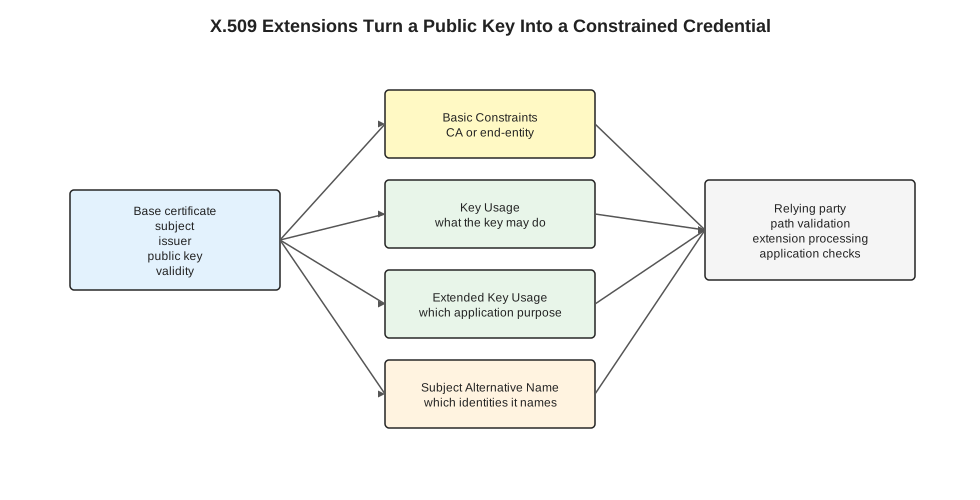
The diagram shows the layering. Basic certificate fields bind an issuer, subject, public key, and validity window. Extensions constrain that binding. A relying party validates the chain, processes critical extensions, then applies application-specific checks such as TLS service identity verification.
A relying party is the software making a trust decision from the certificate: a browser, curl, a Kubernetes controller, an ingress proxy, a package manager, or a TLS library. The relying party parses the certificate, validates the path, and accepts or rejects it for a specific operation.
Extension Shape
Each extension has three pieces:
| Field | Meaning |
|---|---|
| Object identifier | A globally assigned identifier for the extension type, such as Subject Alternative Name or Key Usage. |
| Critical flag | Whether software must reject the certificate when it cannot process the extension. |
| Value | Extension-specific data, encoded according to that extension’s ASN.1 type. |
The critical flag is the compatibility gate. A relying party must reject a certificate when it encounters an unknown critical extension. It may ignore an unknown non-critical extension. Criticality marks an extension as required for safe interpretation. Treat it as an interoperability rule rather than a risk score.
The Extensions You See Constantly
This table covers the extensions that explain most TLS and internal PKI behavior.
| Extension | What it answers | Common mistake |
|---|---|---|
| Basic Constraints | Is this certificate a CA, and how deep may subordinate CAs go? | Issuing a CA certificate without CA:TRUE, or letting an end-entity certificate act like a CA. |
| Key Usage | Which low-level cryptographic operations may this key perform? | Using one key for signing certificates, signing handshakes, and key agreement without checking allowed bits. |
| Extended Key Usage | Which application purposes is this certificate valid for? | Presenting a client-auth-only certificate as a server certificate. |
| Subject Alternative Name | Which identities does this subject represent? | Issuing a certificate that omits one of the names clients use. |
| Subject Key Identifier | Which subject public key is this, usually as a compact key identifier? | Treating it as an identity or authorization field. |
| Authority Key Identifier | Which issuer key should be used to validate this certificate? | Assuming issuer name alone is enough when CAs rotate keys or reuse names. |
| CRL Distribution Points | Where can revocation lists be fetched? | Assuming a certificate being inside its validity window means it has not been revoked. |
| Authority Information Access | Where can issuer or OCSP information be fetched? | Depending on network fetching in places where clients run offline or behind restricted egress. |
CA vs End-Entity
Basic Constraints separates CA certificates from end-entity certificates. A CA certificate can sign other certificates when CA:TRUE is present and the certificate also has suitable key usage. An end-entity certificate is used by the final workload: a web server, client, service account, or signing identity.
A minimal CA shape looks like:
X509v3 Basic Constraints: critical
    CA:TRUE, pathlen:0
X509v3 Key Usage: critical
    Certificate Sign, CRL Sign
A pathlen:0 intermediate CA can issue end-entity certificates. Its authority stops there: it cannot create another subordinate CA beneath itself, which is common for an intermediate dedicated to one environment.
A server leaf certificate uses a different extension shape:
X509v3 Basic Constraints: critical
    CA:FALSE
X509v3 Key Usage: critical
    Digital Signature, Key Encipherment
X509v3 Extended Key Usage:
    TLS Web Server Authentication
X509v3 Subject Alternative Name:
    DNS:api.example.com, DNS:api.prod.svc
The same public-key algorithm can appear in both examples. The extensions tell the relying party which role the certificate may play.
Key Usage vs Extended Key Usage
Key Usage is about cryptographic operations. It answers questions such as “may this key sign certificates?”, “may this key sign digital data?”, and “may this key participate in key encipherment or agreement?”
Extended Key Usage (EKU) is about application purpose. It answers questions such as “is this certificate valid for TLS server authentication?”, “TLS client authentication?”, “code signing?”, or “email protection?”
These two layers answer different checks:
| Layer | Example check |
|---|---|
| Key Usage | Is the key allowed to produce the kind of cryptographic signature this operation needs? |
| Extended Key Usage | Is this certificate intended for this application protocol or role? |
A certificate can have a key capable of signing a TLS handshake and still fail because its EKU lacks server authentication. A server-auth EKU also needs compatible key usage bits for the operation the TLS stack performs.
TLS Server Checks
A TLS client combines several certificate checks before it sends application data:
- Chain validation: build a signed path from the leaf certificate to a trusted root.
- CA constraints: verify that each issuer in the path had CA authority.
- Time and revocation: check the validity window and any revocation policy the client enforces.
- Usage constraints: verify that key usage and EKU permit TLS server authentication.
- Service identity: verify that the certificate names the service the client contacted.
Certificate SANs and Access Paths covers the service identity check. The other extension checks still run: SAN carries service names, while Basic Constraints, Key Usage, and Extended Key Usage constrain the certificate’s role.
Inspecting Extensions
Use openssl x509 to inspect a saved certificate:
openssl x509 -in cert.pem -noout -textFor a live TLS server:
openssl s_client \
  -connect api.example.com:443 \
  -servername api.example.com \
  -showcerts </dev/null 2>/dev/null \
| openssl x509 -noout -subject -issuer -ext basicConstraints -ext keyUsage -ext extendedKeyUsage -ext subjectAltName
Ask for specific extensions when you need a short diagnostic output.
With cert-manager, the common fields map directly to extensions:
apiVersion: cert-manager.io/v1
kind: Certificate
metadata:
  name: api-tls
  namespace: prod
spec:
  secretName: api-tls
  issuerRef:
    name: internal-ca
    kind: ClusterIssuer
  dnsNames:
    - api.example.com
    - api.prod.svc
  usages:
    - digital signature
    - key encipherment
    - server auth
dnsNames produces SAN DNS entries. usages drives key usage and extended key usage. The issuer determines the chain and CA constraints.
Design Rule
When issuing a certificate, decide four things before writing YAML or OpenSSL config:
| Question | Extension area |
|---|---|
| Is this a CA or a leaf? | Basic Constraints |
| What cryptographic operations may the key perform? | Key Usage |
| Which protocol or application role is this certificate for? | Extended Key Usage |
| Which names or identities should clients authenticate? | Subject Alternative Name |
Subject names make the service valid under the right names. The other extensions decide whether the certificate may play that role.