Machine-bound secrets with recovery recipients is a local secret-storage pattern for bootstrap credentials. You encrypt each secret to a daily key that only works on one physical machine and to a separate recovery key stored outside that machine. The daily key gives theft resistance and convenience. The recovery key lets you migrate or recover after hardware loss.
A plaintext private key on disk is easy to copy. A non-extractable hardware key resists disk theft and disappears with the hardware. Multi-recipient encryption gives the encrypted file two independent unlock paths: the hardware key for daily use and the recovery key for migration or loss.
Two Recipients
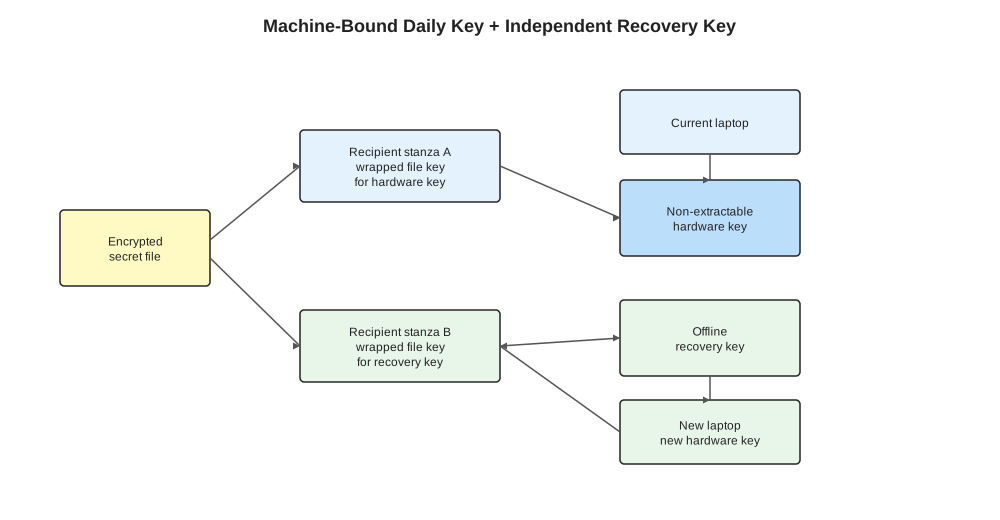
The encrypted file has two parts: a header and a body. The body is encrypted once with a key derived from a random file key. The header stores one wrapped copy of that file key per recipient. The daily recipient is hardware-bound and convenient. The recovery recipient is offline and portable. Either recipient can unwrap the same embedded file key and decrypt the body.
Recipient means a public key or public-key-like identifier that an encryption tool can target. In age, a recipient string such as age1... tells the sender which private key should be able to decrypt later.
Recipient stanza means one header entry in an age file. Each stanza stores the same file key wrapped for one recipient. A file encrypted to two recipients has two stanzas in the file header.
File key means the random symmetric key generated for one encrypted file. It is not a separate sidecar file. Age derives the payload-encryption key from this file key and encrypts the file payload once. Each recipient stanza stores an encrypted copy of the file key in the encrypted file header.
Recipient A: daily hardware key. A TPM (Trusted Platform Module), YubiKey, Secure Enclave, smartcard, or similar device can hold private key material in a non-extractable form. The software asks the device to perform a private-key operation. The private key bytes stay inside the device boundary.
Recipient B: recovery key. A separate age key, hardware token, or offline private key lives outside the laptop: in a password manager, sealed backup, safe, or another controlled recovery store. The normal path ignores it. The recovery path uses it when the daily hardware key disappears.
Why Multi-Recipient Encryption Works
Tools such as AGE use hybrid encryption. Age generates a random file key for the payload, derives the payload encryption key from it, and encrypts the payload once. It then stores the file key in the file header once per recipient, encrypted or wrapped in the form that recipient type expects. For public-key recipients, this is the asymmetric part: the recipient’s public key protects the file key, and the matching private key unwraps it during decryption.
For two recipients:
age \
  -r age1tpm1dailyrecipient... \
  -r age1recoveryrecipient... \
  -o terraform-root-token.age \
  terraform-root-token.txt
The encrypted file has two recipient stanzas in its header. The daily identity unwraps the embedded file key on the original machine. The recovery identity unwraps the same embedded file key on a replacement machine. Both paths derive the same payload key and decrypt the same body.
Operational rule: put both recipients in the recipient list before inserting secrets. Encryption happens at write time. A file encrypted only to the TPM recipient can be recovered only while that TPM can still decrypt and re-encrypt it.
Daily Path
The daily path optimizes for no plaintext key at rest:
age-plugin-tpm --generate -o ~/.passage/identitiesThe exact file format is tool-specific. The useful property is that the identity file contains a handle or wrapped object while the raw private key remains inside the hardware boundary. Decryption calls the plugin; the plugin asks the TPM to perform the private-key operation.
With passage, the password-store shape is familiar:
passage insert homelab/r2/access-key
passage show homelab/r2/access-key
passage stores encrypted files under a password-store-like directory and uses age recipients. The TPM plugin supplies one age identity. The encrypted secret files remain in the passage store.
Recovery Path
The recovery path treats hardware loss as a planned lifecycle event:
- Build or buy the new machine.
- Install the same secret-storage tooling.
- Generate a new machine-bound recipient on the new hardware.
- Use the recovery private key to decrypt the existing store.
- Add the new machine recipient to the recipient list.
- Re-encrypt the store to the new recipient set.
- Remove the old machine recipient if it should no longer decrypt future files.
Keep the recovery private key off the daily machine. Bring it out only for migration or recovery.
For age-style recipients, the recipient file might look like:
# ~/.passage/store/.age-recipients
age1tpm1currentmachine...
age1offlinebreakglass...
On a planned laptop replacement, add the new machine before removing the old one:
age1tpm1currentmachine...
age1tpm1newmachine...
age1offlinebreakglass...
Re-encrypt every secret after editing the recipient list. After verifying the new laptop can read the store, remove the old machine recipient and re-encrypt again.
Threat Model
This pattern buys different properties from disk encryption, password managers, and central secret stores.
| Scenario | Daily hardware key helps? | Recovery recipient helps? | Notes |
|---|---|---|---|
| Stolen disk, no running session | Yes | Not directly | Encrypted files and non-extractable key leave the attacker without a decrypting identity. |
| Malware running as the user | Limited | No | Malware can ask the local tool to decrypt while the user environment is authorized. Hardware binding provides key-at-rest protection, not runtime sandboxing. |
| Dead motherboard or TPM reset | No | Yes | The machine-bound key is gone by design. Recovery key restores availability. |
| Accidental deletion of encrypted store | No | No | You still need normal backups of encrypted files. Recipients protect key access; backups protect file existence. |
| Recovery key lost | Daily path still works | No | Rotate or re-encrypt while the daily hardware key is still alive. |
This pattern covers key material at rest and hardware loss recovery. OS hardening, LUKS/FileVault, session locking, least-privilege tokens, and central audit still matter.
What Belongs In This Store
Machine-bound local stores are best for bootstrap secrets: credentials needed to reach the real secret source or restore the platform.
Good candidates:
- Terraform backend credentials
- A break-glass token for a local secret manager
- API tokens needed to initialize infrastructure
- Encryption keys whose public recipient is committed elsewhere
Poor candidates:
- High-churn application secrets better managed by a central store
- Shared team secrets that need audit, rotation workflow, and access review
- Long-lived cloud admin tokens that can be replaced with workload identity
- Anything that should be available to CI without human-controlled bootstrap
Use the local machine-bound store for bootstrap, a central secrets manager for runtime distribution, and workload identity for machines and CI where the platform supports it.
Implementation Sketch With Passage
Create a daily TPM identity:
mkdir -p ~/.passage
age-plugin-tpm --generate -o ~/.passage/identities
Create an offline recovery key and store the private half somewhere outside the laptop:
age-keygen -o recovery-key.txt
# Save the AGE-SECRET-KEY-1... line in a password manager or offline backup.
# Keep the printed public recipient.
Configure recipients before inserting anything:
mkdir -p ~/.passage/store
$EDITOR ~/.passage/store/.age-recipients
age1tpm1daily...
age1recovery...Insert secrets:
passage insert infra/r2/access-key
passage insert infra/r2/secret-key
Test the recovery path before you need it: inspect recipients, decrypt one secret with the recovery key, or rehearse on a separate machine.
Design Rule
Use a hardware-bound daily key with a recovery recipient:
- Daily recipient: non-extractable, convenient, machine-bound.
- Recovery recipient: independent, offline, portable, rarely used.
- Re-encryption procedure: tested before hardware loss.