Subject Alternative Name (SAN) is the X.509 certificate extension that lists the DNS names, IP addresses, and other reference identities a TLS certificate is valid for. A TLS client checks whether the name it used to connect appears in the certificate’s SAN list and whether the certificate chain validates to a CA it trusts.
See X.509 Certificate Extensions for where SAN fits among other certificate constraints such as Basic Constraints, Key Usage, and Extended Key Usage.
SANs connect certificate issuance to routing design. The same backend can be reached through public DNS, Kubernetes service DNS, a port-forwarded loopback address, and a private load balancer name. Each access path gives the client a different reference identity: the DNS name or IP address the client authenticates.
Access Paths
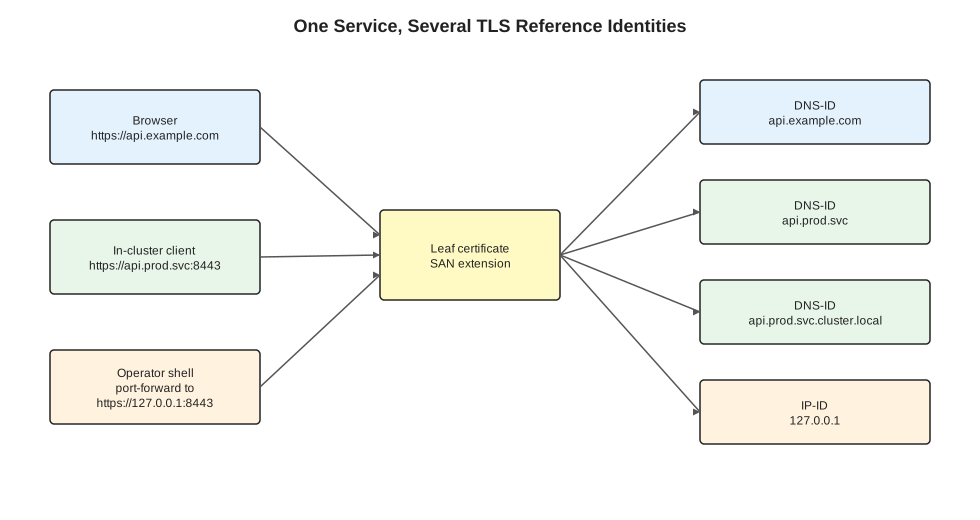
One backend service can be reached through several client paths. The certificate is reusable across those paths when its SAN extension covers the names that clients dial: public DNS for browsers, service DNS for in-cluster clients, and loopback IP or localhost for port-forwarded operator workflows.
The access path determines the identity check. A browser opening https://api.example.com verifies api.example.com. A pod connecting to https://api.prod.svc:8443 verifies api.prod.svc. An operator running kubectl port-forward svc/api 8443:8443 and then calling https://127.0.0.1:8443 verifies 127.0.0.1. Those names may all arrive at the same TLS listener. To the client, they are different identities.
The certificate presents identifiers. DNS resolution, Kubernetes service routing, port-forwarding, and ingress rules happen outside the certificate. The client validates the certificate against the name it already chose before sending application data.
SAN vs Common Name
Older TLS material often says the certificate’s Common Name (CN) identifies the server. Modern service identity verification uses SANs. RFC 9525, the current service identity verification profile, treats SAN identifiers such as DNS-ID and IP address identifiers as the normal matching input and deprecates CN-ID fallback. Operationally: put service names in SANs.
The distinction matters because a certificate can have one CN but many SAN entries:
Subject:
  CN = api.example.com

X509v3 Subject Alternative Name:
  DNS:api.example.com
  DNS:api.prod.svc
  DNS:api.prod.svc.cluster.local
  IP Address:127.0.0.1
A client that dials https://api.prod.svc expects api.prod.svc in the SAN extension. A CN of api.example.com gives the client the wrong reference identity.
DNS Names And IP Addresses
DNS SANs cover names such as api.example.com, api.prod.svc, or api.prod.svc.cluster.local. In Kubernetes, service DNS commonly has short and fully qualified forms. For a service named api in namespace prod, clients may use api, api.prod, api.prod.svc, or api.prod.svc.cluster.local depending on search domains and resolver behavior. TLS verification sees the name the client library was given, not the DNS name that search expansion eventually resolved.
IP SANs cover literal addresses such as 127.0.0.1, 10.43.12.8, or ::1. DNS SANs and IP SANs are distinct identifier types. If the client connects to https://127.0.0.1:8443, the certificate needs an IP address SAN for 127.0.0.1; DNS:127.0.0.1 is the wrong type.
Wildcard DNS SANs only match DNS labels according to hostname-matching rules. A wildcard such as *.example.com can cover api.example.com. It does not cover a.b.example.com, service DNS under .svc, or IP addresses. Wildcards are convenient for public HTTP services and usually the wrong abstraction for internal service identities with explicit names and ports.
Worked Example
Suppose a service has one TLS listener on port 8443 and three supported callers:
| Caller | URL used by client | Reference identity | Required SAN entry |
|---|---|---|---|
| Browser | https://api.example.com | api.example.com | DNS:api.example.com |
| In-cluster controller | https://api.prod.svc:8443 | api.prod.svc | DNS:api.prod.svc |
| Operator via port-forward | https://127.0.0.1:8443 | 127.0.0.1 | IP:127.0.0.1 |
This certificate supports all three:
apiVersion: cert-manager.io/v1
kind: Certificate
metadata:
  name: api-tls
  namespace: prod
spec:
  secretName: api-tls
  issuerRef:
    name: internal-ca
    kind: ClusterIssuer
  dnsNames:
    - api.example.com
    - api.prod.svc
    - api.prod.svc.cluster.local
  ipAddresses:
    - 127.0.0.1
The dnsNames and ipAddresses split encodes the identifier type the TLS client will match.
Debugging
When a TLS connection fails, separate trust failure from name failure.
Trust failure means the client cannot build a chain from the leaf certificate to a trusted CA:
certificate signed by unknown authority
self signed certificate in certificate chain
unable to get local issuer certificate
Fix this by giving the client the right CA bundle:
curl --cacert internal-ca.pem https://api.prod.svc:8443/healthName failure means the chain is trusted, but the leaf certificate does not cover the reference identity:
certificate is valid for api.example.com, not api.prod.svc
certificate is not valid for any names, but wanted to match 127.0.0.1
Fix this by issuing a certificate with the right SANs or by connecting through a name already present in the certificate.
Use openssl to inspect what the server presents:
openssl s_client \
  -connect api.example.com:443 \
  -servername api.example.com \
  -showcerts </dev/null 2>/dev/null \
| openssl x509 -noout -subject -issuer -ext subjectAltName
For port-forwarded access, the check changes because the reference identity changes:
kubectl -n prod port-forward svc/api 8443:8443

curl --cacert internal-ca.pem https://127.0.0.1:8443/health
If the certificate lacks IP Address:127.0.0.1, this should fail even though the TCP tunnel reaches the correct service.
Design Rule
Design certificate SANs from supported client access paths.
Before issuing the certificate, write the table:
| Access path | Who uses it | URL or host configured in client | SAN type needed |
|---|---|---|---|
| Public ingress | Humans / external API clients | api.example.com | DNS |
| Cluster service | Controllers / jobs | api.prod.svc | DNS |
| Fully qualified cluster service | Clients without search-domain assumptions | api.prod.svc.cluster.local | DNS |
| Port-forward | Operators / local Terraform | 127.0.0.1 or localhost | IP or DNS |
Every row that is part of the supported operating model needs either a SAN entry or a deliberate client configuration that uses a different name. Skipping verification (--insecure, insecureSkipVerify, tls-skip-verify) is a debugging shortcut.