The advertiser control plane is the advertiser-facing part of an ads system: the UI, APIs, validators, review workflows, and config stores where an advertiser creates campaigns, sets budgets, uploads creatives, chooses targeting, configures bids, and connects measurement sources. A creative is the user-visible ad asset plus render metadata: image, video, product unit, copy, destination URL, trackers, and format constraints. Trackers are callback URLs or event hooks used to record impressions, clicks, billing notices, diagnostics, or other delivery events.
Market structure decides where the advertiser uses that control plane:
| Market structure | Who offers the advertiser control plane | Example |
|---|---|---|
| Walled platform | The company that owns the user surface and the ad marketplace. | Pinterest Ads, Meta Ads, Google Ads on Google surfaces, TikTok Ads. |
| Open-web programmatic | A demand-side platform (DSP), which buys ad opportunities across publishers and exchanges for advertisers. | The Trade Desk, DV360, Amazon DSP. |
| Retail media / commerce ads | The retailer or commerce marketplace that owns purchase-intent inventory. | Amazon Ads, Walmart Connect, Instacart Ads. |
In all three cases, the control plane is the buyer-side configuration system that turns advertiser intent into executable ad demand. For serving, each request needs records shaped around fast lookup and scoring, so the serving path consumes precomputed read models: small denormalized records, indexes, and caches built from the advertiser objects for one runtime job.
For RunCo, the mental model is:
- RunCo edits domain objects in the advertiser UI.
- Config processing validates and normalizes those objects.
- Serving-facing read models are written into indexes, key-value stores, and caches.
- A feed request reads those serving records to retrieve, filter, rank, pace, render, and log ads.
- Later events join back to the object ids and serving-time version used when the decision happened.
The Domain Objects
RunCo wants to advertise a new running shoe. Before any user request arrives, RunCo configures:
| Object | RunCo example | What it represents |
|---|---|---|
| Account | RunCo US, billing profile, policy state, measurement integrations | The legal/billing advertiser and its platform-level settings. |
| Campaign | Spring marathon launch, 100 USD daily budget, flight dates, purchase objective | A business goal with budget and schedule. |
| Ad group | NYC runners, California trail runners | A buying slice under the campaign: targeting, bid controls, and delivery history. |
| Targeting | Geo, audience, device, placement, product/category filters | Which opportunities RunCo wants to enter. |
| Bid controls | Manual bid, cost cap, target return on ad spend, bid strategy | How much RunCo is willing to pay or how automated bidding should behave. |
| Creative | Shoe image, trail video, product unit, destination URL, trackers | What the user can see or click. |
| Measurement integration | Server-side purchase feed, mobile partner postback, offline upload | Where downstream outcomes such as purchases arrive from. |
The account → campaign → ad group → creative tree organizes how the advertiser manages spend, targeting, assets, and reporting. A campaign can contain multiple ad groups because each ad group can target a different audience or placement while sharing a campaign budget. An ad group can contain multiple creatives because the same buying slice can rotate or test several assets.
Serving records are derived from that tree. Retrieval cares about lookup keys such as geo, audience, placement, and creative format. Pacing cares about budget and spend-state keys. Rendering cares about asset URLs and trackers. Those records are built from the advertiser hierarchy, then stored in shapes that match the request path.
Campaign Planning
Campaign planning estimates likely delivery before the campaign starts spending. It is still part of the advertiser-facing control plane because the advertiser is choosing budget, audience, dates, placement, and objective while asking, “will this configuration have enough opportunities to spend?”
For RunCo, planning can answer questions such as:
| Planning question | What the system has to estimate |
|---|---|
| Can 100 USD/day spend against this audience? | Expected eligible opportunity volume under targeting, placement, and bid constraints. |
| Is the audience too narrow? | Reach, frequency, and candidate availability before live traffic starts. |
| Which placement mix changes delivery? | Inventory volume and competition across feed, search, shopping, video, or offsite inventory. |
| What happens if the budget doubles? | Whether the campaign is budget-limited, bid-limited, audience-limited, or inventory-limited. |
Planning uses forecasts, historical aggregates, inventory estimates, and simulation-like calculations before the campaign enters live traffic. Serving still decides one live opportunity at a time. A good planning answer prevents obvious underdelivery before the campaign reaches the request path.
From Domain Objects To Serving Read Models
This diagram maps buyer-facing objects to serving-facing records. The top half is what RunCo edits; the bottom half is what retrieval, eligibility, ranking, pacing, rendering, logging, and attribution read at runtime.
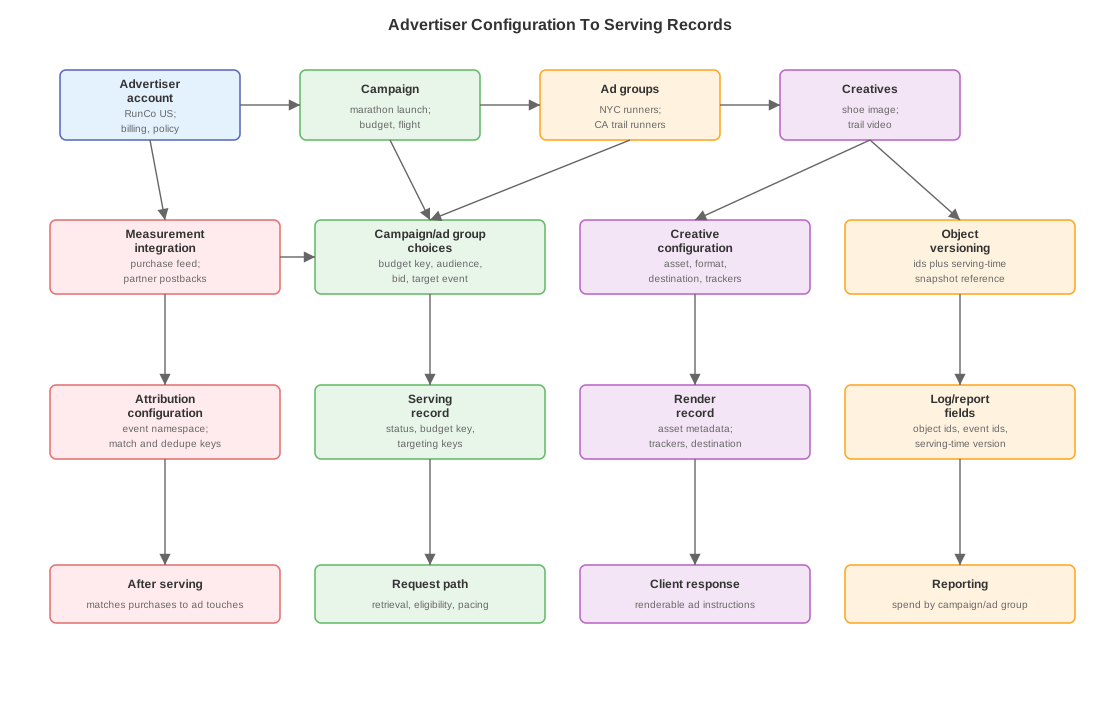
A read model is a precomputed record shaped for one consumer. It can live in a key-value store, cache, inverted index, bitmap index, vector index, or relational table depending on the access pattern. The important part is the shape: the consumer reads the fields it needs without loading the whole campaign graph.
| Advertiser-facing setting | Serving-facing read model | Why serving wants it |
|---|---|---|
| Target runners in New York and California | Retrieval keys such as geo:US-NY, geo:US-CA, audience:runners, surface:feed | Retrieval can ask the ad index for candidates attached to the user’s geo, audience, and surface. |
| Spend up to 100 USD/day for the campaign | Budget key such as budget:campaign:123 | Pacing and eligibility can find the spend counters and pacing control for this campaign. |
| Campaign is approved and active | Eligibility flags such as approved=true, paused=false, flight=open | Eligibility can reject blocked or paused demand with cheap checks. |
| Upload a shoe image with a destination URL | Render record with asset URL, size, format, landing URL, click tracker, impression tracker | The client can render the creative without reading bids, targeting, or attribution settings. |
| Optimize toward purchases | Optimization event such as event:purchase plus attribution window | Ranking and pacing know which downstream outcome should influence bids and learning. |
| Send purchases from RunCo’s backend | Matching config: event namespace, allowed match keys, dedupe key, timestamp field | Attribution can match later purchases to prior ad touchpoints and avoid counting the same order twice. |
A key in this note means a compact lookup value used by the serving path. It can be an id, enum, normalized string, segment id, bitmap id, or composite key.
These key types appear in the serving records above:
| Term | Meaning |
|---|---|
| Targeting key | Lookup value derived from targeting, such as geo:US-CA, audience:runners, or surface:feed. |
| Budget key | Lookup value for the spend and pacing state attached to a campaign, ad group, or shared budget. |
| Event namespace | Scope for advertiser events, so RunCo’s purchase stream is separate from another advertiser’s purchase stream. |
| Match key | Identifier allowed for linking a later conversion to an earlier ad touchpoint: click id, logged-in user id, hashed email, mobile partner id, or another approved key. |
| Dedupe key | Business-event identifier such as order_id=R123; if browser and server paths both send the order, attribution counts it once. |
| Serving-time version | Version of the read model used by a specific request. Later logs use it to reconstruct the config active at decision time. |
Which Consumer Reads Which Record
Each serving consumer wants a different record shape. This table names the consumer first, then the minimal fields that let that consumer do its job without loading the full advertiser hierarchy.
| Consumer | Record shape | Example fields |
|---|---|---|
| Retrieval | Candidate lookup record | Targeting keys, audience keys, product/category keys, active status |
| Eligibility | Constraint record | Policy state, pause state, flight window, budget availability, placement compatibility |
| Ranking | Scoring record | Bid controls, optimization event, creative priors, historical performance dimensions |
| Pacing | Spend-control record | Budget key, spend-state key, target-to-date curve, bid multiplier or throttle output |
| Render | Creative render record | Asset URL, format, destination URL, click tracker, impression tracker |
| Logging/reporting | Event dimension record | Advertiser id, campaign id, ad-group id, creative id, serving-time version |
| Attribution | Conversion matching record | Event namespace, match keys, dedupe rule, attribution window |
The read models can be built through config streams, change data capture (CDC) from campaign stores, cache warmers, index builds, or database materialized views. The implementation varies by platform. The common shape is domain objects on the write side and small serving records on the read side.
Measurement Source And Optimization Event
Measurement configuration has two different roles:
| Piece | RunCo example | Used for |
|---|---|---|
| Measurement source | RunCo sends server-side purchase events with order id, timestamp, value, and match keys | Observing downstream outcomes |
| Optimization event | Campaign selects purchase | Telling ranking and pacing which outcome to value |
The same measurement source can support many campaigns. RunCo might use one purchase feed for a running-shoe campaign and a trail-accessory campaign. Each campaign can still choose a different objective: purchases, add-to-cart events, leads, or app installs.
That is why measurement setup sits near the account/campaign model. The account connects event sources. The campaign or ad group chooses which event should affect bidding, pacing, attribution, and reports.
Serving-Time Versioning
Temporal versioning has one job: join later events to the config that was active when serving made the decision.
RunCo changes the NYC runners ad group during the day:
| Time | Ad-group state | Why the version matters |
|---|---|---|
| 11:30 AM | Bid is 2.00 USD, geo is New York | Explains why the ad entered an 11:45 AM auction. |
| 12:00 PM | Bid changes to 2.50 USD | Explains pricing and pacing for afternoon requests. |
| 3:00 PM | Geo expands to New Jersey | Explains why New Jersey requests can retrieve the ad after 3:00 PM. |
A click at 11:45 AM, an impression at 1:15 PM, and a conversion at 5:00 PM can all carry the same ad-group id. Reporting can group them under NYC runners. Debugging and backfills still need the bid, targeting, policy, creative review, and budget state active at each serving decision.
This versioning requirement is narrower than event sourcing. The platform may store campaign edits in many ways. Ad serving needs temporal reconstruction: given an ad event, recover the serving-facing record version used by that request.
Propagation
RunCo pauses the sneaker campaign at 2:00 PM.
| Step | System action | Failure signal if stale |
|---|---|---|
| 1 | Campaign store records the pause | UI says paused but downstream records remain active |
| 2 | Config processing publishes the changed serving records | Consumers lag or miss the update |
| 3 | Retrieval overlay stops returning the campaign | Candidate sets still include the paused campaign |
| 4 | Eligibility and pacing records block participation | Auction logs show the campaign entering after pause time |
| 5 | Render records stop serving the creative for new insertions | Client receives render instructions for paused demand |
| 6 | Logs carry the serving-time version | Debugging can identify which consumer used stale state |
During propagation, different consumers can briefly see different versions. Retrieval can include a campaign while pacing blocks it. Eligibility can say active while render metadata already points to a newer creative version. The serving-time version tells operators which read model each request used.
Design Pressure
These tradeoffs are product-model decisions with infra consequences. Adding advertiser-visible flexibility usually creates more serving records, more precedence rules, and more expensive joins later.
| Choice | What improves | What gets harder |
|---|---|---|
| More object levels | Advertiser control and reporting granularity | Read-model generation, precedence rules, migrations, joins |
| More lower-level overrides | Precise targeting, bid, budget, and frequency control | Hotter state and more surprising pacing behavior |
| Faster propagation | Pauses, policy blocks, and budget edits converge sooner | More real-time config infrastructure and rollback risk |
| Richer event dimensions | Better reporting, debugging, and training joins | Larger logs and more expensive aggregates |