DataHub
LinkedIn open-sourced DataHub as a metadata platform for cataloging data assets, pipelines, and their relationships. You get a unified graph of who owns what, where it came from, and what it means.
The data model has four moving parts. An entity (identified by a URN) holds typed JSON documents called aspects. You change metadata by posting a Metadata Change Proposal (MCP) to the Generalized Metadata Service (GMS). GMS validates, persists, and emits a change event that downstream indexers consume.
Prerequisites
- Familiarity with metadata catalogs (what problem they solve)
- Basic understanding of REST APIs and Kafka
The Entity-Aspect Model
Entities
Each entity in DataHub’s metadata graph carries three pieces: a type
(dataset, dataFlow, etc.), a URN (unique identifier), and a bag of
aspects.
Built-in entity types (non-exhaustive):
| Category | Entities |
|---|---|
| Data assets | dataset, dashboard, chart, mlModel, mlFeature, notebook |
| Pipelines | dataFlow (a DAG), dataJob (a task within a flow), dataProcessInstance (a single run) |
| Identity | corpUser, corpGroup, role |
| Taxonomy | tag, glossaryTerm, glossaryNode, domain, dataProduct, container |
| Platform | dataPlatform, dataPlatformInstance |
| Governance | assertion, incident, structuredPropertyDefinition |
The entity registry (entity-registry.yml) declares each entity’s name,
key aspect, and allowed aspects. You add new entities by writing schema files in
PDL (Pegasus Data Language, LinkedIn’s interface definition language; see the
PDL Schema Layer section below) and referencing them in the registry.
Aspects
A versioned, typed JSON document attached to an entity. DataHub writes and emits change notifications at the aspect level.
Two rules:
- One aspect per (URN, aspectName) pair. You cannot have two
ownershipaspects on the same dataset. The latest write wins. - Schemas are reusable across entities.
ownership,globalTags,statusapply to many entity types. The entity registry controls which aspects belong to which entity.
Key aspects carry the fields encoded inside the URN (e.g. datasetKey
carries platform, name, and environment). GMS writes them automatically when the
entity first appears.
Common Aspects
| Aspect | What it stores | When you write it |
|---|---|---|
ownership | List of (owner URN, ownership type) tuples | Ownership changes |
status | removed: bool (soft-delete flag) | Soft delete / restore |
globalTags | List of tag URN associations | Tag application |
domains | List of domain URNs the entity belongs to | Domain assignment |
schemaMetadata | Field-level schema (names, types, PKs, FKs). Source-of-truth from the platform. | On ingestion from source connector |
editableSchemaMetadata | UI-editable overlay (descriptions, tags per field) | When users edit field docs in the UI |
editableDatasetProperties | UI-editable description override | UI edits |
dataFlowInfo | Pipeline name, description, externalUrl | Pipeline ingestion (Airflow, dbt) |
upstreamLineage | List of upstream dataset URNs + per-column lineage | Lineage ingestion |
browsePathsV2 | Hierarchical browse path as a list of entries | Computed at ingestion |
structuredProperties | Values for typed, schema-validated custom properties | Governed custom metadata |
Why two properties aspects? Connectors overwrite datasetProperties on every
run. User descriptions live in editableDatasetProperties, safe from that
overwrite cycle.
The URN System
Format
Base format: urn:li:<entityType>:<id>
Simple URNs (single-string ID):
urn:li:corpuser:eporcu
urn:li:tag:PII
urn:li:domain:Finance
urn:li:dataPlatform:snowflake
Compound URNs wrap a tuple in parentheses, comma-separated:
urn:li:dataset:(urn:li:dataPlatform:snowflake,analytics.customers,PROD)
                 └── platform URN ──┘          └── name ──┘        └env┘

urn:li:dataJob:(urn:li:dataFlow:(airflow,etl_dag,PROD),load_users_task)
urn:li:schemaField:(urn:li:dataset:(...),fieldPath)
The compound parts match the fields of the entity’s key aspect
(datasetKey, dataJobKey, etc.) as defined in PDL. A URN is a serialized key.
The Environment Segment
The third component of a dataset URN is the fabric (enum FabricType):
PROD, DEV, STAGING, TEST, QA, UAT, etc. DataHub does not infer it;
your ingestion source’s env config sets it. Two datasets with identical
platform + name but different fabric produce different URNs and are treated
as separate entities.
Platform URN vs Entity URN
- A platform URN identifies a system that hosts data:
urn:li:dataPlatform:snowflake. ThedataPlatformentity is a registry of supported systems (icons, display names). - An entity URN identifies an asset on a platform. The platform URN is embedded inside dataset/dashboard URNs as the first tuple element.
- A dataPlatformInstance URN
(
urn:li:dataPlatformInstance:(urn:li:dataPlatform:snowflake,prod_us_east_1)) disambiguates multiple instances of the same platform.
Metadata Change Proposals (MCPs)
MCP vs MCL
| MCP | MCL | |
|---|---|---|
| Full name | Metadata Change Proposal | Metadata Change Log |
| Direction | Producer → GMS (request) | GMS → Consumers (event) |
| Semantics | ”I want to change this" | "This change was committed” |
| Transport | REST endpoint or Kafka MetadataChangeProposal_v1 | Kafka MetadataChangeLog_Versioned_v1 |
| Content | New aspect value only | New + previous aspect value (enables diffing) |
Lifecycle: MCP → GMS validates & writes → MCL emitted → consumers react (search indexer, graph indexer, automations).
MCP Payload
{
  "proposal": {
    "entityType": "dataset",
    "entityUrn": "urn:li:dataset:(urn:li:dataPlatform:hive,db.table,PROD)",
    "changeType": "UPSERT",
    "aspectName": "ownership",
    "aspect": {
      "value": "{\"owners\":[{\"owner\":\"urn:li:corpuser:alice\",\"type\":\"DATAOWNER\"}]}",
      "contentType": "application/json"
    },
    "systemMetadata": {
      "runId": "ingest-2026-06-03",
      "lastObserved": 1717440000000
    }
  },
  "async": "false"
}
Watch for:
aspect.valueis a JSON string (double-encoded).contentTypeis alwaysapplication/json.entityTypemust match what the URN encodes. GMS rejects mismatches.systemMetadatais optional. It tracks ingestion provenance (used for stale entity soft-deletion via stateful ingestion).- The
asyncflag sits at the top level, outsideproposal.
changeType Semantics
| Value | Behavior |
|---|---|
UPSERT | Full replacement of the aspect. If absent, create it. If present, the new JSON overwrites the old with no field-level merging. Most common type. |
CREATE | Insert; fail if aspect already exists. |
PATCH | Field-level merge using JSON Patch (RFC 6902) semantics. PDL schema declares which fields are patchable and what the array merge keys are. |
DELETE | Delete the aspect (or the entity if aspectName is the key aspect). |
RESTATE | No-op write. Re-emits the same value to refresh systemMetadata.lastObserved. Used by stateful ingestion. |
UPSERT is full replacement, not merge
Naively calling UPSERT on
ownershipto “add an owner” wipes out all existing owners. You must either: (a) read-modify-write, (b) usePATCH, or (c) use the Python SDK’s Patch builders.
Sync vs Async Ingestion
The "async" flag controls how GMS commits the MCP.
"async": "false" (synchronous) GMS validates, writes to SQL in the
request thread, emits the MCL to Kafka, then returns 200. The HTTP response
confirms the write succeeded. Search/graph indexing still happens via MCL
consumers, so the entity may not appear in search results yet. But a read-by-URN
from GMS will see it immediately.
"async": "true" (asynchronous) GMS writes the MCP to the
MetadataChangeProposal_v1 Kafka topic and returns 200 immediately. A separate
consumer performs validation + SQL write + MCL emission. Failures (validation
errors, schema violations) never reach the HTTP caller. They surface in consumer
logs or a dead-letter topic (DLQ, a Kafka topic where unprocessable messages
land for later inspection).
Use sync for interactive writes. Use async for high-throughput bulk ingestion.
The GMS REST API
GMS is the Java backend built on LinkedIn’s Rest.li framework. It owns the SQL store and the Kafka producers.
Writing: POST /aspects?action=ingestProposal
The primary write endpoint. Request body wraps the MCP in a proposal field
plus the async flag (see payload above). Returns {"value": "<entityUrn>"} on
success.
A batch variant, POST /aspects?action=ingestProposalBatch, accepts
{"proposals": [...], "async": "..."} for batch writes (processed serially, not
transactionally).
Reading
| Endpoint | Purpose |
|---|---|
GET /entitiesV2/{urn} | V2 read. Returns aspects keyed by name with systemMetadata. |
GET /aspects/{urn}?aspect=<name>&version=<n> | Single aspect, optionally historical (0 = latest) |
POST /entities?action=search | Search via Elasticsearch |
Modern DataHub (0.13+) also exposes OpenAPI v3 under
/openapi/v3/entity/<entityType>/{urn}. Friendlier than RestLi; gradually
replacing it for external clients.
Headers
Content-Type: application/json
X-RestLi-Protocol-Version: 2.0.0
Authorization: Bearer <PAT>
GMS requires X-RestLi-Protocol-Version because Rest.li (LinkedIn’s RPC
framework) has its own JSON conventions for batching, projections, and error
envelopes. The OpenAPI v3 endpoints don’t need this header.
Architecture
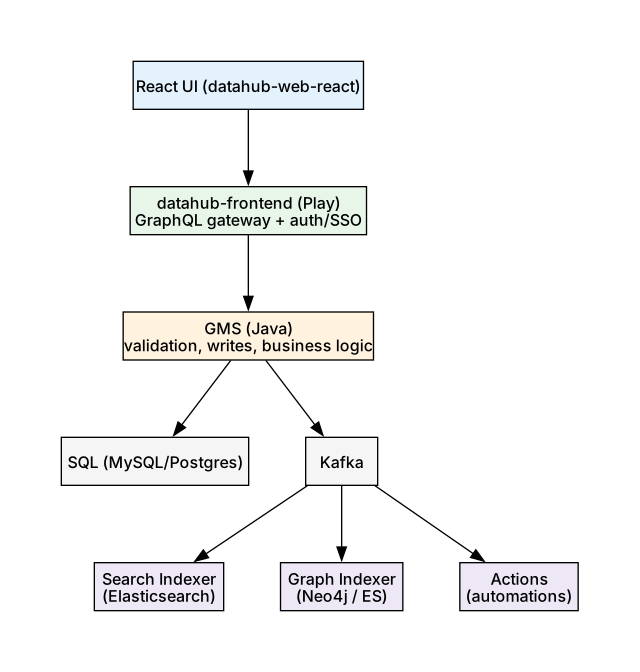
The React UI talks to the frontend gateway via GraphQL. The frontend translates queries into RestLi calls to GMS. GMS owns the SQL store and produces MCL events to Kafka. Downstream indexers consume MCL events asynchronously: Elasticsearch for full-text search, Neo4j (a graph database) or an ES graph index for relationship traversal, and the Actions framework for custom automations.
The GraphQL API
When to Use Which
| Use GraphQL when | Use GMS REST/OpenAPI when |
|---|---|
| Reading enriched, joined views (dataset + resolved owners in one query) | Writing aspects (GraphQL exposes only curated mutations) |
| You want exactly the fields you need | Bulk ingestion / connector pipelines |
| Search with facets, autocomplete, lineage traversal | Reading raw aspect JSON for replication |
GraphQL endpoint: POST <frontend>/api/graphql
scrollAcrossEntities — Cursor Pagination
Standard search uses offset pagination bounded by ES max_result_window (~10k).
scrollAcrossEntities uses cursor pagination backed by an ES point-in-time.
Example:
query {
  scrollAcrossEntities(input: {
    types: [DATASET]
    query: "*"
    count: 1000
    scrollId: null
    orFilters: [
      { and: [
        { field: "platform", values: ["urn:li:dataPlatform:snowflake"] }
        { field: "origin",   values: ["PROD"] }
      ]}
    ]
    searchFlags: { skipHighlighting: true, skipAggregates: true }
  }) {
    nextScrollId
    total
    searchResults { entity { urn type } }
  }
}
orFilters is a list of conjunctive (AND) groups that are OR’d together
(disjunctive normal form). Pagination terminates when nextScrollId is null.
Cursors expire after ~5 minutes.
batchUpdateSoftDeleted
mutation {
  batchUpdateSoftDeleted(input: {
    urns: ["urn:li:dataset:(...)", "urn:li:dataset:(...)"]
    deleted: true
  })
}
Under the hood, DataHub writes the status aspect with removed: true for
each URN. Soft-deleted entities disappear from search/browse but their aspects
stay on disk. Restore with deleted: false. For a true purge (row deletion),
use datahub delete --urn ... --hard.
Storage Model
The metadata_aspect_v2 Table
The canonical versioned aspect store (MySQL/Postgres in OSS):
| Column | Type | Notes |
|---|---|---|
urn | VARCHAR(500) | Entity URN. PK part 1. |
aspect | VARCHAR(200) | Aspect name. PK part 2. |
version | BIGINT | PK part 3. 0 = latest. |
metadata | LONGTEXT | Aspect value as JSON. |
systemmetadata | LONGTEXT | runId, lastObserved, registryVersion. |
createdon | DATETIME(6) | Write timestamp. |
createdby | VARCHAR(255) | Actor URN. |
Primary key: (urn, aspect, version).
Version Semantics
DataHub uses an inverted versioning scheme:
- Version 0 is always the latest value (this is what reads hit).
- On UPSERT, GMS performs a transaction:
- Copy the current version=0 row to version = MAX(version)+1 (building history: 1, 2, 3, …).
- Overwrite version=0 with the new value.
- So version 0 is mutable (overwritten on every write), while versions 1, 2, …, N are immutable history with higher numbers being more recent.
Version 0 = latest, not oldest
A brand-new aspect goes straight to version 0 with no history rows.
Timeseries Aspects
Timeseries aspects (datasetProfile, datasetUsageStatistics,
assertionRunEvent) do not live in SQL. They live in Elasticsearch indices,
queried by time range. Append-only, no versioning, no UPSERT semantics.
Lifecycle and Events
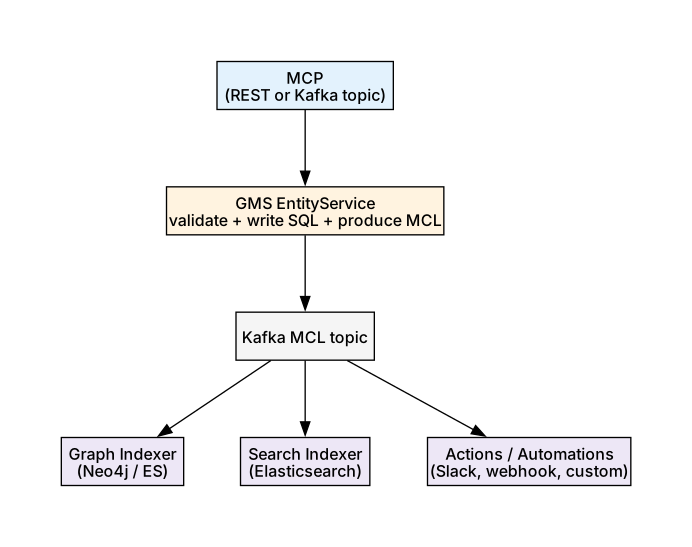
An MCP enters GMS via REST or Kafka. GMS validates it against the PDL schema, writes to SQL, and produces an MCL event on Kafka. Consumers process MCL events in parallel: graph indexer updates Neo4j/ES relationships, search indexer updates Elasticsearch documents, Actions framework triggers custom automations.
Each MCL contains:
entityUrn,entityType,aspectName,changeTypeaspect(the new value)previousAspectValue(old value, enables diffing)systemMetadata,created(actor + timestamp)
Subscribing to Changes
- Raw Kafka consumer on
MetadataChangeLog_Versioned_v1. Full firehose; you handle filtering and Avro (compact binary serialization format) deserialization. - DataHub Actions framework. Python framework that consumes MCL, handles deserialization, filters by entity type / aspect / change pattern, and ships built-in actions (Slack, Teams, Webhook, Custom). Recommended for automations.
- GraphQL subscriptions. Primarily for UI live updates, not backend work.
Common Pitfalls
| Pitfall | Why it bites | Fix |
|---|---|---|
| UPSERT wipes sibling fields | Full replacement, not merge | Use PATCH or read-modify-write |
async: true swallows errors | HTTP 200 doesn’t mean the write succeeded | Use sync for interactive writes; monitor DLQ for async |
| Version 0 confusion | People expect 0 = oldest | Remember: 0 = latest, history grows upward |
| Timeseries aspects not in SQL | Querying metadata_aspect_v2 won’t find them | Query ES indices directly for timeseries |
X-RestLi-Protocol-Version missing | 400 errors from GMS | Always include 2.0.0 for RestLi endpoints; not needed for OpenAPI v3 |
| Soft delete ≠ row deletion | Aspects remain on disk | Use datahub delete --hard for true purge |
The PDL Schema Layer
PDL (Pegasus Data Language) is LinkedIn’s IDL and the source of truth for all
entity and aspect schemas. From .pdl files under metadata-models/, the build
generates:
- Avro schemas (a compact binary serialization format) → Kafka serialization (MCP/MCL)
- Java POJOs → GMS internals
- Python classes (
datahub.metadata.schema_classes) → SDK - TypeScript types → React frontend
- GraphQL types → partially generated
Example PDL for the ownership aspect:
namespace com.linkedin.common

@Aspect = { "name": "ownership" }
record Ownership {
  @Relationship = {
    "/*/owner": {
      "name": "OwnedBy",
      "entityTypes": ["corpuser", "corpGroup"]
    }
  }
  @Searchable = {
    "/*/owner": { "fieldName": "owners", "fieldType": "URN" }
  }
  owners: array[Owner]
  lastModified: AuditStamp
}
Annotations:
@Entitydeclares the record is an entity key (e.g.DatasetKey)@Aspectdeclares the record is an aspect;namebecomes theaspectName@Relationshipmarks a URN field as a graph edge (populates Neo4j/graph index)@Searchablemarks a field for Elasticsearch indexing
The entity registry (entity-registry.yml) ties it together:
entities:
  - name: dataset
    keyAspect: datasetKey
    aspects:
      - datasetProperties
      - ownership
      - schemaMetadata
      - status
      - upstreamLineage
      - browsePathsV2
      - structuredProperties
      # ...
To add a new aspect: write the PDL, annotate @Aspect and
@Searchable/@Relationship, add to the entity in entity-registry.yml,
rebuild. No Java code changes needed for storage. The entity service is driven
entirely by the registry.